- What is a Design System?
- How a SaaS Design System is Structured: Tokens, Components, Patterns
- Why Do SaaS Products Need Design Systems?
- SaaS Design System Foundations and Components
- SaaS Design System Examples to Learn From
- How to Build a Design System for Scalable SaaS Products (Step-by-Step)
- How to Build a Design System for Startups and Small Teams
- Tools to Build and Manage a SaaS Design System
- Testing and Validation of Design Systems
- Build In-House or Hire a SaaS Design Agency?
- Common Design Mistakes to Avoid in SaaS Design Systems
- Frequently Asked Questions
- Final Thoughts


.svg)

%201%201.svg)
Design Systems 101: How to Build a SaaS Design System That Scales

- What's inside: foundations (color, typography, spacing), core components (buttons, inputs, tables, modals, navigation), and SaaS patterns (data tables with filters, dashboards, settings pages).
- How it's structured: tokens come first, components are built from tokens, and patterns combine components into real product layouts.
- How to build one: audit your current UI, define foundations as tokens, build a component library, add SaaS patterns, align with engineering, document usage rules, then roll it out across teams.
- How long it takes: 4 to 8 weeks for foundations and core components, and 3 to 6 months for a complete system with patterns and documentation.
- For startups: start small, with one token-based palette, one type scale, a spacing scale, and around 10 core components.
- Tools teams use: Figma for libraries and variables, Storybook for coded components, and Zeroheight or Supernova for documentation.
- Examples to learn from: Atlassian Design System, Shopify Polaris, Salesforce Lightning, IBM Carbon, and GitHub Primer.
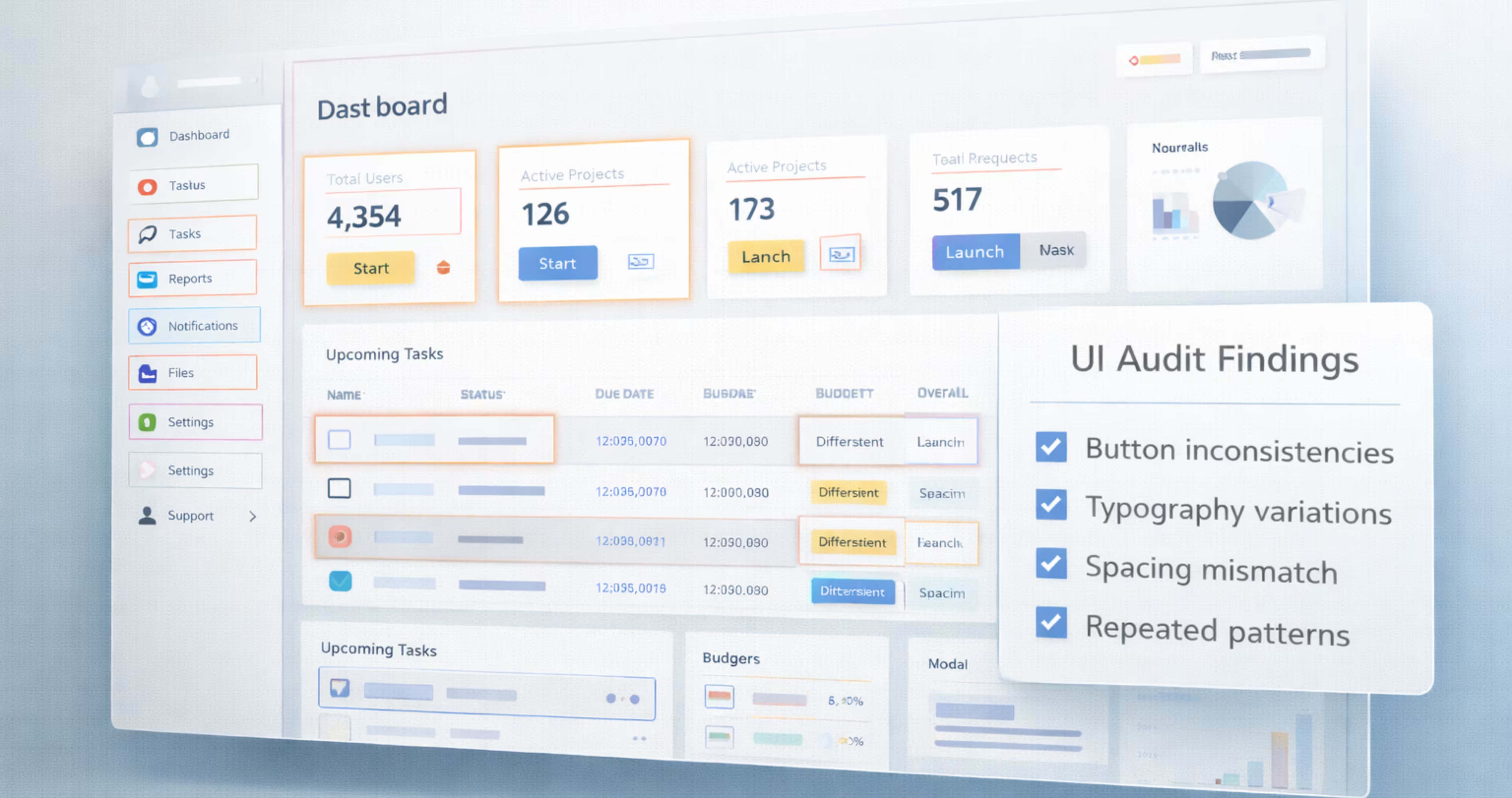
SaaS products grow fast, and new features like dashboards, modules, and workflows are added continuously. Over time, these new features add small design inconsistencies like different spacing, typography, component styles across screens. As the product scales, these inconsistencies make the product interface harder to manage.
A design system solves this by providing a set of reusable components and clear design rules. Instead of redesigning elements for every feature, teams use the same predefined patterns. This keeps the product consistent and removes confusion as it scales.
In this guide, we'll share how you can build a SaaS design system that scales, with real examples, the tools teams use, and a 7-step process. You'll also learn how to scale it across teams as the product grows.
What is a Design System?
A design system is a single source of reusable components, visuals and product guidelines used to build interfaces consistently at scale. It brings together all UI elements in one cohesive framework that teams can reference as the product grows. A SaaS design system applies the same idea to software products, with extra patterns for dashboards, data tables, filters, and multi-step workflows.
The design system works as a single shared foundation of how the product will look and behave, as it scales. Instead of creating new designs every time, a design system provides a set of design components that you can use across the product. Here are the components you'll usually find in design systems:
- Design foundations: colors, typography, spacing, grid
- Reusable UI components: buttons, inputs, navigation, tables and modals
- Layout structures and UI patterns
- Interaction states and behaviors
- Documentation and usage references
So, instead of using scattered design files, a design system works as a unified collection of product visual language and interface building blocks in one place.
How a SaaS Design System is Structured: Tokens, Components, Patterns
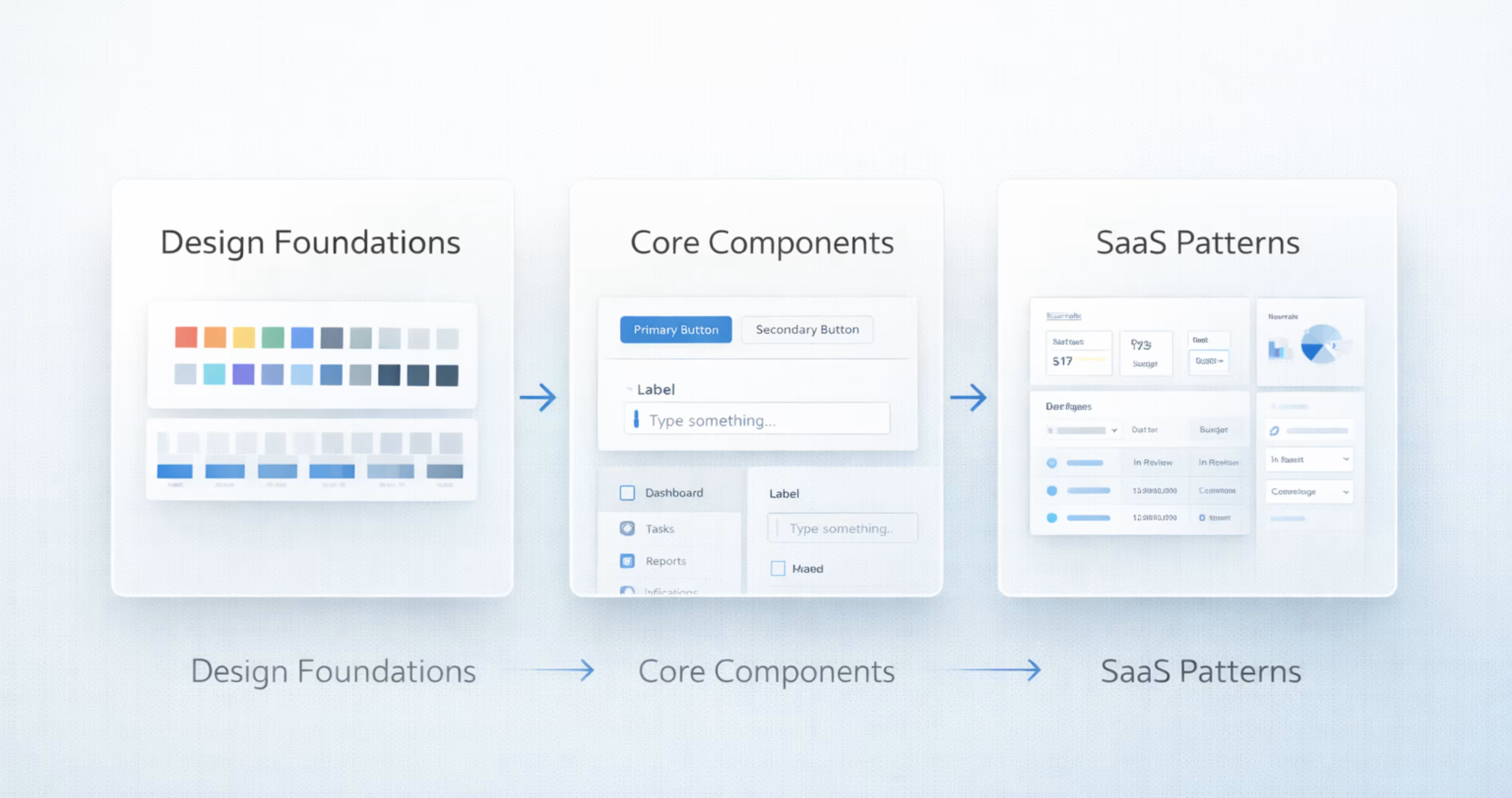
A design system is easier to build when you see it as three layers. Each layer is built from the one below it, so a change at the bottom flows up through the whole product.
Design tokens (foundations): Tokens are the smallest design decisions, saved as named values like color-primary-500, font-size-body, or spacing-md. Color, typography, spacing, radius, and elevation all live here.
Components: Components are reusable UI elements built from tokens, like buttons, inputs, tables, and modals. A button uses the primary color token, the body font token, and the medium spacing token, so it looks the same everywhere.
Patterns: Patterns combine components into layouts that solve a common SaaS task, like a data table with filters, a settings page, or an onboarding flow.
When teams skip the token layer, every component carries its own hard-coded values. A simple brand color update then turns into a manual hunt across hundreds of screens.
Why Do SaaS Products Need Design Systems?
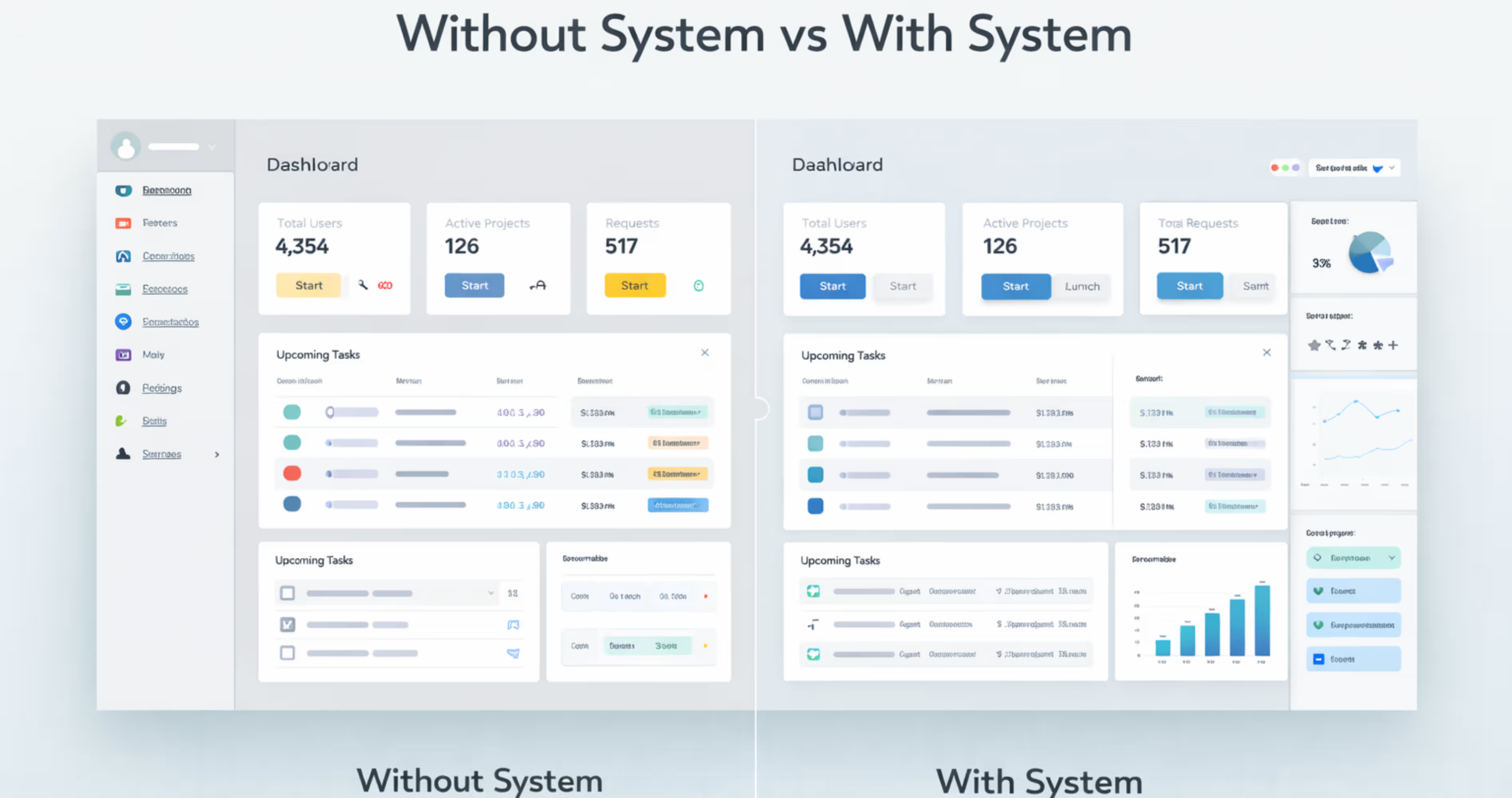
SaaS products are not the same as the typical marketing websites. They are built with complex interfaces that contain dashboards, tools, settings, and workflows that continue to expand over time. With complexities like that, it can be easy to get confused about adding a new feature or module to the application.
That’s where the SaaS design system helps. It provides a shared set of reusable components that helps design new features while keeping consistent with the whole product.
Here are the top reasons why you should include a design system for your SaaS product:
Increases Brand trust: Most of the leading SaaS platforms use design systems to provide a smooth brand experience to the users. Using the design system produces a consistent interface design through the entire product, so it’s easier to understand and use the software.
Makes operation more efficient: with reusable design components, the team doesn't need to redesign common UI elements every time a new feature arrives. This helps reduce the time for continuously recreating components, and speeds up the overall process.
Easy to scale product: a design system helps teams to add new modules, screens, or workflows without starting from scratch. When new design modules arrive, they don’t have to design from scratch, but implement the already used patterns. So it makes scaling products consistent and easy over time.
Improves User Experience: following a standardized user experience makes the navigation predictable and easier to understand. This helps users to easily understand how the product works, and improves the user retention.
Want to see how design clarity improves real products? Check out our case study on InvestIQ to see how we transformed a complex investment dashboard into a scalable interface built on clear design patterns.
SaaS Design System Foundations and Components
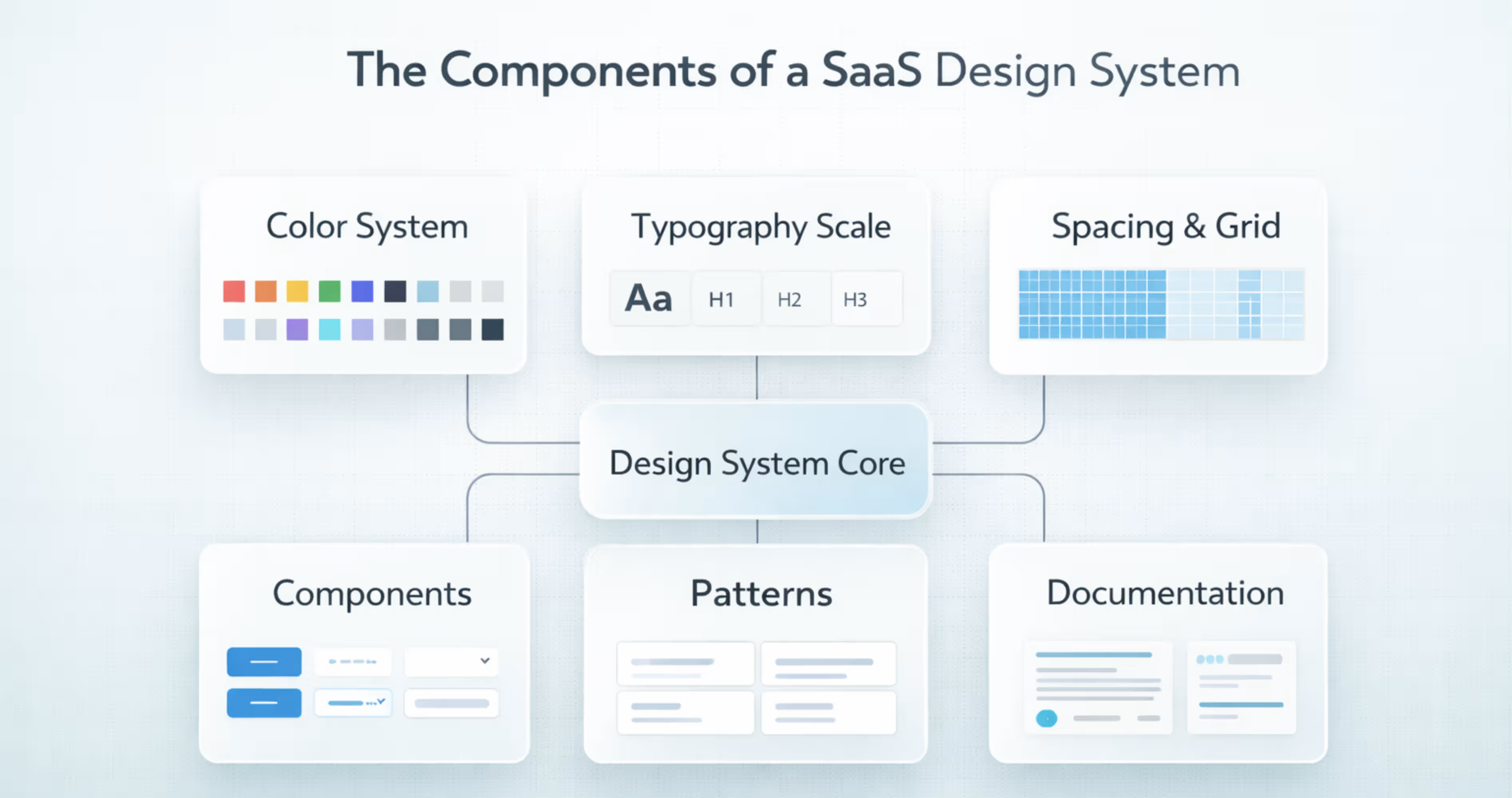
A SaaS design system is more than just a set of UI components. It’s a shared system that includes visual foundations, reusable components, and interface patterns that teams use to design and build the product consistently.
It gives designers and developers a single reference for how the product should look and behave across all features and screens. Building that reference alongside the screens is a standard part of our UI/UX design services.
Getting the full set right, not just buttons and colors, is why so many teams turn to specialists in design systems for SaaS rather than building one piecemeal.
Here are the core elements that most SaaS design systems include. The first three are your design system foundations. The rest are the core components built on top of them:
Color System
A color system is a defined set of colors used consistently across the product. It usually includes brand colors, neutral colors, background colors, and status colors like success, warning, or error.
Without a design system color palette, the teams may use slightly different shades in different designs. Over time, it makes the product look inconsistent and harder to recognize. A color system keeps the interface visually consistent over different screens.
Typography Scale
A typography scale defines different text sizes, spacing and font styles across the product. It sets clear standards for headings, body text, labels and captions.
SaaS users read a lot of information in tables, forms and dashboards while using a product. If the text style varies across screens, it would make the UI inconsistent for users and harder to scan. That’s why using a typography scale is important for keeping the text readable and consistent through the product.
Spacing & Layout Grid
Spacing and layout grid help keep screens aligned and organized. The grid gives structure to the layout, and spacing keeps equal gaps between elements. Together, they make the interface look clean and balanced.
SaaS screens often contain tables, filters, sidebars, cards, and forms. A defined spacing and grid system makes sure these elements line up properly and keep consistent spacing across all screens.
Buttons
Buttons trigger actions in the product, such as submitting forms, confirming choices, or moving to another screen.
In SaaS interfaces, buttons appear everywhere from tables, modals, to dialogs. If button styles change across screens, it makes the product feel inconsistent and harder to use. While, following a standard button design system keeps the actions clear and consistent throughout the product.
Form Inputs
Form inputs are input components that provide a structured set of rules, components and best practices that help create intuitive, efficient and accessible forms for products.
SaaS products have different forms using accounts, filtering data, configuration settings etc. Form inputs in a design system define how each input looks and how large it is.
Navigation
Navigation helps users move around the product using elements like sidebars, menus, tabs, and search.
SaaS products usually have many features, sections, and tools. Without clear navigation, it becomes hard for users to find what they need. A defined navigation system in the design system keeps the layout consistent across screens and makes the product easier to use.
Tables and Data Display
Tables and data components are the core parts of some SaaS products. They organize, display, and interact with large datasets. Usually the table and data display include components like data tables, rows, columns, sorting controls, filters, paginations, and dense layouts.
Users of many SaaS products rely on them to scan, compare, filter, sort and manage complex information like lists, reports and dashboards. A proper data table component keeps the data easy to read while interacting across the product.
Cards and Containers
Cards and containers are the fundamental layout elements for design systems. They are used to organize, structure and display data in a clean, digestible and visually distinct way. Cards use borders and spacing to visually separate and represent a distinct topic or content group. While, the containers provide structure to the topic.
In the SaaS design system, they are used in dashboards, product listings, and complex interfaces to reduce cognitive load and improve scalability.
Modals and Dialogs
Modals and dialogs are interruptive UI components that cover the content and make the users focus on a specific task. This task can be anything from confirming, deletion, editing details, creating new items and showing forms.
They let users complete tasks without leaving the current page. It helps make the workflow faster and more focused. A design system defines how modals should look, its size, spacing, headers, and buttons. So, modals stay consistent across the whole product.
Alerts and Notifications
Alerts and notifications are messages that inform the users about the current system status or result of actions. A notification shares information about the system or the result of an action, while alert highlights something important that may require user attention.
Alerts and notifications are used in SaaS design systems for showing success messages after saving, warning before risky actions, error messages in forms , or info banners about updates. Without a consistent style, this feedback can be missed or confusing. That’s where including them in a design system helps. A design system defines ideal colors, placement and behavior. So, the message looks clear and consistent across all the screens.
Icons
It’s impossible to open an app without interacting with icons. Icons are clear, understandable visual metaphors that you can understand without knowing any language. It helps users understand the specific action, without reading it, so reduces cognitive load to the user.
The SaaS products use icons in toolbars, buttons, menus , tables and navigation bars. You might see one in the edit, delete settings, search, filter or down icons used throughout the product. They make every page feel consistent and easy to understand.
Design systems define the ideal icon style, like line, filled, size and stroke across the product. So, everything feels unified and on-brand.
Empty States
Empty states appear when there is no data to show on a screen. This can happen when a new user has arrived on a data screen, or when a list has no results. Without guidance, users may feel confused about what to do next.
The empty states are short messages that clearly guide actions like creating a project, adding data or more. Examples of using empty states in SaaS design can include ‘no projects yet’, or ‘no results found’.
The design system includes empty states to set a standard of icons, illustrations, or short messages that are used in the content. It helps understand and navigate users without creating any confusion.
Loading and Skeleton States
Loading and skeleton states appear when a page or content is still loading. During this time, users may think the page has stopped or an error has occurred. Loading indicators help reassure users that the system is working.
The design systems define when to use spinners or skeletons, how they look, and how they behave. This keeps loading feedback consistent across the product and improves the overall user experience.
SaaS Design System Examples to Learn From
You don't need to start from a blank page. Many leading SaaS companies publish their design systems openly, and each one is a good reference for a different problem.
Atlassian Design System
The Atlassian Design System powers Jira, Confluence, and Trello. It's a strong reference for design tokens, accessibility rules, and keeping many products under one visual language.
What to copy: how tokens are named and documented for both design and code.
Shopify Polaris
Shopify Polaris is used for the Shopify admin and by developers building apps for merchants. It stands out for its content guidelines, which cover voice, tone, and how to write UI copy.
What to copy: writing rules for buttons, errors, and empty states.
Salesforce Lightning Design System
The Salesforce Lightning Design System is built for data-dense enterprise CRM screens. Salesforce was one of the first teams to use design tokens at scale.
What to copy: patterns for complex records, forms, and data-heavy layouts.
IBM Carbon
IBM Carbon is open source and used across IBM's products. Its data table and data visualization guidance is some of the most detailed available.
What to copy: table states, sorting, filtering, and chart rules.
GitHub Primer
GitHub Primer is the system behind github.com. It's designed for dense, developer-focused interfaces where many actions sit on one screen.
What to copy: how to keep busy screens readable with a clear hierarchy.
Segment Evergreen
Evergreen is Segment's React UI framework. It's smaller and simpler than most enterprise systems, which makes it a useful reference for startups.
What to copy: a lean component set that covers most product needs.
Uber Base Web
Base Web is Uber's React component library. Its theming and override system lets teams customize components without breaking them.
What to copy: how to allow customization while keeping one source of truth.
GitLab Pajamas
Pajamas is GitLab's fully public design system. It documents components and also how people propose, review, and add new ones.
What to copy: a clear contribution and governance process.
Study two or three of these before you build. You'll see the same structure every time: foundations first, then components, then patterns and documentation.
How to Build a Design System for Scalable SaaS Products (Step-by-Step)
Where should you start? Start with a UI audit. Screenshot every screen, group duplicate buttons, inputs, and colors, then turn the ones you keep into design tokens for color, type, and spacing. Build core components from those tokens before adding SaaS patterns like data tables, filters, and dashboards.
Building a SaaS design system is not about just creating UI components. It’s about creating a proper system for design that understands your current product and helps build a system that teams can understand and maintain over time.
Here is a step-by-step process for creating a design system for SaaS products:
Step 1: Audit the Current Product UI
Before creating a design system, you have to audit the current design and find out what’s inconsistent in the design. For that, you can go to the product screens to list every UI element used.
Then look for common inconsistencies, and repetitive designs through the design, like different buttons, radios, different fonts in tables etc. For this, you can use collaboration tools like Miro or FigJam to help teams map inconsistencies and user flows visually.
This will help show what needs to be fixed and what can be reused over the design system.
Step 2: Define Design Foundations
After auditing the current product UI, it’s time to define design foundations that everything will be built on. The design foundations includes common things like color, typography, spacing, sizing scales, and elevation rules.
Define these elements as design tokens like color-primary-500 or spacing-md. It helps create a clear, semantic narrative and decide how different themes like light and dark mode will work with it. These foundations ensure consistency before components are created.
Step 3: Build Core Component Library
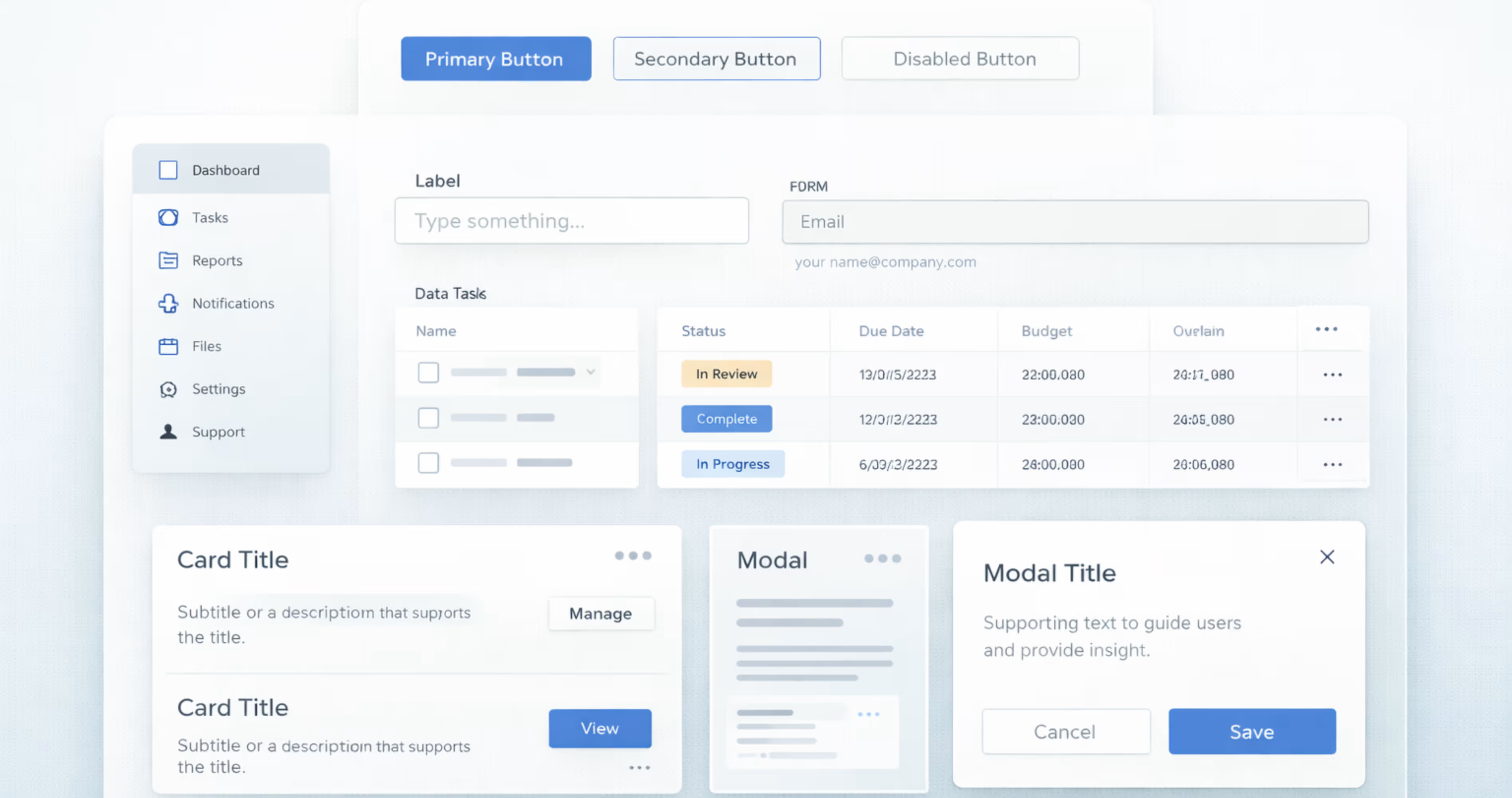
When you have defined the core design foundations, it’s time to create the reusable components library that will be used across the products.
These reusable components include buttons, inputs, dropdown modals, navigation and layout elements. Using tools like Figma’s shared libraries, or Sketch symbols, you can create and manage these centralized UI components.
Start with simple components and gradually move from basic elements to more complex ones. For each component, define all the states and variations ( hover, active, disabled, loading, size variations) and how it behaves in different screen sizes.
This component library becomes the main building block that SaaS interfaces use to create consistent and scalable user experiences.
Step 4: Add SaaS-Specific Patterns
SaaS products often use the same screen structures across different features and modules. After defining core UI components, the next step is to create SaaS-specific patterns that combine those components into real product layouts.
These patterns represent common structures used throughout the application. For example, a data table pattern may combine rows, columns, sorting, filters, pagination, and row actions into one standard layout. Instead of designing these structures from scratch each time, teams can reuse the same pattern across modules.
Step 5: Align With Engineering
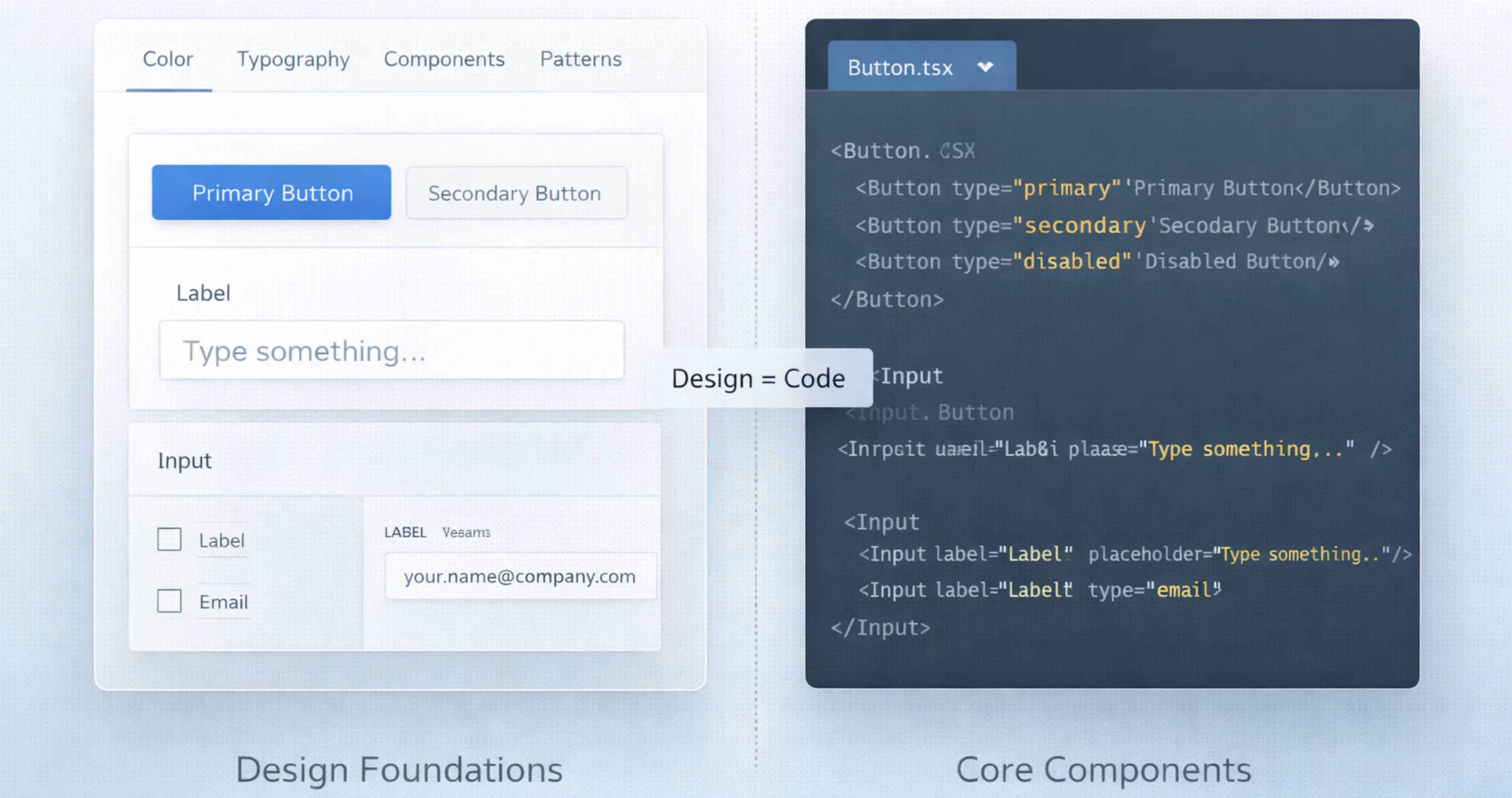
A design system only works when the design matches the actual product UI. And to make that happen, every component designed should also exist in the code with the same structure, styles and behavior. And for that, you’ll need a close alignment between design and engineering.
Start by mapping out each design component with a coded component. For example, you can link the button component in Figma to the same button component in the codebase. Both sides should support the same sizes, states, and variants, so what designers ship is exactly what developers build.
Step 6: Document Usage Rules
Each component should have clear guidance on how it is used, how it behaves, and how it should appear in different situations.
For every component or pattern, document its ideal structure, correct usage examples, and clear do-and-don’t guidelines. It will help designers and developers apply components consistently without making assumptions.
Step 7: Adoption Across Teams
After creating the design system, the next step is adoption across design and engineering teams. A design system is valuable only when it’s actively used in real product work.
Start by introducing the systems gradually by providing onboarding sessions and walkthroughs. So, they understand how to use it in daily work. For implementations, teams should begin using design systems in the new features first. Then, slowly upgrade the existing screens over time as they are redesigned.
How to Build a Design System for Startups and Small Teams
Startups and small teams don't need a 200-component system. They need a lean one that removes repeated decisions and grows with the product. Here is a minimum viable design system you can build in a few weeks:
- One color palette saved as tokens: brand, neutral, and status colors (success, warning, error)
- One type scale with 5 to 6 sizes for headings, body, labels, and captions
- A simple spacing scale (4, 8, 16, 24, 32, 48)
- 10 core components: button, input, select, checkbox, table, card, modal, toast, tabs, and navigation
- Empty, loading, and error states for every data screen
- One shared Figma library that every designer works from
- A one-page usage doc with do and don't examples
Start with the screens your users see most, usually the dashboard and the main data table. Add a new component only when the same need shows up in two or more features. That rule stops a small design system from growing faster than your team can maintain it.
Tools to Build and Manage a SaaS Design System
The right tools keep design and code in sync as your design system grows. These are the tools most SaaS teams use at each stage:
- Figma: Build foundations and components in shared libraries. Use Figma variables to store color, spacing, and typography tokens and to switch between light and dark themes.
- Tokens Studio: Manage design tokens in one place and sync them to GitHub, so developers get the same values designers use.
- Storybook: Build and test coded components in isolation. Developers can check every state and variant before a component goes into the product.
- Zeroheight: Create a documentation site that pulls in Figma components and Storybook code, so usage rules live next to the real components.
- Supernova: An all-in-one design system platform for documentation, token management, and exporting tokens to code.
- Miro or FigJam: Run the UI audit and map inconsistencies before you start building.
For a startup, Figma plus Storybook is usually enough. Add a token manager and a documentation tool once more than one team uses the system.
Testing and Validation of Design Systems
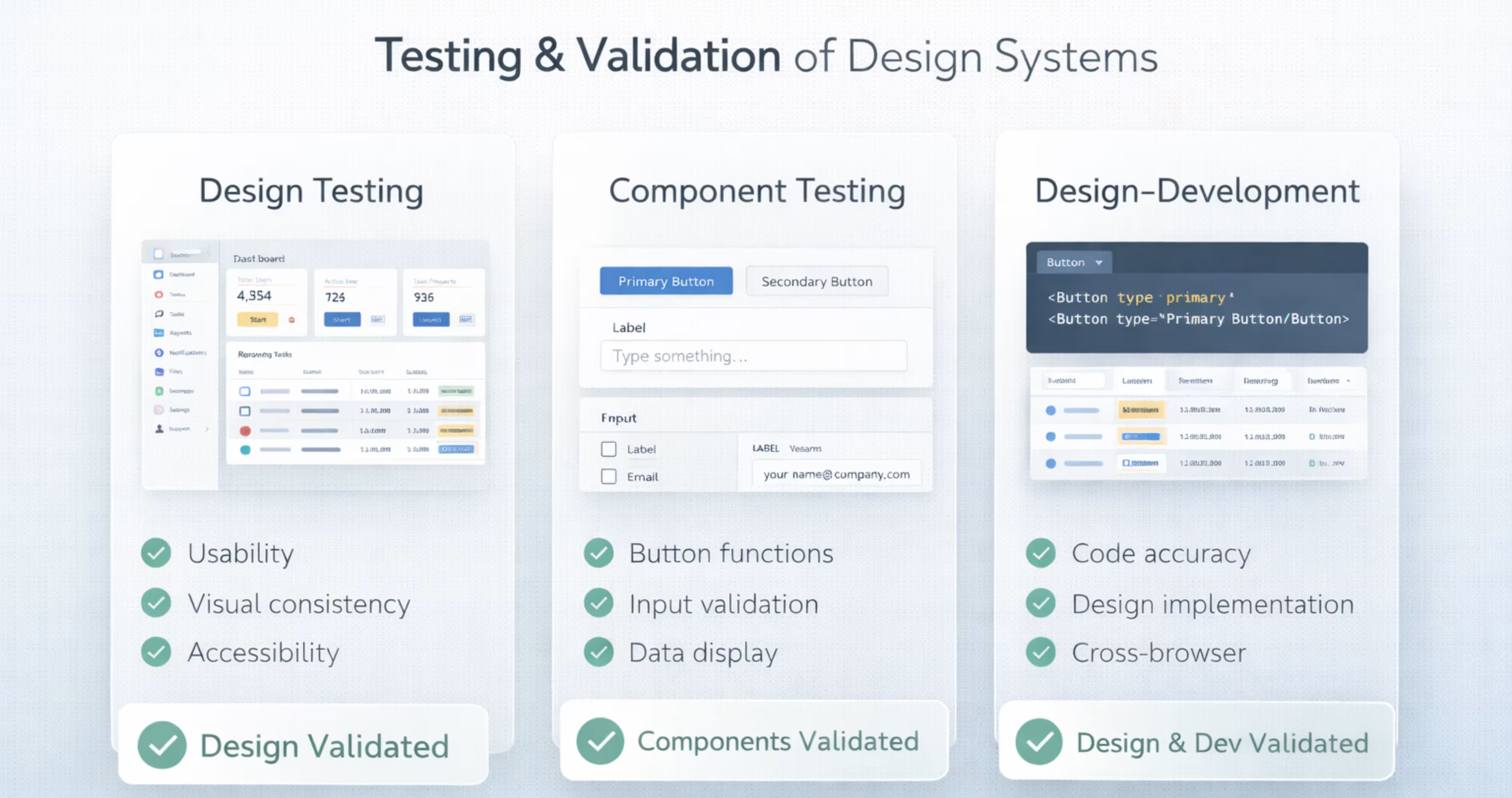
Testing and validating design systems make sure the design system is accessible and functional across platforms. It confirms that components are usable, accessible, and consistent across different platforms or screen sizes.
Here are three main areas to test and validate a SaaS design system:
Design Testing
The design testing checks whether the layouts work with real user workflows. SaaS products often contain complex data such as tables, dashboards and forms, so interfaces must stay clear, and easy to scan.
This testing involves reviewing screens in realistic scenarios to see if users can understand and navigate the design easily. It will make sure that the design system works for real usage, not just ideal layouts.
Component Testing
Component testing makes sure that each component works correctly in all its states and variations. This includes working in hover, active, disabled, loading, and different sizes.
As the components appear in many contexts across SaaS products, they must adapt consistently to different layouts and use cases. This component testing makes sure they remain usable and visually consistent wherever they are used.
Design-Development Testing
The design-development testing makes sure that the design matches the development implementation. This means matching the spacing, layout, colors, and typography that the product design has assigned.
It also needs to be checked whether the implemented design follows these rules correctly to produce a UI that properly reflects system states and expected outputs.
Another part of checking consistency is confirming that responsive behaviors, icons, and patterns in the product follow the same design rules assigned to them in the design system.
Build In-House or Hire a SaaS Design Agency?
Once you know what a design system needs, the next question is who builds it. Both options work. The right one depends on your team, your timeline, and how fast the product is changing.
Build in-house if:
- You have a senior product designer and a front-end developer who can own the system
- Your product is early, with a small number of screens
- You can give the team 4 to 8 weeks for foundations and core components without delaying features
Hire an agency if:
- Your product already has inconsistent screens across several modules and needs an audit first
- Your designers are fully booked on feature work and the system keeps getting pushed back
- You need a documented, developer-ready system in weeks, not quarters
Many teams mix both. An agency builds the foundations, components, and documentation, then hands the system to the in-house team to maintain. If you're weighing that route, a SaaS design agency that builds the system alongside your product screens makes sure every component is tested on real workflows from day one.
Common Design Mistakes to Avoid in SaaS Design Systems
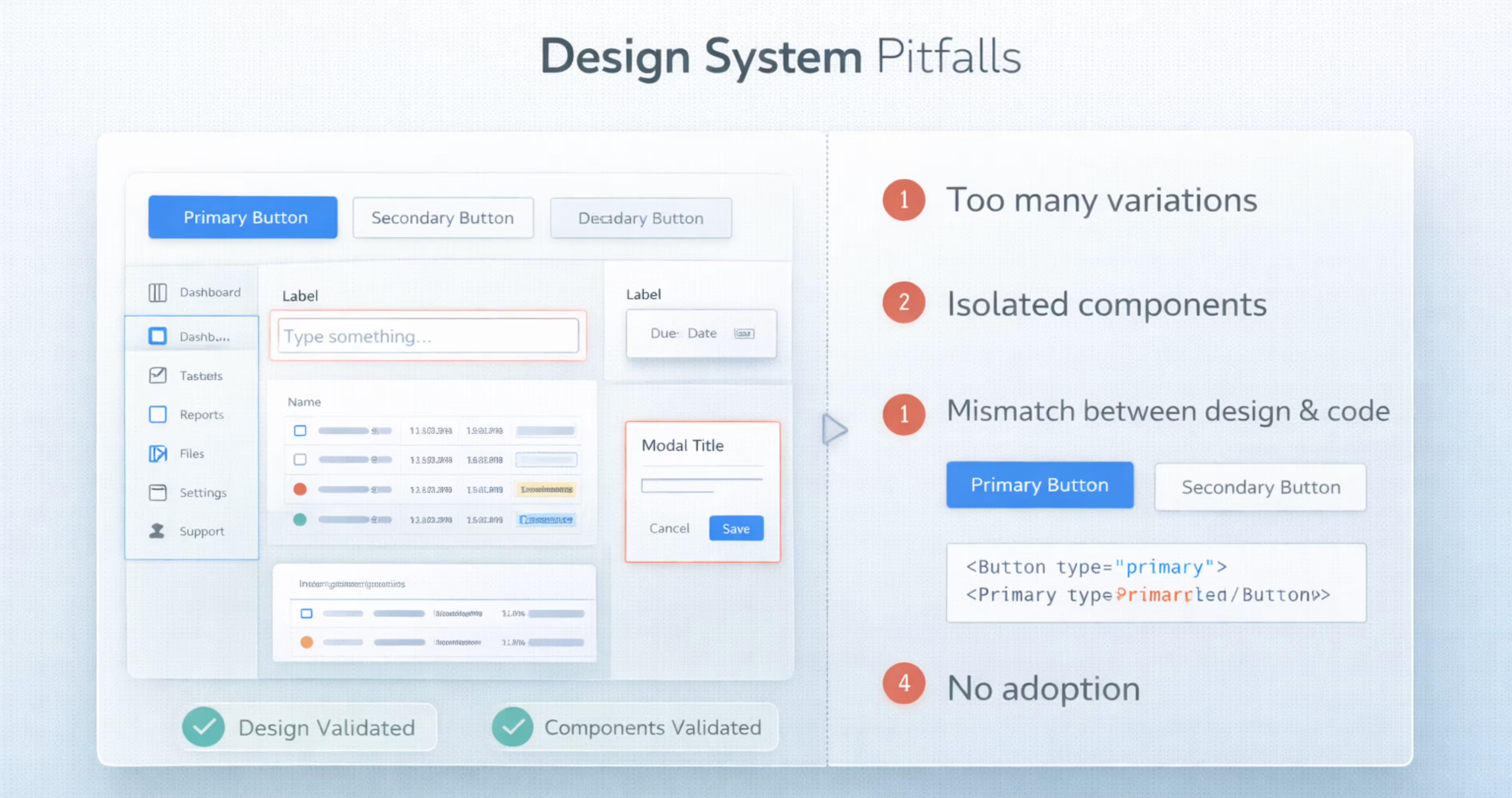
SaaS design systems can greatly improve product consistency and team efficiency. However, if they are created or used incorrectly, they can cause confusion instead of clarity. Here are common mistakes to watch for when building and maintaining a SaaS design system:
- Treating the design systems as just a UI kit instead of following the patterns and usage rules.
- Designing components in isolation without reviewing the product or user workflows.
- Adding too many size, color, style variations and exceptions in the design system.
- Design components not matching with coded components. This is where teams end up using UI inconsistently.
- Not adopting the design system across both design and development teams.
- No governance or maintenance after creating the design system. This causes teams to add new components outside the best practices.
Frequently Asked Questions
How long does it take to build a SaaS design system?
A basic SaaS design system takes around 4 to 8 weeks to define foundations and core components. A more complete system with patterns, documentation, and engineering alignment can take 3 to 6 months.
What happens if a SaaS product has no design system?
Without a design system, the interface becomes inconsistent as the product grows. Different screens start using different buttons, spacing, and typography, and every new feature takes longer to design and build.
Where can I create a SaaS design system?
You can build a SaaS design system in Figma, using shared libraries and variables for foundations and components. Pair it with Storybook for coded components and Zeroheight or Supernova for documentation. If your team lacks the time, a SaaS design agency like Orbix Studio can build and document it with you.
What makes a SaaS design system scalable?
A SaaS design system becomes scalable when it's built on design tokens, reusable components, and documented patterns. New features can then reuse what already exists instead of redesigning the UI each time.
Do developers need to follow the design system exactly?
Developers should follow the design system by default, because it keeps the product consistent. If the system blocks a real product need, the team can extend it with a new component or variant through an agreed review process.
What is the difference between a design system and a UI kit?
A UI kit is a set of ready-made UI elements. A design system includes those elements plus design tokens, usage rules, coded components, and governance. A UI kit helps you design faster, while a design system keeps the whole product consistent as it grows.
Does a startup need a design system?
Yes, but a small one. A startup needs a lean design system with tokens for color, type, and spacing plus around 10 core components. It saves time on every new feature and costs far less than fixing inconsistent UI later.
What are some good examples of SaaS design systems?
Well-known SaaS design systems include Atlassian Design System, Shopify Polaris, Salesforce Lightning Design System, IBM Carbon, GitHub Primer, Segment Evergreen, Uber Base Web, and GitLab Pajamas. All of them are public, so you can study how each one structures tokens, components, and documentation.
Final Thoughts
Creating a design system can be highly effective for SaaS products, when used correctly. It can help SaaS teams produce consistent, scalable interfaces that improve the overall product quality.
By maintaining a well-structured design system, teams can scale product features more easily. It also helps design and development teams collaborate across the product.






.svg)
.svg)


.svg)







.avif)



.svg)

