- What Is AI Agent UX Design?
- Anatomy of an AI Agent Interface
- Designing Autonomy, Permissions and User Control
- AI Agent UX Examples From Real Products
- Trust, Transparency and Agent Feedback
- AI Agent Error Handling and Recovery UX
- Multi-Agent UX: Coordination, Handoffs and Ownership
- AI Agent Onboarding and Accessibility
- How to Test AI Agent UX
- AI Agent UX Design Checklist
- Frequently Asked Questions
- Final Thoughts


AI Agent UX Design: How to Design Interfaces for Autonomous AI Agents
- AI agent UX design shapes how people hand work to an AI and correct it. Without it, users can't see what the agent did.
- Show the plan before the agent acts, then show clear status while it works. People trust what they can follow.
- Agents take real actions, while chatbots mostly answer questions. That's why agent interfaces need permission, progress and undo controls.
- Match the agent's authority to the risk of each action. Searching can run freely, but paying or deleting should wait for a clear yes.
- Every agent fails sometimes, so design recovery before launch. Users need to see what broke, what got done and what's pending.
- Test agent UX with normal, messy and risky scenarios, not only happy paths. A correct result means little if users feel lost.
Designing an AI agent interface involves more than adding a chat window to your product. An agent can plan tasks, use external tools, make decisions, and perform actions with limited human involvement. That creates new UX challenges around visibility, permissions, trust, and user control.
Users need to know what the agent can do, what it's doing now, and when their input is required. They also need a clear way to intervene when the agent makes a mistake.
This guide covers the practical side of AI agent UX design, including interface anatomy, autonomy patterns, approval flows, error handling, and testing methods.
What Is AI Agent UX Design?
AI agent UX design focuses on how people delegate tasks to software that can plan, make decisions, and take action using external tools. It covers how users set goals, define limits, review plans, approve important actions, and track results. The challenge is giving people control without making them manage every step themselves.
Unlike a traditional chatbot, an AI agent can work toward a goal by completing several steps. It might use a browser to research options, a calendar to check availability, or an API to perform an action. Microsoft Design describes these systems as AI assistants built from instructions, knowledge, actions, skills, and memory. If you're new to the concept, start with our beginner guide on what an AI agent is.
This is a more specific area of AI product UX design. While AI product UX covers any product that uses AI, agent UX deals with software that acts on a user's behalf, sometimes without constant supervision.
The design process follows a similar loop across most use cases. Users set a goal, review the plan, approve important actions, monitor progress, and check the outcome. The flowchart below breaks this process into six stages, including where users can step in.
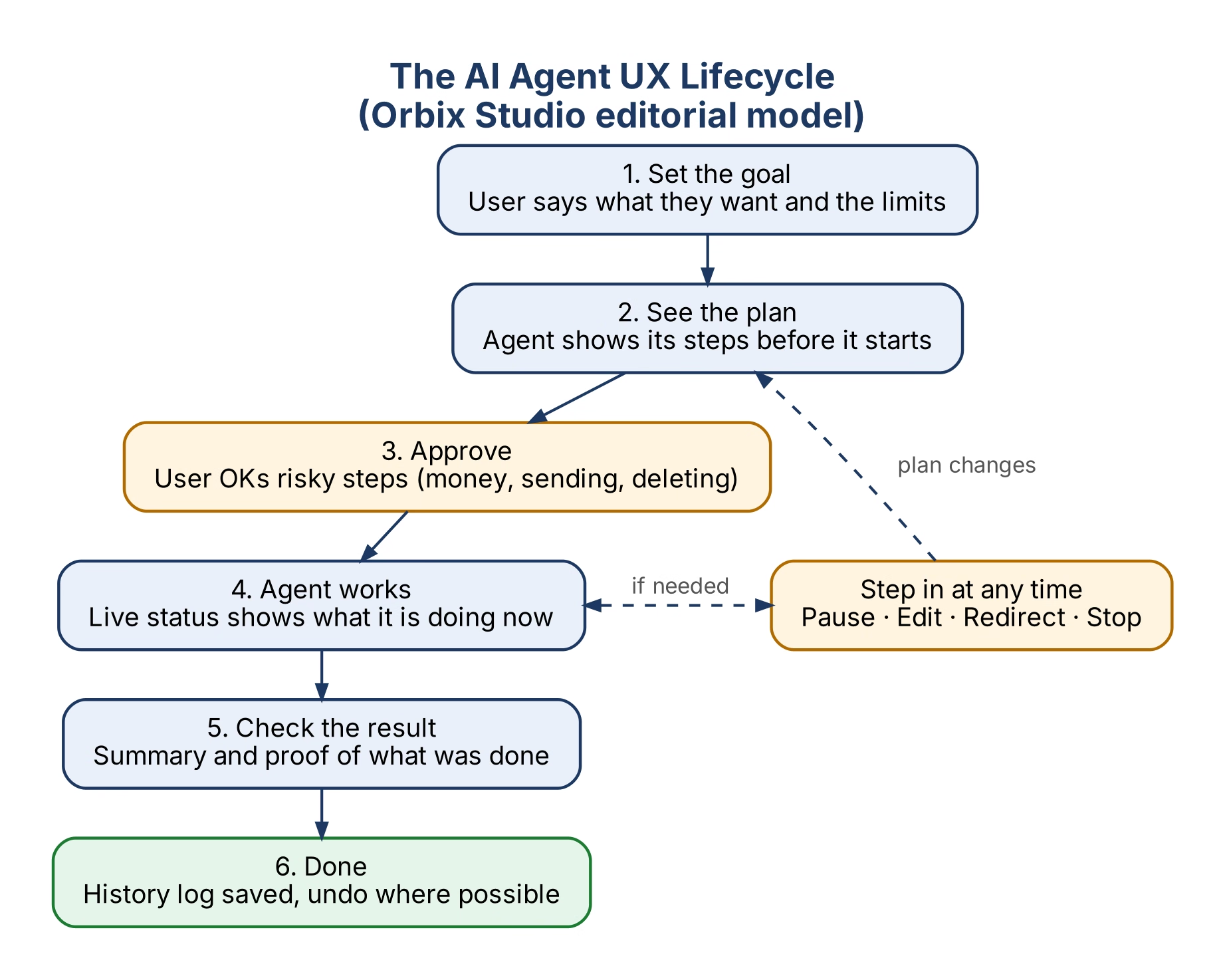
Research supports this shape. A March 2026 Amazon Science article on human-agent coordination describes user involvement as high during setup, lower while the agent works and higher again at review. That's why the setup and review screens deserve the most design care.
AI Agents vs. Chatbots, Assistants and Automation
AI agents differ from chatbots, assistants and automation in how much they do on their own. A chatbot answers. An assistant helps you do a task. Automation follows fixed rules. An agent plans steps toward a goal, uses tools and adapts along the way, so it needs stronger oversight in the interface.
Real products often blend these, so treat the table as a guide, not strict definitions.
Chat is still useful in agent products, usually as the place where you give the goal. But a chat thread is a poor tracker for a ten-step task. Good AI chatbot UI design focuses on messages, replies and tone. Agent UX adds a workspace that shows the work itself.
Here's the same trip done three ways, so you can see who does what.
Anatomy of an AI Agent Interface
An AI agent interface usually needs seven parts: a task card with the goal and limits, a plan view, live status with controls, approval requests, an activity history, a memory and permissions panel, and a result summary. Together they let users understand, steer and check the agent without reading its raw reasoning.
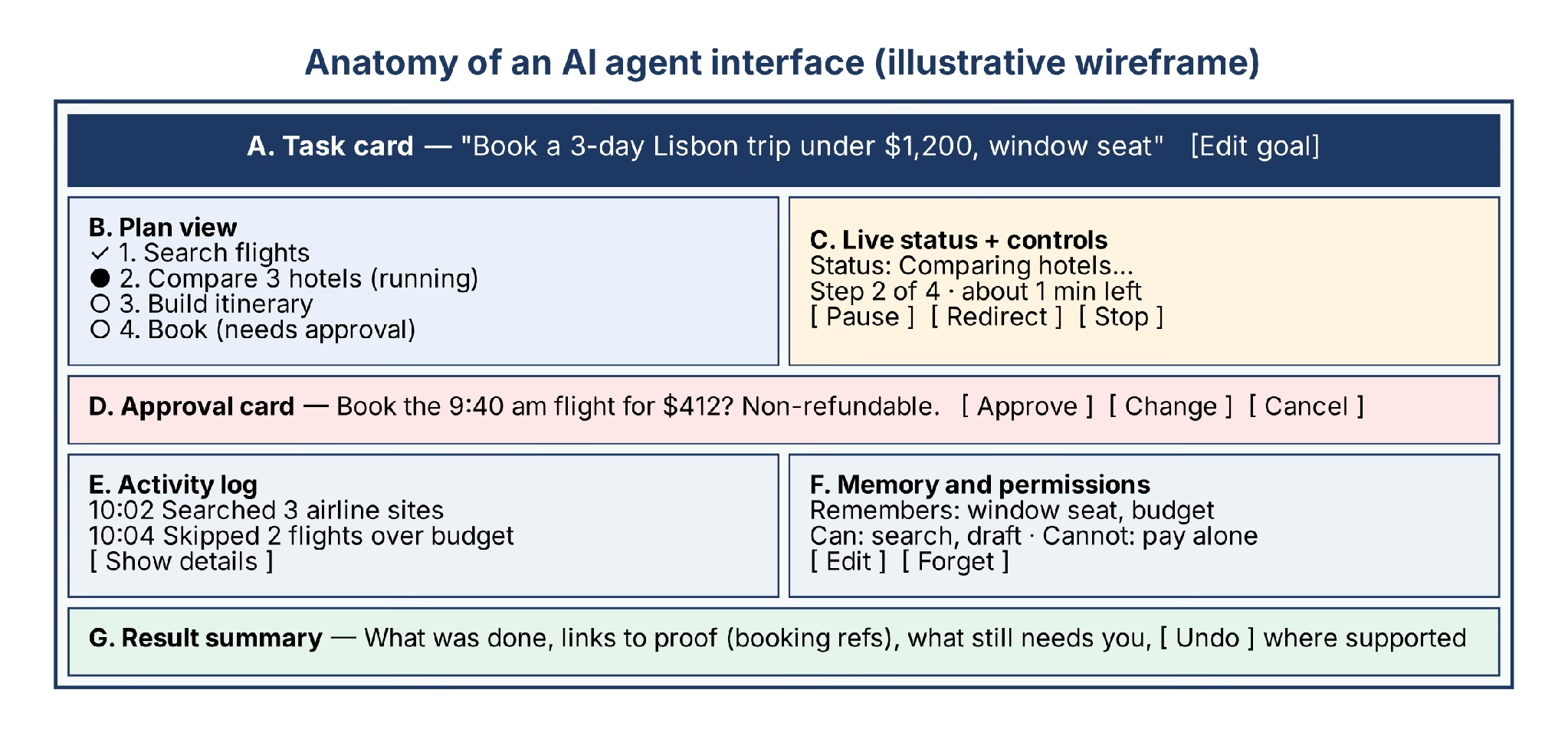
Where these parts sit on screen is a layout question as much as an AI question. If your agent lives inside a bigger product, the same rules from SaaS navigation design apply: keep the agent workspace easy to find and keep its status visible from wherever the user is.
Common AI Agent UX Design Patterns
Most agent interfaces reuse a small set of named patterns. Smashing Magazine, Eleken and other design publications use slightly different names for them, so this table maps each pattern to what it does and where it shows up in TripMate.
Designing Agent Plans and Task Previews
A good plan preview lists the agent's steps in plain language before anything runs, marks which steps need approval and lets users edit, reorder or reject steps. Users can then catch a misunderstanding before it costs them anything.
In TripMate, Maya types: "Plan three days in Lisbon under $1,200, window seat, no flights before 8 am." TripMate replies with a plan:
- Search flights that match your limits.
- Compare three hotels near the center.
- Build a day-by-day itinerary.
- Book flight and hotel. Needs your approval.
Maya notices it picked hotels "near the center" and changes it to "near the river," which saves a wrong booking later. Plans should also be easy to skip for simple, low-risk tasks, so experienced users aren't slowed down.
Showing Progress Without Creating Noise
Show progress by reporting meaningful state changes, such as started, waiting for approval, step finished, finished or failed, with a step count and a plain-language label. Keep tool calls and internal steps behind a "Show details" link. Users need to know where the work stands, not every operation the agent runs.
Compare these two status lines:
Amazon Science's researchers describe a related idea in three zones
Long-running agents also need a way to reach users who've left the screen, such as a notification when approval is needed. Keep those alerts for moments that need the user, not for every finished step.
The moment a user comes back deserves its own design. When an agent stops and hands work back, the screen should work as a short briefing: the goal, what's done, why the agent stopped, the decision it needs and what happens after the user answers. Maya shouldn't have to scroll a log to find out why TripMate is waiting.
Designing Autonomy, Permissions and User Control
Design autonomy by matching how much an agent may do alone to the risk of each action. Read-only and easily reversed actions can run freely. Actions that spend money, send messages, share data or can't be undone should wait for approval. Users should always be able to see, change and revoke what the agent is allowed to do.
Researchers Kevin Feng, David McDonald and Amy Zhang argue in "Levels of Autonomy for AI Agents" (Knight First Amendment Institute, 2025) that an agent's autonomy is a deliberate design decision, not just a side effect of how capable it is. They describe five levels based on the user's role: operator, collaborator, consultant, approver and observer.
We turned that idea into a simple ladder that product teams can use in design reviews.
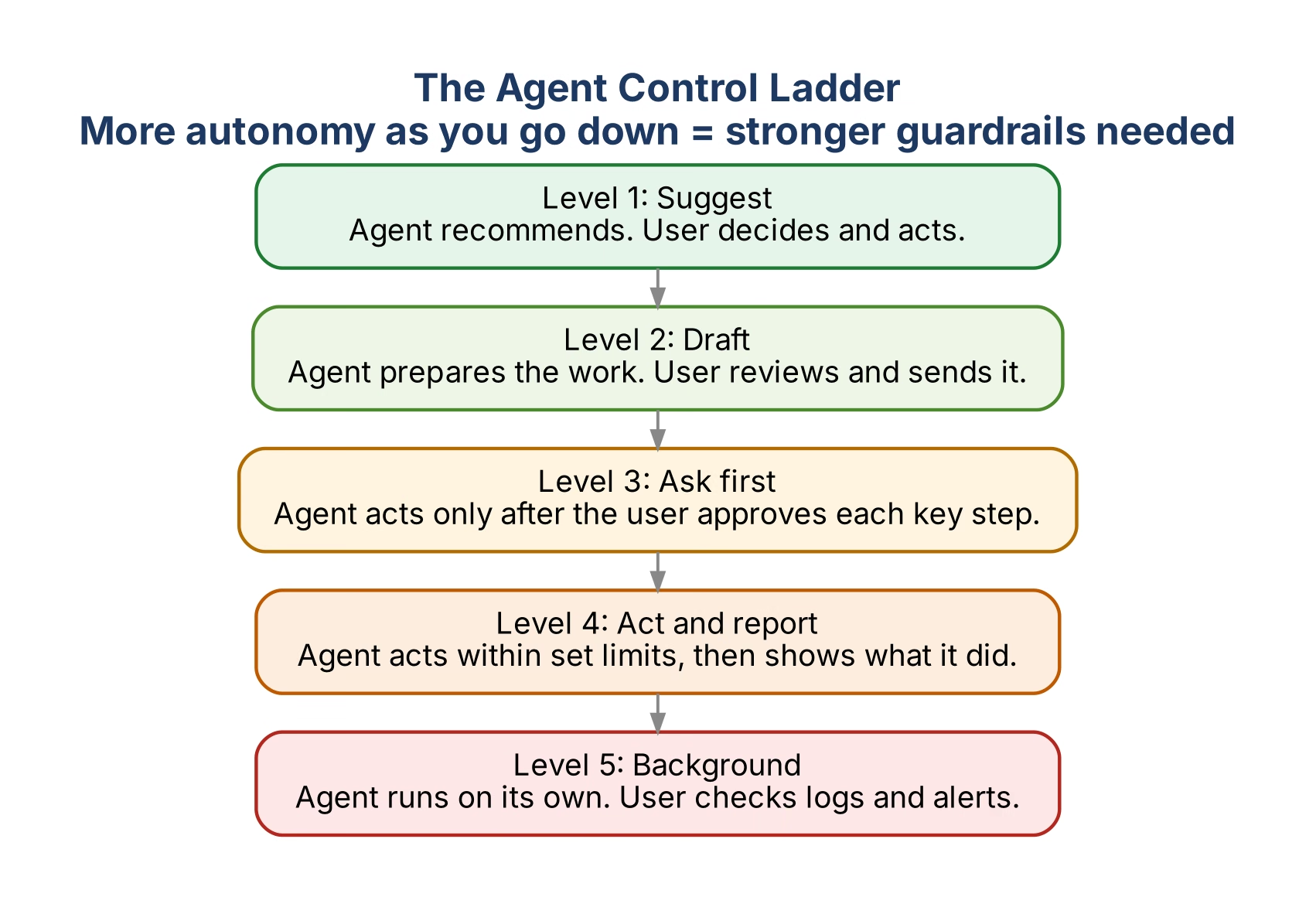
Amazon Science's researchers describe a related idea in three zones: "done with me," "done for me" and "done under me." They also report that preferences varied widely in their prototype testing, and they suggest a middle option where users review the plan before it runs without approving every step.
One more detail: how proactive an agent is and how much authority it has are two different settings. TripMate can be proactive and suggest a cheaper hotel on its own, while still having no authority to book it. Treating these as one switch removes a useful middle ground.
When Should an AI Agent Ask for Approval?
An AI agent should ask for approval when an action falls outside the limits the user set, affects money, messages, shared data or deletions and can't be easily undone, or when the agent isn't sure what the user wants. Low-risk, reversible actions inside the user's limits can usually run without asking.
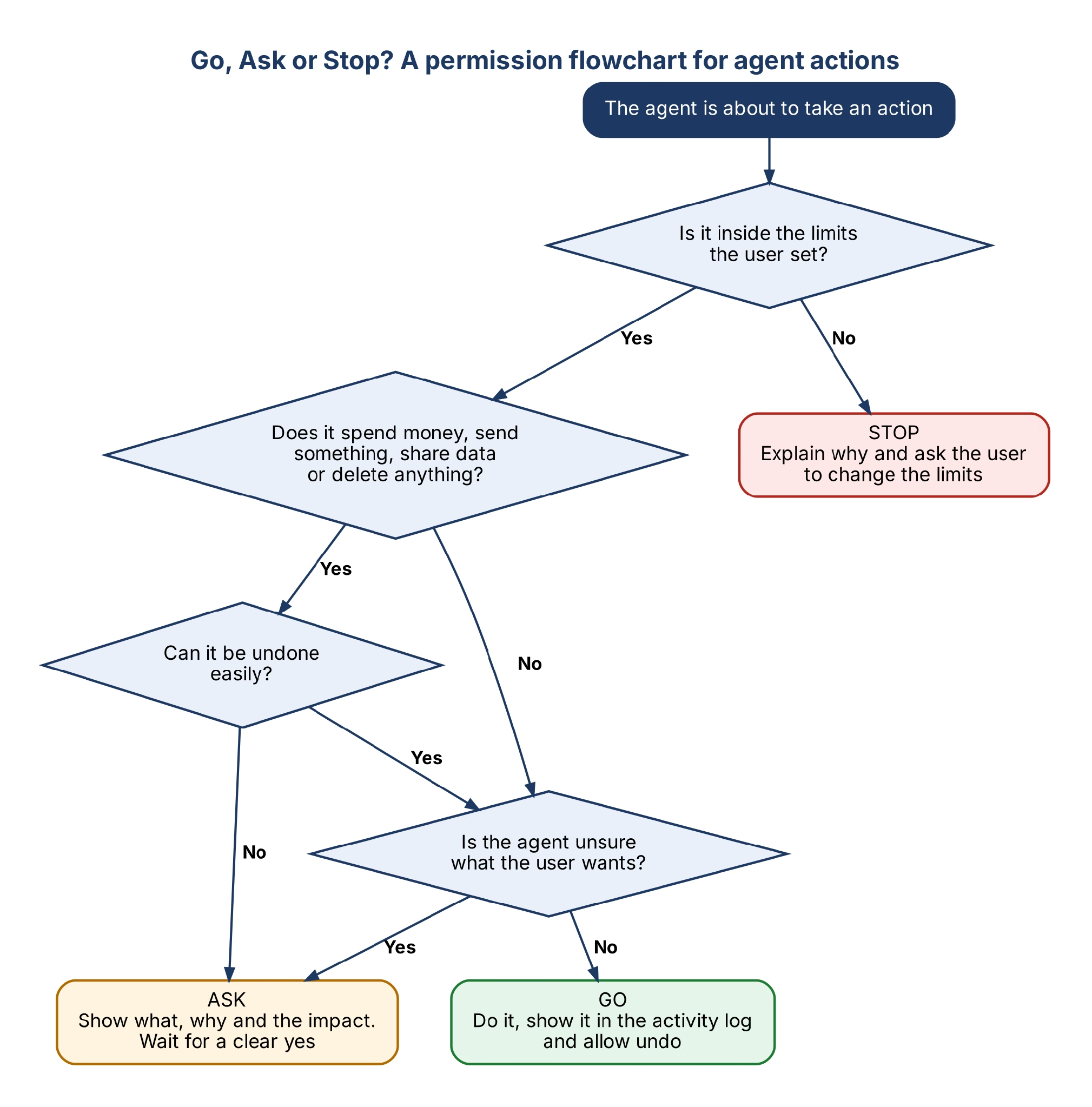
This matrix shows the same idea with examples from TripMate.
A good approval request answers three things at a glance: what the agent wants to do, why, and what happens if the user says yes. "Book the 9:40 am flight for $412? Non-refundable." works. "Proceed?" doesn't. Asking about every small step causes problems too, because people start clicking "Yes" without reading.
Pause, Stop, Redirect and Undo
Users should be able to pause, stop or redirect an agent from any screen where it's working, with controls that are visible, not hidden in settings. Undo should be offered wherever the underlying system really allows it, and the interface should say honestly when an action can't be reversed.
- Pause freezes the agent after its current step, so nothing is half-done.
- Stop ends the task and shows what was completed before it stopped.
- Redirect lets the user change the goal or plan without starting over.
- Undo reverses a finished action where possible, such as removing a saved hotel or cancelling within a free cancellation window.
Be careful with undo promises. TripMate can't undo a non-refundable booking, so the approval card says so before Maya agrees, not after.
AI Agent UX Examples From Real Products
Real agent products already use the patterns in this guide. ChatGPT's cloud browser, Claude in Chrome, Google's Jules and GitHub Copilot's cloud agent all combine plan previews, permission settings, confirmation before risky actions, activity logs and human review. Here's what their own documentation says each one does, as of November 2026.
Two details are worth copying. OpenAI keeps website access separate from action approval, so trusting a site never skips the check on a payment. And GitHub links each commit message to its session log, so reviewers can trace why a change was made.
There's also a counterexample. Jules's documentation says that if you navigate away, the plan is eventually auto-approved on a timer. That suits low-risk coding tasks where waiting costs time. It wouldn't suit TripMate, where an unattended approval could spend Maya's money.
Product features change often, so recheck these details against each product's help pages before you cite them.
Trust, Transparency and Agent Feedback
Build trust in an AI agent by making its capabilities, actions, evidence and limits visible at the moment they matter, and by making mistakes easy to fix. Aim for appropriate trust rather than maximum trust: users should rely on the agent for what it does well and double-check where it's weaker.
Microsoft Design's agent principles make two points that matter here. Agent status and current activity should always be clearly visible, and the agent's level of certainty and reasoning should be visible or easy to reach, to avoid overreliance.
Feeling confident in an agent isn't the same as the agent being reliable. A polished interface can make people trust an agent more than they should. That's why proof matters more than tone: booking references, sources, before-and-after views and clear notes such as "I couldn't confirm the hotel's breakfast policy."
Explain What Matters, Not Every Internal Step
Explain what matters by showing users the information they need at each stage, such as the goal before starting, status during work, impact before risky actions and evidence at the end, and keeping technical detail one click away. More transparency isn't always better. Too much detail can bury the one line that matters.
A 2026 arXiv paper, "Design Principles for Human-Agent Interaction," concludes that effective agent communication needs carefully designed transparency rather than maximal information. In practice, we use a five-question check we call the Agent Action Visibility Framework. For every meaningful action, a user should be able to answer:
- What is the agent doing?
- Why is it doing this?
- What information or permission does it need?
- What can I change, pause or stop?
- How can I verify the result?
If the screen can't answer one of these, that's your next design fix. This is an Orbix Studio teaching tool, not a validated industry standard. Here's how the answers change across the task.
Feedback, Memory and User Expectations
Agents that remember preferences should show what they remember and let users correct or delete it. Feedback controls should change the agent's future behavior in a way users can see. Not every agent has memory, and memory differs by product, so tell users plainly what the agent keeps and for how long.
In TripMate, the memory panel shows "Remembers: window seat, budget under $1,200." Maya can edit it or tap "Forget." When she rejects a hotel and says "too far from the river," TripMate confirms: "Got it. I'll prioritize hotels near the river for this trip." That short confirmation tells her the feedback landed.
AI Agent Error Handling and Recovery UX
AI agent error handling UX means pausing safely, explaining what went wrong in plain words, showing what was and wasn't completed, and offering clear options such as retry, fix the input, undo or hand the task to a person. A lone "Something went wrong" message or a bare retry button isn't enough for agents.
Agents fail in more ways than ordinary apps because they take many steps across many systems. A late-2026 arXiv paper, "When AI Agents Act on Our Behalf," analyzed 695 documented incidents and sorted them into 12 failure modes across three interaction stages. The authors found that all 12 modes appeared at both low and high autonomy, but higher autonomy changed the form a failure took, how far it reached and whether it could be undone.
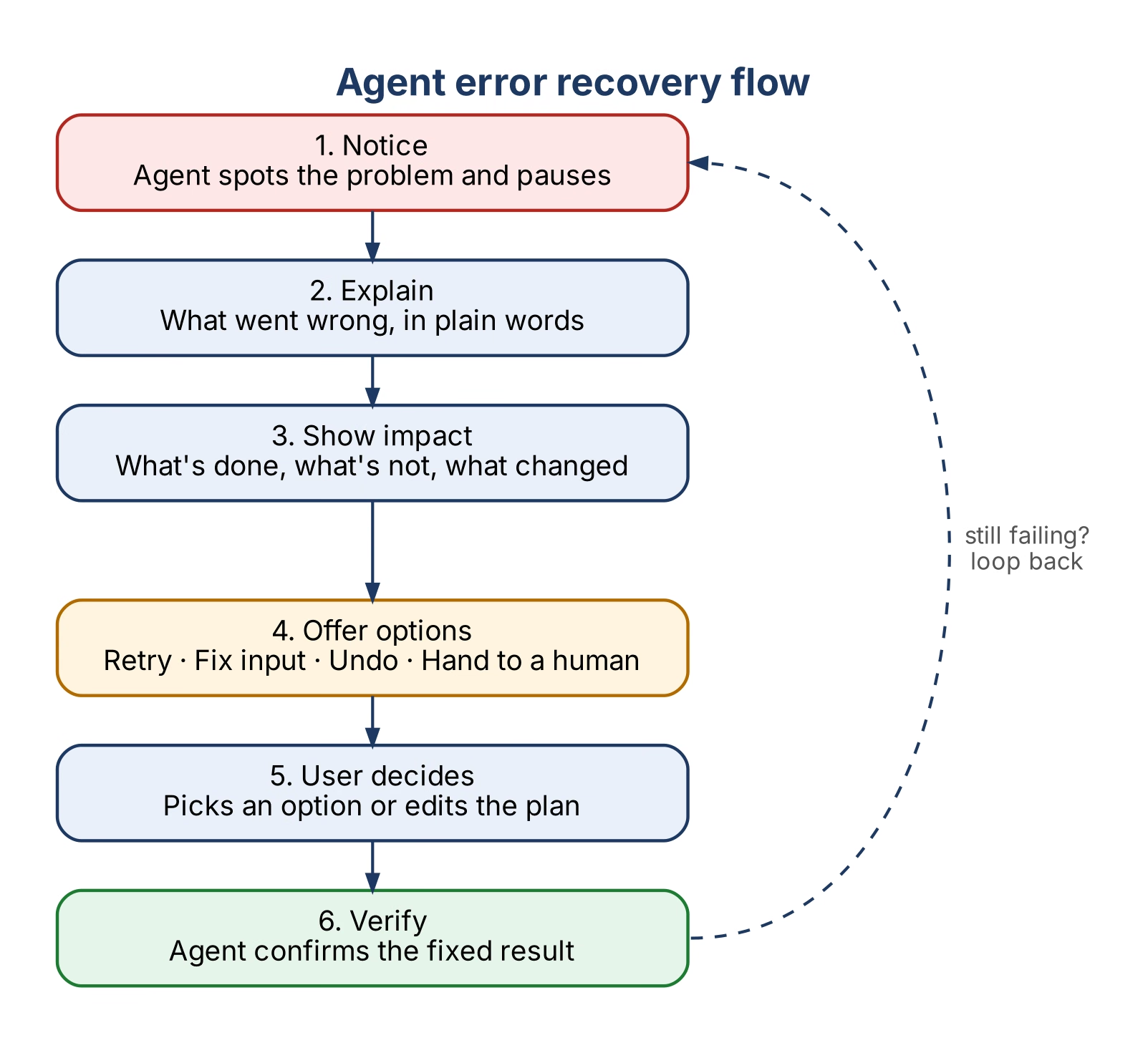
Here's what each common failure should tell the user, with TripMate examples.
Designing Recovery for Partial Completion
Design for partial completion by clearly separating completed, failed and pending actions, confirming the real state of outside systems before retrying, and offering retry, edit, stop or escalation. Partial completion is easy to overlook, and it can lead to double bookings or duplicate payments.
Picture TripMate booking Maya's flight, then failing on the hotel. A stop button alone doesn't help. Maya needs a panel like this:
Before offering "Retry hotel," the agent should check whether the hotel booking actually went through. A timeout doesn't always mean nothing happened. Retrying blindly can book the same room twice.
Multi-Agent UX: Coordination, Handoffs and Ownership
Multi-agent UX design makes several cooperating agents feel like one clear product. Users should see which agent owns each task, where work is handed from one agent to another and how conflicting results get resolved. Usually one lead agent talks to the user, while helper agents work behind it.
Imagine TripMate splits work across a flight agent, a hotel agent and a budget agent. If the budget agent rejects the hotel agent's pick, Maya shouldn't see two contradicting messages. She should see one summary: "Hotel option is $85 over budget. Choose a cheaper hotel or raise the limit."
Amazon Science's researchers note that multi-agent systems can create long stretches where agents work alone, which they call "valleys." Those stretches need deliberate design for notifications, approvals, monitoring and audit trails. Useful patterns include:
- One lead agent as the single voice to the user.
- An ownership label on each plan step, such as "Hotel agent."
- One place to see and settle conflicts.
- One stop control that halts every agent at once.
Don't expose every agent-to-agent message. That clutters the screen without helping the user decide anything.
AI Agent Onboarding and Accessibility
Good AI agent onboarding explains what the agent can and can't do, helps users set limits and starts with a small, low-risk task. Good agent accessibility means status changes reach screen reader users, focus stays stable when approval cards appear, users can pause auto-updating content and status never relies on color alone.
A first-run flow for TripMate might look like this:
- Introduce the agent in one sentence: "TripMate finds and drafts trips. You approve anything that costs money."
- Ask for limits early: budget cap, airlines to avoid and which accounts it can use.
- Suggest a small first task, such as "Find three weekend flight options," with no booking.
- Show a sample plan, status line and summary before real work starts.
- Offer more autonomy later. After a few good tasks, ask: "Want me to book flights under $300 without asking?"
If your agent connects to tools your team already uses, our guide to AI integration for beginners explains how those connections work. Agents often connect to tools through standards such as the Model Context Protocol (MCP). Every new connection is also a new permission, so it belongs in the agent's permission panel.
For accessibility, the W3C's WCAG 2.2 standard includes several criteria that matter a lot for agents:
Don't announce every tiny step, though. If a screen reader reads out each search the agent runs, the experience turns into noise. Announce meaningful changes: started, waiting for approval, finished and failed. Meeting WCAG is necessary, but it doesn't prove an agent is usable, so test with assistive technology users too.
How to Test AI Agent UX
Test AI agent UX by giving real users realistic tasks across normal, ambiguous, interrupted, failed and consequential scenarios. Then check whether they understood the plan, stepped in at the right time, recovered from failures and verified the result. Task success alone isn't enough, because a correct result can still leave users confused.
This scenario-based approach follows published research. Apple researchers, in a paper presented at IUI 2026, built a design taxonomy for computer-use agents covering user prompts, explainability, user control and mental models. They tested it in a Wizard-of-Oz study with 20 participants across normal, error-prone and risky task runs. In a Wizard-of-Oz test, a researcher secretly plays the agent, so you can test the experience before the AI is built.
Use this worksheet in your own sessions. It's a proposed method, so define how you'll measure each item before you report results.
Which Metrics Should You Track for AI Agent UX?
Track task success together with measures of understanding, control and recovery, never alone. Netlify's guide to measuring agent experience warns that raw task-success rate can rise simply because friction that protected the user was removed, so it should always be paired with a legibility or reversibility measure.
In Smashing Magazine, UX researcher Victor Yocco suggests treating a reversion rate above 5% for a task as a sign to switch off automation for it. Use numbers like that as starting points, then set your own based on how risky the task is.
You can prototype these tests with the same UI/UX design tools your team already uses. For a structured review of an existing product, pair the worksheet with a standard UX audit process, adding the agent-specific checks above.
Designing an agent takes more than connecting a model to a workflow. If your product needs clearer agent interactions, it may help to explore Orbix Studio's AI product UX design services.
AI Agent UX Design Checklist
Use this checklist before you ship an agent feature. If you can tick every line, you've covered the basics. For a deeper look at any single area, browse the related guides on the Orbix Studio blog.
- The agent says what it can and can't do before the first task.
- Users can set goals and limits in plain language and edit them later.
- The plan is visible before any consequential action runs.
- Steps that need approval are marked in the plan.
- Status uses plain words, shows progress and hides technical noise.
- Pause, stop and redirect are always one click away.
- Approval cards show the action, cost and whether it can be undone.
- An activity history records every action with a time stamp.
- Errors explain what happened, what's done and what's next.
- When the agent stops, it says why and what decision it needs.
- Partial completion shows done, failed and pending steps separately.
- Users can see, edit and delete what the agent remembers.
- Status changes reach screen readers and don't rely on color.
- The team has tested normal, ambiguous, interrupted, failed and risky scenarios.
Frequently Asked Questions
Is AI agent UX the same as agentic UX?
Mostly, yes. Agentic UX is a broader label for designing any experience where AI takes initiative and acts. AI agent UX design usually refers to the interface of a specific agent product. Both share the same core ideas: delegation, visible status, permission design, user control and recovery from errors.
What are the 7 types of AI agents?
Lists differ by source. IBM names five main types: simple reflex, model-based reflex, goal-based, utility-based and learning agents. Many guides add hierarchical agents and multi-agent systems to reach seven. For UX design, the type matters less than how much autonomy the agent has and how risky its actions are.
Do I need to code to design an AI agent interface?
No. Designers can map an agent's lifecycle, permissions and failure states without writing code. It helps to understand basics like tools, APIs and memory, though, because they decide what the agent can actually do and what users need to see and control. That shared language makes developer handoff much smoother.
Which popular AI products already use agents?
ChatGPT, Claude, Google's Jules and GitHub Copilot all offer agent features that browse, code or work across apps, as the real-product table above shows. Our roundup of the most popular AI tools covers what the leading tools do. Studying how they show status and ask for approval is a practical way to learn.
Are there official guidelines for AI agent UX?
There's no single standard yet. The most cited references are Microsoft Design's agent UX principles, Google PAIR's People + AI Guidebook and Microsoft Research's Guidelines for Human-AI Interaction, published at CHI 2019. For accessibility, WCAG 2.2 applies to agent interfaces like any other web UI. Most teams combine these with their own tested patterns.
What is human-in-the-loop in AI agent design?
Human-in-the-loop means a person must approve certain steps before the agent can continue. It suits high-risk actions such as payments, sending messages or deleting data. The UX challenge is making each approval quick and clear, so people actually read it instead of clicking "Yes" out of habit.
How do you make an AI agent trustworthy?
Make the agent's work visible and its mistakes fixable. Show the plan first, ask before risky actions, report what was done with proof and offer undo where possible. Aim for appropriate trust, not maximum trust, so users rely on the agent where it's strong and double-check where it isn't.
How long does it take to design an AI agent interface?
It depends on how many tasks, tools and permission levels the agent has. A focused agent with one workflow is far simpler than a multi-agent system. [ADD: Orbix Studio's typical timeline range, only if the team wants to share one.] Plan time for testing error and risky scenarios, not just the main flow.
Final Thoughts
AI agent UX design comes down to one principle: give people the right amount of visibility, autonomy and control for each task and its consequences. Show the plan, keep status meaningful, ask before risky actions, design for failure and test with real users in messy situations.
Start small with one workflow, one clear permission model and one honest activity history, then grow from there. If your team is designing an agent product and wants a second pair of eyes on the experience, Orbix Studio's designers are happy to talk it through.