AI Product UX Design: How to Design and Validate AI Experiences
- AI product UX design shapes how people use, check and control AI features. Good results depend on user decisions, not only on the model.
- Use AI only where it adds real value over simple rules. A plain form or fixed workflow is often faster and safer for stable tasks.
- Match the AI's freedom to how serious the action is. Risky steps need a preview, the right permissions and a human "yes" first.
- Show evidence and sources so users can check answers themselves. A confidence score alone can make a wrong answer look right.
- Test with planned failures and measure whether users catch bad advice. Speed means little if people spend the saved time fixing errors.
What makes an AI-powered product genuinely useful? Is it how quickly the model generates an answer? How accurately does it complete a task? Or how many things can it automate?
All of these matter. But there's another question worth asking: can people actually use what the AI produces?
Users need to understand AI outputs, check important information, correct mistakes, and decide when to take action. That's where AI product UX design comes in. It connects AI capabilities with the decisions people make every day. Let's look at how to design these experiences, from choosing the right AI interactions to testing whether they deliver real value.
What Is AI Product UX Design?
AI product UX design is the work of shaping how people understand, use, check and control features powered by AI. It covers the screens, words, buttons and feedback around an AI model. The goal: people get value from the AI without trusting it blindly or giving up on it.
Think about a spell checker. The AI guesses a word. The UX decides what you see: a quiet red underline, a pop-up suggestion, or an automatic change. Same AI, three very different experiences.
Most UX basics still apply. It's still human-centered design, which means starting from what people need, not from what the technology can do. If you want a refresher, our guide to SaaS UX design fundamentals covers the basics.
What's new is uncertainty. Microsoft researchers led by Saleema Amershi published 18 Guidelines for Human-AI Interaction in 2019. Many of them focus on the same few jobs: telling users what the AI can do, handling its mistakes, and supporting people over time.
How AI Product UX Differs From Traditional UX
Most regular software follows fixed rules. You click "Export," and you get the same file every time.
Many AI features give probabilistic outputs. That means the answer is the AI's best guess, and the guess can change if the data or wording changes a little. Not every AI feature is unstable, and not all old software is perfectly predictable. But your design should expect answers that are sometimes wrong, incomplete or made up.
People also bring a mental model, their own picture of how a product works. Many users think AI is smarter or more certain than it is. Good AI UX corrects that picture early.
Designing for AI vs. Designing With AI
These sound alike, but they're different jobs. Designing for AI means designing a product that has AI inside it. Designing with AI means using AI tools to help you design, like drafting wireframes or summing up research.
This guide is about designing for AI. For the other side, see how AI is changing design work or compare popular AI design tools.
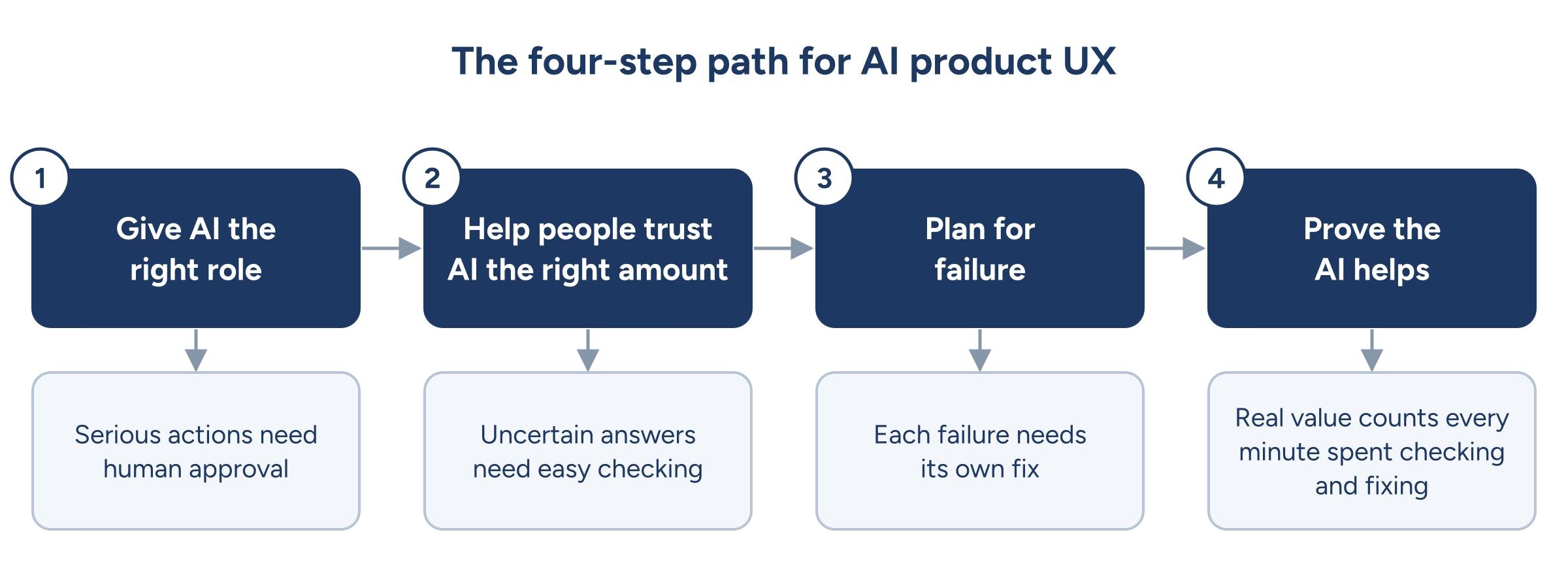
Key point: The four steps rest on one rule: uncertain answers need easy checking, serious actions need human approval, each failure needs its own fix, and real value counts every minute spent checking and fixing.
How to Choose the Right AI Interaction Model
Pick your AI interaction model by asking two questions. Does AI add real value over simple rules? And how bad is it if the AI gets it wrong? Low-risk tasks can use direct AI help. High-risk tasks need limits, previews and a human "yes" before anything happens. This is step one of the path: give AI the right role.
Meet our example. BidDesk is a made-up SaaS tool for procurement teams, the people who choose and buy from suppliers. Maya is a procurement lead who compares suppliers and approves purchases. Her team wants to add AI, but only where it helps.
When to Use AI, Rule-Based Automation, or a Hybrid Approach
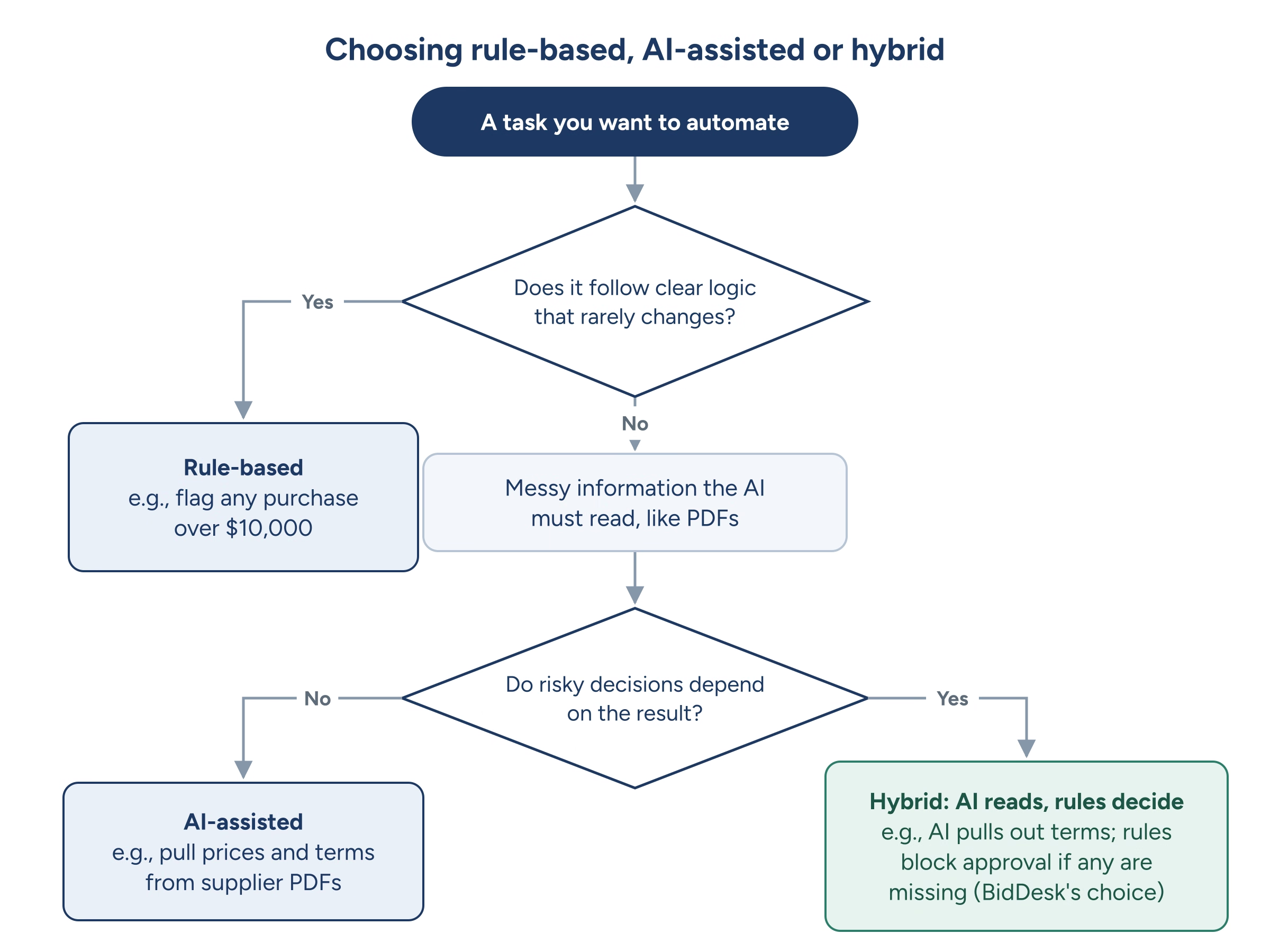
Not every problem needs AI. Google's People + AI Guidebook suggests checking whether AI is even the right tool before you build. Simple rules are cheaper, faster and easier to explain.
For BidDesk, hybrid wins. AI does slow reading. Clear rules handle the risky decisions.
Matching AI Autonomy to User Needs and Action Risk
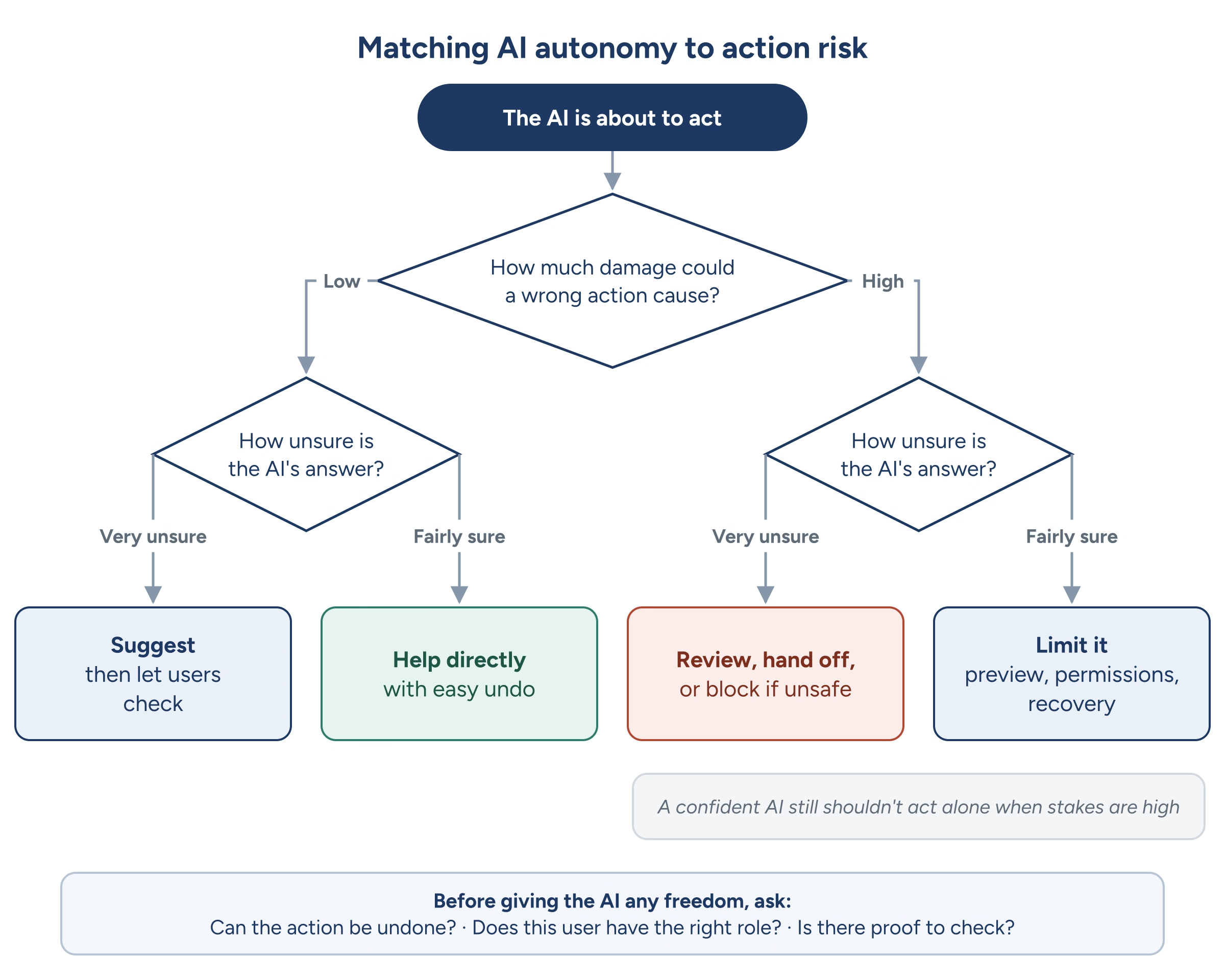
Autonomy is how much the AI can do without asking a person first. More autonomy saves time, but it makes mistakes more costly. This matters even more for AI agents, which are AI systems that take actions on their own, like sending emails or placing orders.
Match autonomy to two things: how unsure the AI's answer might be, and how much damage a wrong action could cause. This editorial framework, based on published research, turns that into four choices. Adapt it to your product.
One rule matters most. A confident AI still shouldn't act alone when the stakes are high. It shouldn't approve a $24,000 contract by itself.
Before giving the AI any freedom, ask: Can the action be undone? Does this user have the right role? Is there proof to check? For wider risk guidance, see the NIST Generative AI Profile.
Designing AI Experiences Users Can Trust and Control
Design for trust by building appropriate reliance: people accept good AI advice and reject bad advice. Three things get you there: honest expectations, proof people can check, and human control over serious actions. This is step two: help people trust AI the right amount.
More trust isn't always better. Overreliance is accepting wrong AI answers. Underreliance is ignoring good ones. Both waste what AI can offer, so aim for the middle.
Setting Expectations and Communicating AI Uncertainty
Start by telling users what the AI can and can't do. Google's PAIR chapter on mental models explains why: when expectations match reality, people make better choices.
BidDesk's first-use screen could say: "AI reads supplier documents and suggests prices and terms. It can miss details in scanned files. Always check the source before you approve."
Then show warnings in context, right where they matter. If a PDF is blurry, BidDesk shows "Low-quality scan: check this price" next to the number. A warning in the right place beats a long disclaimer nobody reads.
Making AI Outputs Verifiable Without Creating False Confidence
Should AI show confidence scores? Sometimes, but carefully. "92% confident" shows how sure the AI feels. It doesn't prove the answer is right.
In our view, a safer default is evidence. In BidDesk, every price links to the exact line in the supplier's document. Maya clicks and checks it in seconds.
Explanations help too. This is often called explainable AI: showing why the AI gave an answer. But an explanation doesn't make the answer true. In To Trust or to Think (2021), Buçinca, Malaya and Gajos found that asking people to decide on their own before seeing the AI's answer reduced overreliance in the tasks they studied. People liked it less, so use it where the stakes justify the extra step.
Showing confidence in charts? Our guide to designing confidence indicators in AI dashboards goes deeper.
Designing Human Oversight, Permissions, and Reversibility
Human oversight means a person can review, approve, change or stop what the AI does. It only works when the review is real, not a pop-up people click through.
- Preview before action. Show exactly what will happen first.
- Role-based permissions. Only the right people approve big actions.
- Undo where possible. If something can't be undone, say so clearly.
- A way to escalate. Let users hand tricky cases to a human expert.
In BidDesk, the AI suggests a supplier, but only a manager with approval rights can confirm the purchase. BidDesk also records who approved what, which supports accountability. For multi-role teams, see our guide to enterprise roles and permission workflows.
One honest warning: a reviewer alone doesn't make things safe. Busy people miss things, so clear evidence and safe defaults matter as much as the "Approve" button.
How to Design AI Interfaces That Recover From Failure
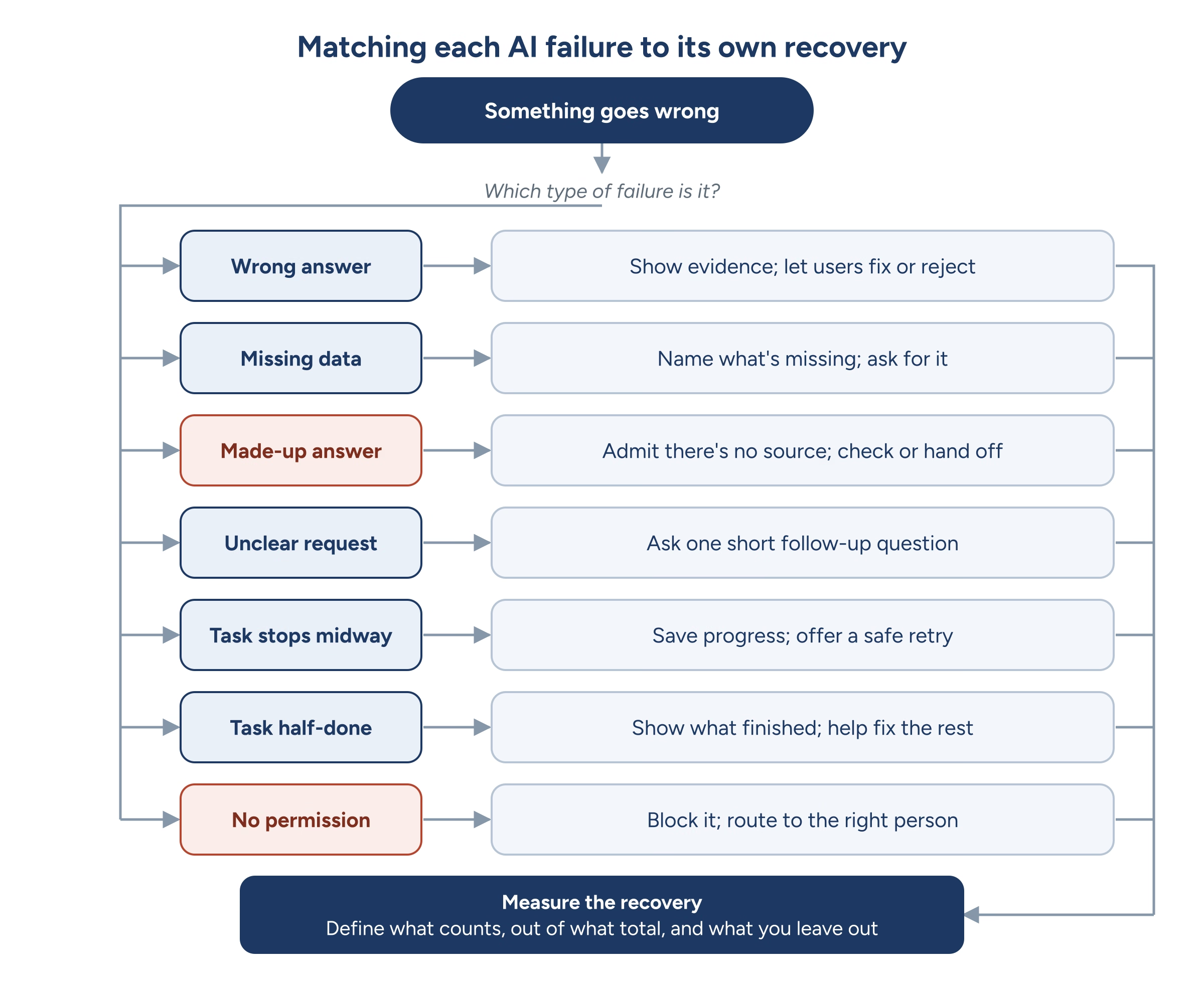
Give each type of failure its own fix. A wrong answer needs a way to correct it. Missing data needs a clear question. A stopped task needs a safe retry that won't repeat actions. One generic "Something went wrong" message can't cover all of these. This is step three: plan for failure.
Google's PAIR chapter on errors and graceful failure makes the point simply: AI will fail sometimes, so plan for it from day one.
AI Failure States and Their Appropriate Recovery Patterns
A hallucination is an answer that sounds right but isn't based on real data. It's common, but it's not the only failure.
For each measure, define what counts, out of what total, and what you leave out. And remember: a retry doesn't fix everything. If a payment stopped halfway, a blind retry could send it twice. Microsoft's HAX Toolkit helps teams plan these cases before launch.
Reducing Prompt Friction With Hybrid Interfaces and Guided Interactions
An empty chat box can feel like a blank exam paper. Nielsen Norman Group calls this the articulation barrier: many people struggle to put what they want into words. Writing prompts also adds cognitive load, the mental effort a task takes. Their AI design study guide collects research on this.
The fix is a hybrid interface that mixes typing with buttons, filters and dropdowns. In BidDesk, Maya can click "Compare suppliers," pick filters like "annual price," and type only when she needs something specific.
Match the interface to the task. Chat suits open questions. Buttons and forms suit repeated, clear jobs. For more ideas, see these AI-driven UX patterns for SaaS.
How to Validate and Measure AI Product UX
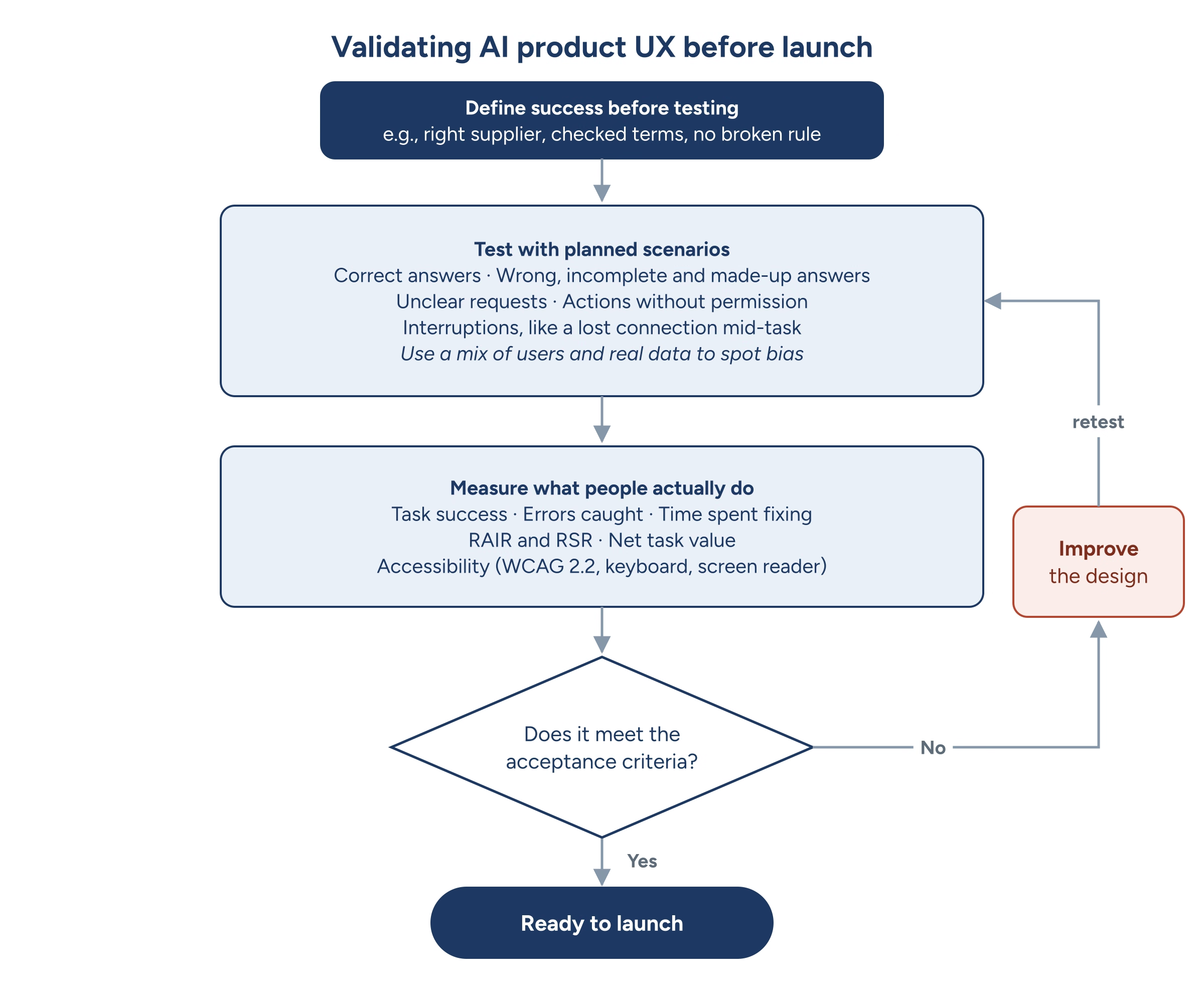
Validate AI product UX by watching what people do when the AI is right and when it's wrong. Track task success, whether users catch bad advice, how much fixing they do, and accessibility. Happy survey scores alone can hide problems, because people may happily accept wrong answers. This is step four: prove the AI helps.
Testing AI Experiences With Realistic Success and Failure Scenarios
Good AI testing includes failures on purpose. Your usual UX design process still applies. Just add these test cases:
- Correct answers, to check the normal flow
- Wrong, incomplete and made-up answers, to see if users notice
- Unclear requests that could mean two things
- Actions without permission, like a junior user trying to approve
- Interruptions, like a lost connection mid-task
Define success before testing. For BidDesk: "picked the right supplier, with checked terms, without breaking an approval rule." Always record totals too, because "8 errors in 40 tasks" says far more than "8 errors."
Test with a mix of users and real data to spot bias, where the AI works well for some people or cases but poorly for others. And keep in mind that zero failures in a small test doesn't mean zero risk after launch.
Measuring Appropriate Reliance
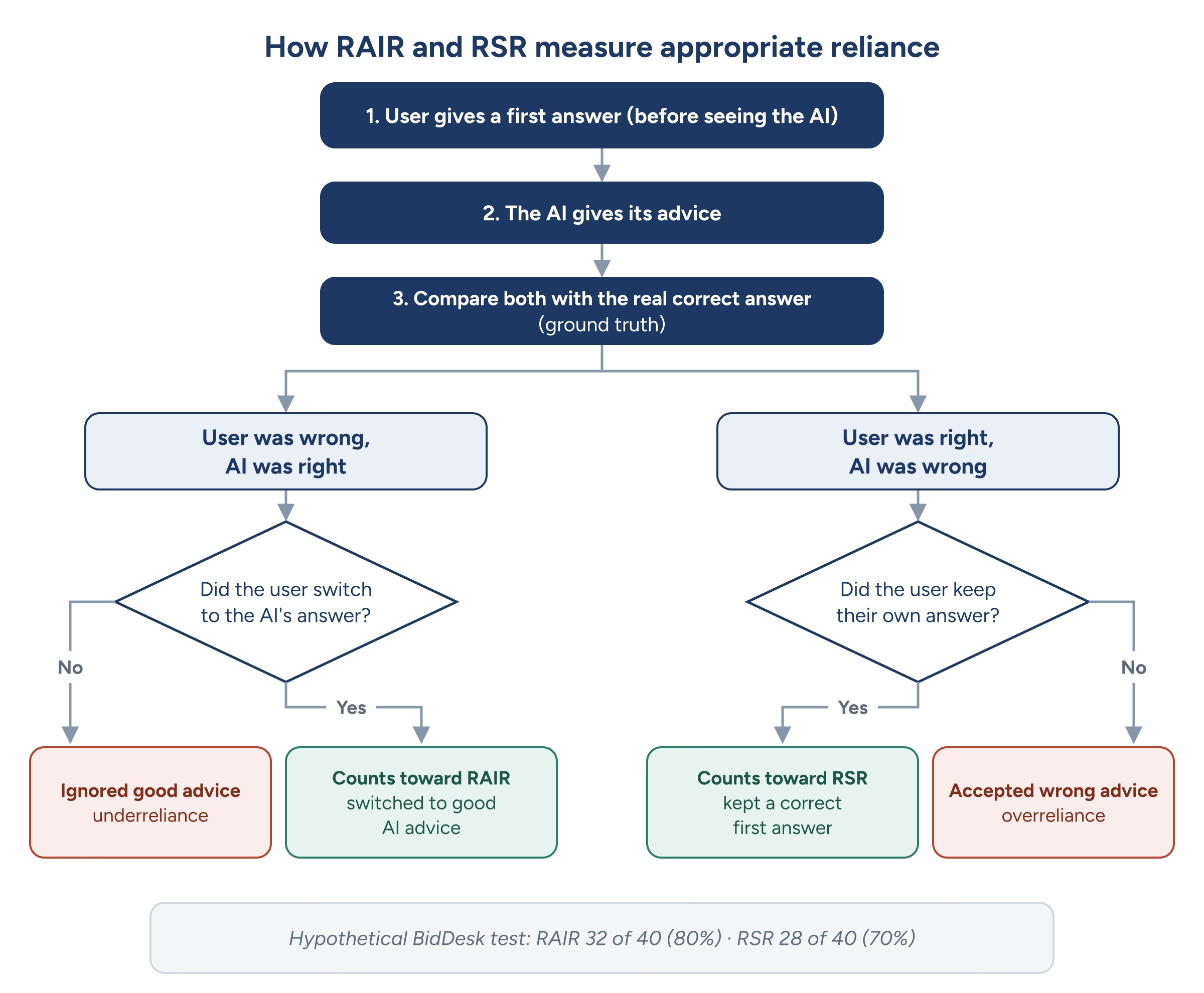
Schemmer and colleagues described two measures in Appropriate Reliance on AI Advice (IUI 2023):
- Relative AI Reliance (RAIR): The user was wrong at first and the AI was right. How often did they switch to the AI's answer?
- Relative Self-Reliance (RSR): The user was right at first and the AI was wrong. How often did they keep their own answer?
RAIR = correct switches to AI advice ÷ initially wrong decisions that got correct AI advice × 100
RSR = correct first answers kept ÷ initially correct decisions that got wrong AI advice × 100
You need three things per case: the user's first answer before seeing the AI, the AI's advice, and the real correct answer (ground truth). If a total is zero, that measure can't be calculated.
In a hypothetical BidDesk test, users switched to good AI advice in 32 of 40 chances (RAIR 80%). They kept their own correct answer in 28 of 40 chances (RSR 70%). So in 12 cases, they dropped a right answer for a wrong AI one. That's a clear signal to make the evidence easier to check.
Evaluating Net Task Value and AI-Assisted Efficiency
A fast AI answer doesn't always mean a faster task. People still type, wait, check, fix and sometimes recover. Net task value counts all of it.
AI-assisted time = input + waiting + checking + fixing + recovery
Time saved = time doing it by hand − AI-assisted time
The AI answered in one minute, but checking and fixing took eleven. That's why "the AI answered in seconds" is weak proof of value.
Keep the comparison fair. Quality and safety must match in both versions, and overlapping steps should be measured as real elapsed time. These numbers are illustrative, not Orbix project results, and this is a working model, not an official standard.
Testing Accessibility and Defining Launch Acceptance Criteria
AI features must work for everyone, including screen reader and keyboard-only users. The W3C WCAG 2.2 guidelines apply to AI screens too. These criteria matter most:
This is a short list, not a full audit, so test with real assistive tools. Watch streaming text too: announcing every new word overwhelms screen reader users.
Before launch, set acceptance criteria, simple pass-or-fail rules. For BidDesk: "zero unauthorized approvals in testing" and "users catch most planted price errors." Base them on your own risk level; no single number fits every product.
AI Product UX Design in Practice: A SaaS Procurement Example
A good AI product UX example shows the whole workflow around the AI's answer. Here's BidDesk end to end: the AI reads supplier documents, links every number to its source, flags missing terms, and blocks risky approvals until a person checks them.
Designing a Verifiable AI Supplier Evaluation Workflow
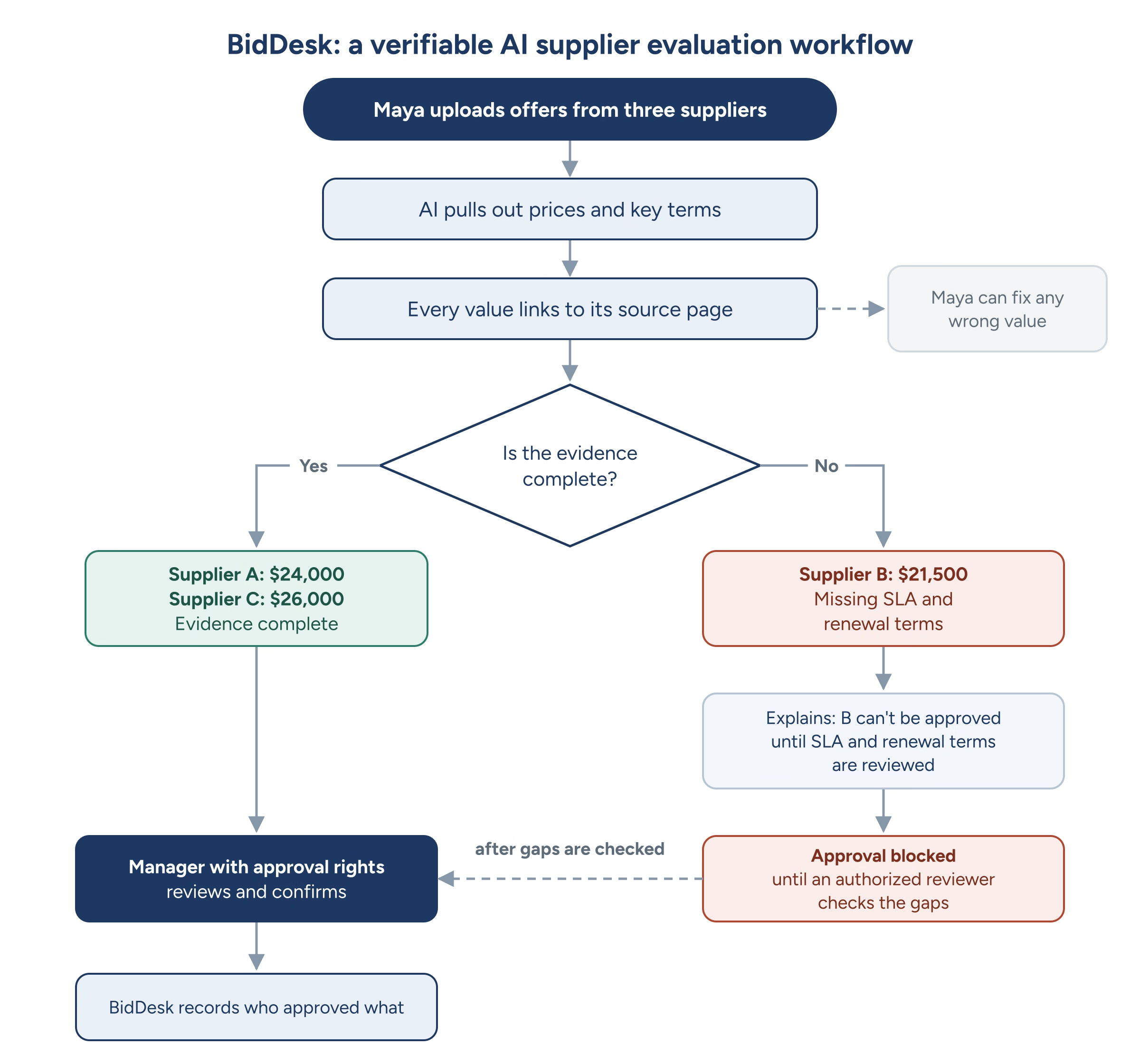
Maya uploads offers from three suppliers. BidDesk's AI pulls out prices and key terms:
Supplier B looks cheapest. But it's missing its SLA (service level agreement, the promise about uptime and support) and its renewal terms. Without those, nobody can judge B fairly.
So BidDesk does four things:
- Links every value to its source page
- Lets Maya fix any wrong value in the table
- Explains: "Supplier B can't be approved until SLA and renewal terms are reviewed"
- Blocks approval for B until an authorized reviewer checks the gaps.
Testing Human Control, Recovery, and Business Value
The BidDesk team then tests this exact workflow:
- Wrong price: Does Maya catch a planted error using the evidence link?
- Missing terms: Does the screen flag them clearly?
- No permission: Is a junior user blocked from approving?
- Dropped connection: Does a retry avoid a double order?
- Keyboard and screen reader: Can someone finish without a mouse?
- Time saved: Is there a real saving at the same quality?
- Good and bad advice: What are the RAIR and RSR scores?
With these results, the team can see where the design works and where it needs changes. For real projects, browse Orbix Studio's AI product case studies. If you're comparing outside design partners, our roundup of AI product design agencies can help you build a shortlist
Frequently Asked Questions
Do AI products always need a chat interface?
No. Chat works for open-ended questions, but many AI tasks work better with buttons, filters and forms. A hybrid interface lets people click for common actions and type only when they need something specific. Choose the interface based on the task, not on what's popular.
How do you handle AI hallucinations in UX?
Show the source behind each answer so people can check it. When the AI can't find support, it should say so instead of guessing. For risky actions, add a review or approval step. Then test with planted wrong answers to see whether users actually catch them.
What metrics matter most for AI product UX?
Start with task success, error spotting, time spent fixing, and recovery rate. If people make decisions with AI advice, add reliance measures like RAIR and RSR. Compare total task time with doing it by hand, at the same quality. Survey scores help, but they shouldn't be your only signal.
Is AI product UX design different from general AI UX?
They overlap a lot. "AI UX" is a broad term that can also mean using AI tools for design work. AI product UX design is narrower. It focuses on products with AI inside them: how people understand, check, control and recover from AI answers. This guide covers that meaning.
What are the key principles of AI product UX design?
AI product UX starts with clear expectations, useful interactions, and user control. People should understand what the AI can do, how reliable its outputs are, and when they need to step in. Design for uncertainty, make important information easy to verify, and give users a way to correct mistakes.
How do you build trust in AI-powered products?
Trust comes from helping users understand and verify what AI produces. Show the sources behind important answers, explain limitations where they matter, and avoid presenting uncertain results as facts. Give users control over important actions through previews, approval steps, and undo options. A confidence score alone isn't enough to establish trust.
Final Thoughts
Good AI product UX starts with solving real user problems. Choose the right AI interactions, make outputs easy to verify, keep users in control, and plan for mistakes before launch.
This guide covered AI interaction models, user trust, human oversight, failure recovery, and UX validation. Start with one user problem, test your approach with real users, and measure whether AI actually makes their work easier.