- What Are AI Features for SaaS?
- 8 AI Features Worth Building Into Your SaaS Product
- How to Choose the Right AI Features for Your SaaS
- Design and Integrate AI Features Responsibly
- Evaluate AI Feature Costs and Business Value
- Test, Measure and Release AI Features
- Common Mistakes to Avoid
- Frequently Asked Questions About AI Features for SaaS
- Final Thoughts


AI Features for SaaS: What to Build and How to Choose
- Build AI features to solve a user task, not to show off a model. People judge an AI feature by one thing: does the job get faster, easier or more accurate?
- Every AI feature has a simpler non-AI option. If keyword search, a template or a fixed rule already works, AI adds cost without adding value.
- Start with data you already have. Summaries and auto-tagging are popular first features because the output is easy to check.
- Permissions apply to AI just like everything else. An assistant that shows someone a record they cannot open is a security bug.
- Inline AI usually beats a bolted-on chatbot for tasks people do often. Help that shows up on the screen they already use saves them a switch.
- Measure the whole task, not how fast the AI replies. Review time, corrections and failed attempts all count, so track cost per successful task.
Imagine your SaaS product could summarize customer records, flag risks early and handle boring, repeated tasks on its own. That could save your users hours every week. But which of these should you build first?
AI opens up a lot of options for SaaS companies. The right one depends on your product, your users and the problems they face every day. A feature that works well in a CRM might make no sense in an invoicing tool.
This guide walks through eight AI features, what each one needs, and where each one fits. You will also learn how to pick between ideas, how to build them safely, how to work out what they cost, and how to test them before you launch.
What Are AI Features for SaaS?
AI features in SaaS are tools inside your software that use artificial intelligence to help users finish tasks, understand information, automate work and make better decisions. They sit inside an app people already use, instead of living in a separate product.
A quick refresher: SaaS (Software as a Service) means people use software over the internet, usually by paying a subscription. They do not install anything. They open a browser or a mobile app and log in. Notion for workspaces, Salesforce for customer management and Jira for project tracking are all SaaS products.
When AI is added to these products, they can do more than follow fixed, rule-based steps. They can read text, spot patterns, write drafts and suggest what to do next.
8 AI Features Worth Building Into Your SaaS Product
There are many ways to bring AI into a SaaS product. You can help users write content, understand their data, speed up workflows or find answers without clicking through five screens. Which ones matter most depends on what your users struggle with. Here are eight to consider.
1. Natural Language Search and Knowledge Assistants
Users do not always know where something lives inside a product. Someone using an accounting tool might want “unpaid invoices from last month over $500” but not want to set up four filters. With natural language search, they type that sentence the way they would say it, and the product finds the matching records.
Knowledge assistants go one step further. They do not just find information. They answer questions using your help docs or the user’s own data.
Traditional keyword search looks for exact words. Semantic search looks for meaning. So a search for “late payments” can also find records labeled “overdue.” Many knowledge assistants use retrieval-augmented generation (RAG) to pull the right information first and then write an answer from it.
Notion’s Enterprise Search is a good example. It helps people find answers across their workspace and connected apps, and it only shows results the person already has permission to see.
Two things matter most when you build this. First, users must never see information they are not allowed to open. Second, answers must be based on current content, not old documents or retired policies.
Here is how it could look. A Ledgerly customer asks, “How do I add VAT to an invoice?” The assistant finds the right help article, explains the steps and links to the original guide. If it cannot find a reliable answer, showing normal search results is better than guessing.
2. AI Summarization
Summaries turn long content into a short version that takes seconds to read. Think of a support ticket with 40 messages, a long meeting transcript, or a customer record with years of notes. Instead of reading it all, the user reads a few lines and opens the full text only when they need to.
Slack AI is one example. It can summarize channels and threads, and it can send daily recaps, so people can catch up on what they missed.
Summaries make a strong first AI feature. They reuse content you already store, the result shows up right on the screen, and users can quickly compare it with the original. That makes mistakes easy to spot.
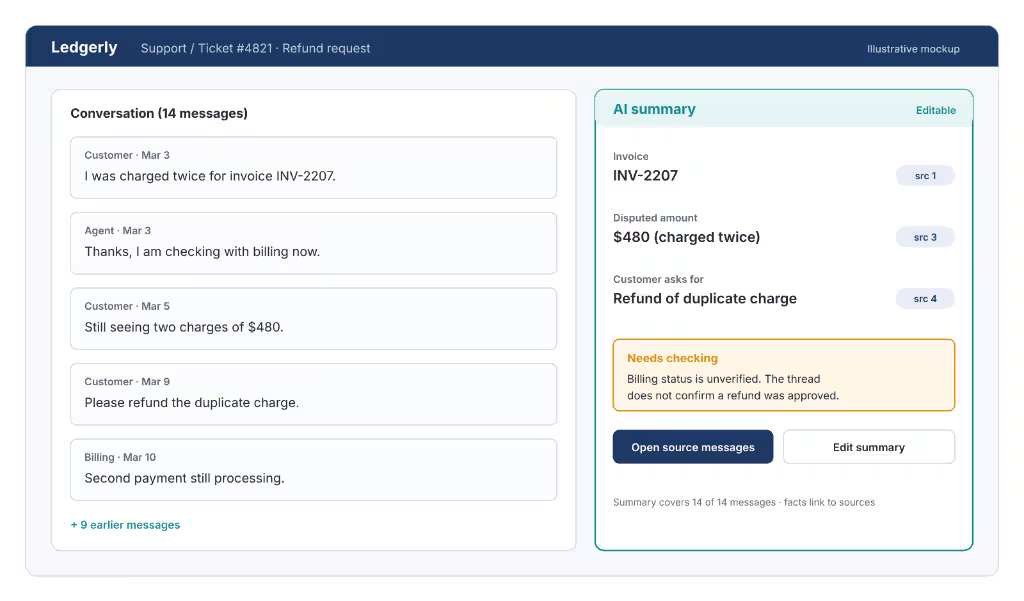
There are two rules to follow. A summary must not add facts that are not in the source. And it should link back to the original text so users can check it. Ledgerly’s ticket summaries, covered later in this guide, are a good example of this feature done carefully.
3. AI Drafting and Content Generation
AI drafting gives users a first version of something: an email reply, a product description, a status update or a piece of code. Instead of starting from a blank page, they get something they can read, edit and use.
Templates already solve part of this problem. They are quick, predictable and easy to reuse. AI becomes more useful when every request needs a slightly different answer and one fixed template is not enough.
GitHub Copilot, for example, can review pull requests and suggest code changes, and developers decide whether to accept them. If you want to see how the main coding assistants compare, this list of AI coding tools startups should try is a good place to start. Research published in Science also found that professionals using ChatGPT finished writing tasks about 40% faster, with an 18% improvement in quality.
4. Predictive Analytics and Risk Scoring
Predictive analytics looks at past data to estimate what might happen next. SaaS products use it to spot customers who may cancel, find leads who are likely to buy and forecast future revenue.
Salesforce Einstein Opportunity Scoring is one example. It studies earlier sales results and gives each open deal a score. Sales teams use the score to decide which deals need attention first. Salesforce also uses a global model for companies that do not have enough sales history of their own.
The quality of a prediction depends on the quality of the history behind it. A churn model, for example, needs records of customers who left and customers who stayed. It also needs to be tested on new data to see if it still works. A model that does well for large accounts can do badly for small ones.
A score on its own is not enough, either. Users need to know what it means and how far to trust it. A customer flagged as high churn risk should come with a reason why. These AI dashboard design best practices show how to present predictions with clear confidence signals.
5. Intelligent Classification and Anomaly Detection
A SaaS product can collect hundreds or thousands of records every day: support tickets, feedback, sales leads, transactions. All of it needs to be sorted, and doing that by hand gets slower as the volume grows.
Classification does the sorting for you. It can tag a ticket as “billing,” mark feedback as a bug report or send a lead to the right sales rep.
Anomaly detection works differently. Instead of sorting, it looks for things that seem off. A sudden jump in refunds or an unexpected drop in sign-ups can trigger an alert before the problem grows.
These are often practical starting points because they use data your product already collects. Accuracy still matters, though. A classifier might handle common categories well and struggle with rare ones. Anomaly detection can also become annoying fast if it sends too many false alarms.
6. AI Customer Support
Support teams spend much of their day answering the same questions. How do I reset my password? How do I change my billing details? Why am I seeing this error? Answering each one by hand takes time, especially when the queue keeps growing.
AI customer support can handle many of these chats on its own. It answers using your help center and docs. When a problem needs a person, it passes the conversation to a support agent along with the context.
Intercom’s Fin is one example. It answers questions from a company’s knowledge sources and can hand chats over to human agents. Intercom also separates confirmed resolutions from assumed resolutions. That difference matters, because a customer leaving the chat does not always mean the problem was solved.
For a design example, Orbix Studio’s ADPList case study shows how AI messaging and Q&A tools can be built to feel supportive without replacing human contact.
Research published in The Quarterly Journal of Economics studied 5,172 customer support agents and found that AI help raised the number of issues resolved per hour by about 15% on average. Newer and less experienced agents gained the most.
7. Personalization, Recommendations and Adaptive Onboarding
A freelancer and a growing agency might use the same SaaS product, but they do not need the same things. One wants a simple invoice setup. The other needs team permissions, approval flows and reports. Showing both of them the same dashboard and the same onboarding steps does not make sense.
Personalization lets the product adapt. It can change the dashboard layout, suggest useful features or adjust onboarding steps based on a person’s role, behavior and goals.
It does not always need AI, though. Good default settings and a clear onboarding flow can already make a big difference. AI helps most when recommendations need to keep up with changing user behavior.
Users should also stay in control. They should be able to dismiss a suggestion, see why it was made and change their preferences. Without that, personalization quickly turns into a nuisance.
8. AI Workflow Automation and Agents
Many tasks in a SaaS product follow the same steps every time. When an invoice becomes overdue, for example, someone has to check its status, write a reminder and contact the customer. Workflow automation can do those steps without anyone doing them by hand.
AI agents go one step further. Instead of only following fixed instructions, an agent can decide which steps to take, use available tools and change its approach to reach a goal. If the idea is new to you, this guide on what an AI agent is explains how agents work.
The main difference is who decides. A traditional workflow follows a set path, even when some steps use AI. An agent has more freedom to pick its next move. That freedom is not always needed. Anthropic recommends starting with the simplest solution that can do the job reliably.
Letting an agent send emails, update records or issue refunds also adds risk. A safer setup lets the agent prepare the action and ask a person to approve it before anything that is hard to undo.
How to Choose the Right AI Features for Your SaaS
Adding AI to a product is the easy part. Working out where it actually helps is harder. You could add a chatbot, automate a few tasks or launch AI recommendations. But if none of them solves a problem your users face often, they will not change much.
Start With a Problem Worth Solving
Look at the tasks your users repeat every day. Are support agents spending too long reading customer chats? Are accountants sorting invoices by hand? Do new customers struggle to find the features they need?
These questions are a better starting point than “where can we fit AI in?” Take Ledgerly as an example. Maya, the product manager, has three ideas: an AI chatbot on the dashboard, automatic ticket summaries for support, and smarter invoice reminders.
After watching how customers use the product, she finds that support agents spend a lot of time reading long billing conversations before they can handle refund requests.
Ticket summaries become the strongest idea. The problem happens often, the information already exists, and agents can quickly check whether a summary is right.
Compare AI With Simpler Alternatives
Not every problem needs AI. Sometimes a better filter, a ready-made template or a simple automation rule does the job.
If customers often forget to pay invoices, a scheduled reminder may fix it with no AI at all. But if the product has to understand different customer situations and change the reminder to match, AI may be worth a look.
Compare both options honestly. The AI version should make the experience clearly better, not just sound more impressive.
Check Whether Your Data Is Ready
Once you have found a good problem, look at what information the feature needs. Having a lot of customer data does not mean you are ready to build an AI feature.
A knowledge assistant needs accurate docs and clear access rules. A classifier needs well-defined categories and examples to test its accuracy. A predictive feature needs past data with known outcomes.
Some features, like drafting and summarizing, can work with your existing records and a pretrained language model. They do not always need a big dataset for training.
Before you build, check that the data is available, reliable and reachable by the AI system.
Define What Success Looks Like
It is easy to get excited when an AI feature gives a great result in a demo. That does not mean it will help people in their daily work.
Decide how you will measure it before you release it. An AI ticket summary, for example, should cut the time agents spend reading chats without leaving out important details.
Also decide what counts as an unacceptable result. A summary that misses a customer’s refund request can do more harm than having no summary.
Test a Small Version Before Building Everything
You do not need to build a full AI system to find out if an idea works. Start with a small prototype and try it on real tasks. If you do not have the team for it, an MVP development agency for SaaS and AI startups can build a lean first version for you.
Compare the results with the current process. Ask a few real users to try it, review the output and tell you where it struggles. If you want help running these tests, this list of the best UX research agencies is a good place to look.
Maya could test ticket summaries with a small group of support agents before rolling them out to the whole team. If agents spend less time reading and still get accurate information, there is a good reason to continue.
If the AI version does worse than the current process, rethink the approach. Sometimes the simpler solution is the better product decision.
Design and Integrate AI Features Responsibly
Designing AI responsibly means three things. Pick an interface that fits how people work. Give users a way to check and fix the output. And make sure the feature follows your product’s rules for permissions, security and reliability. An AI feature that leaks data or fails silently does more harm than no AI at all.
Choose the Right Interaction and Recovery Controls
AI features usually show up in one of three ways:
Inline features usually get used more because they appear right where the work happens. Chat is not wrong, though. It suits questions that do not fit a fixed screen.
Some teams go further and build AI into the core of the product instead of adding it as a side panel. These SaaS product design trends show where that shift is heading.
Whatever style you pick, users need a way to recover when the AI gets something wrong. That means:
- Showing sources so users can check the answer
- Letting users edit the output instead of locking it
- Saying clearly when the AI could not find an answer, instead of showing a vague error
- Offering a fallback, such as normal keyword search
- Keeping shortcuts for expert users so AI suggestions do not slow them down
Accessibility matters here too. Loading states and AI results should be announced to screen reader users. Controls should work with a keyboard. Focus should not jump around when a result appears. WCAG 2.2, the W3C’s accessibility standard, covers these basics, including status messages and keyboard access.
Not every detail needs to be on screen at once. Sources, reasoning notes and confidence signals can stay tucked away until the user asks for them, which keeps the screen clean. This guide on progressive disclosure in UX explains when to hide, reveal and test those details.
Once you have picked a feature, the next question is how users will interact with it. These AI UX patterns for SaaS go deeper on contextual help and workflow-level interactions.
Plan Integration, Permissions and Reliability
There are three common ways to build an AI feature:
If you are connecting a model to a product for the first time, this beginner’s guide to AI integration walks through no-code and API options and a 30-day pilot plan.
Whichever route you choose, some rules never change in a multi-tenant SaaS product, where many customers share the same system:
- Tenant isolation: One customer’s data must never show up in another customer’s AI output.
- Authorization: The AI should only see and do what the current user is allowed to see and do. Check permissions at the moment of use, not only when the content was indexed.
- Action limits: Anything that changes data, sends messages or moves money needs clear limits and, for high-impact actions, human approval.
- Prompt injection: Text inside a document or email can try to give the AI orders. Treat content as data, and never let it override your rules.
- Audit logs: Record what the AI did and why, so your team can look into problems.
- Speed and fallbacks: Decide what happens when the model is slow or down. The product should still work.
One subtle point catches many teams. When an AI action times out, you often do not know if it failed or went through. Before retrying something like “send invoice reminder,” check whether it already happened. Otherwise a customer might get the same email twice.
For more help with managing these risks, the NIST AI Risk Management Framework is a widely used, voluntary guide. It is a framework, not a certification.
If a feature needs existing product data, several integrations or complex permission controls, a technical review can help define the scope. Orbix Studio’s AI integration services cover solution design, integration and testing.
If the feature also needs new backend work or APIs, Orbix Studio’s full-stack development for SaaS and web apps covers that too. And if you would rather not design the review screens and approval flows alone, this list of the best AI product design agencies shows what to look for.
Evaluate AI Feature Costs and Business Value
To judge an AI feature’s cost and value, work out the total cost of each successful task, including failed attempts, review time and infrastructure. Then compare the benefit against the non-AI way of doing it over the same period. A feature can be expensive and still worth it, or cheap and still not worth it.
Calculate Cost per Successful Task
Most teams only look at the model bill. That is just one part of the cost. A fuller picture includes:
- Model usage (often called inference cost)
- Infrastructure, like search indexes and storage
- Human review and correction time
- Failed or abandoned attempts
- A share of build and maintenance costs
Here is a hypothetical example. The numbers are made up and are not real pricing or client data.
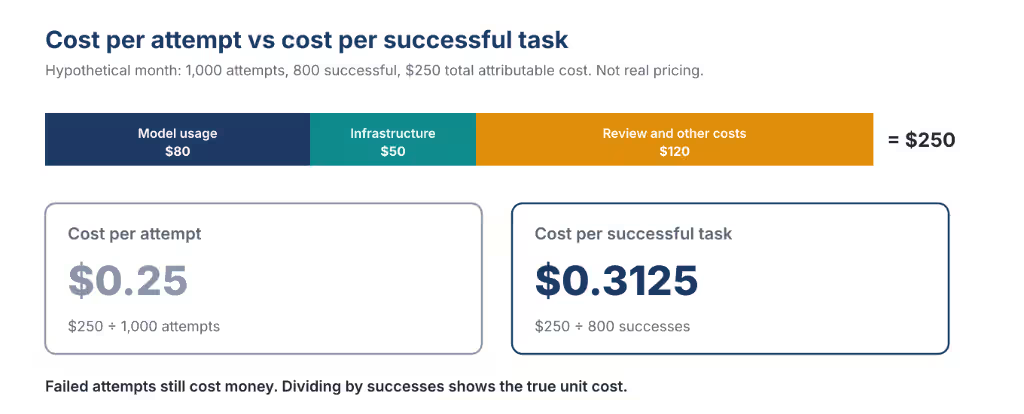
The gap between the last two rows is the whole point. If you divide only by attempts, the feature looks cheaper than it really is, because failed attempts still cost money.
Once you know what a successful AI task costs, compare SaaS pricing models to decide whether a subscription tier, an add-on or a usage-based plan fits best.
Compare Incremental Value Against the Baseline
The real question is not “Is this AI feature valuable?” It is “Is it more valuable than what we would do otherwise?” That extra value is called incremental value.
A simple way to write it:
Incremental net value = (AI benefit − AI cost) − (baseline benefit − baseline cost)
A few rules keep the math honest:
- Use the same time period for both sides.
- Do not count the same benefit twice, such as “time saved” and “salary saved” for the same hours.
- Include quality, not just speed. A slower process with fewer errors can be the better deal.
Research shows why baselines matter, because results vary a lot by task. A field experiment with 758 BCG consultants, led by Dell’Acqua and colleagues, found that AI helped on tasks inside its abilities but hurt accuracy on a task outside them. A 2025 study by METR found that 16 experienced open-source developers took about 19% longer on their tasks when using AI tools in that setting. In February 2026, METR said developers are likely more sped up by newer tools, but that selection effects make the exact number hard to pin down. So treat the 2025 result as a caution, not a rule.
Test, Measure and Release AI Features
To test and measure an AI feature, follow four steps. Define what an acceptable output looks like. Compare it with the non-AI way on real tasks. Track whether users get correct results, not just whether they click the feature. And keep monitoring after launch so you can catch problems and roll back if needed.
Define Acceptance Criteria and Test Against a Baseline
Acceptance criteria are the rules a feature must meet before it ships. Write them for each feature, because “good” means something different for a summary than for a churn score.
For Ledgerly’s ticket summaries, Maya’s criteria might be:
- Includes the invoice number, the disputed amount and what the customer asked for
- Adds no facts that are not in the thread
- Links back to the original messages
- Never says a refund was approved unless the thread says so
Then measure the full task, not just how fast the AI replies. Here is a hypothetical comparison:
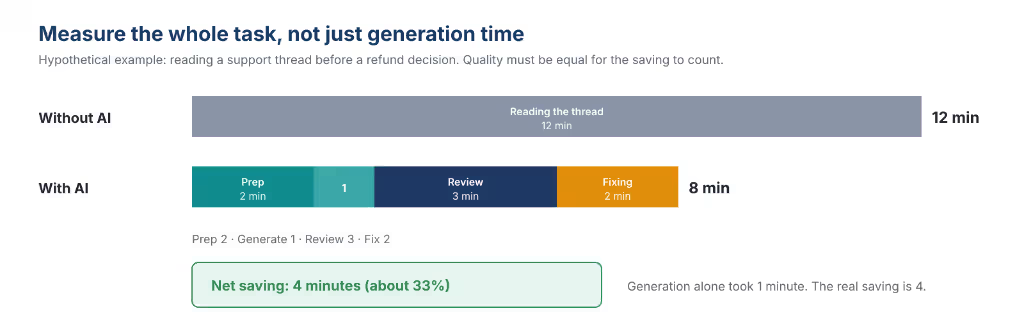
In this example, the AI version saves 4 minutes, or about 33%, but only if the final quality is the same. If agents start making more wrong refund decisions, the time saved does not matter. Measure quality on its own, too.
Measure Meaningful Adoption and Successful Outcomes
“Number of clicks” is a weak measure. A better set of metrics looks like this:
Discovery is often the weakest step. Users cannot adopt a feature they do not know exists, and that starts before they log in. These SaaS website design examples show how strong products explain new capabilities in plain language.
Two warnings. First, an accepted output is not always a correct one. People sometimes accept a suggestion without checking it. Second, a feature that is used rarely is not always failing. If the task only happens once a quarter, measure success per opportunity, not daily use.
Also keep track of how your metrics are defined. Vendors sometimes change their definitions. Intercom, for example, has published updates to how Fin’s performance metrics are reported. When a definition changes, your trend line can jump even though nothing real changed.

Common Mistakes to Avoid
Adding AI can make some tasks much easier, but not every rollout goes well. Some features create more work than they save. Others cause problems users never had before. Here are five mistakes worth avoiding.
- Adding AI because it is popular: It is tempting to add a chatbot or a recommendation engine because competitors have one. But a feature is not useful just because it uses AI. Start with a problem users really have. If a simple search or automation rule fixes it, there is little reason to build something more complicated.
- Ignoring data quality: AI features are only as good as the information they get. Old docs, incomplete records and messy data lead to unreliable results. Check that your data is accurate, organized and right for the feature before you build.
- Giving AI too much control: An AI agent might be able to send emails, update customer records or process refunds. Letting it do that without approval creates risk you do not need. Start with human approval for important actions and expand automation as the feature proves itself.
- Making the experience more complicated: AI should make existing tasks easier, not add another confusing workflow. If users now need several extra steps for something they used to do in two clicks, the feature may not be worth adding.
- Measuring activity instead of results: A chatbot handling thousands of chats does not prove customers are getting better support. Measure what matters, such as answer accuracy, time to finish a task, customer satisfaction and time saved.
Frequently Asked Questions About AI Features for SaaS
Can AI be added to an existing SaaS product?
Yes. Most AI features are added to products that already exist, not built from scratch. Hosted model APIs make features like summaries and drafting possible without training your own model. The harder parts are usually connecting the right data, enforcing permissions, and designing the feature so it fits existing workflows and lets users check and fix results.
Does every SaaS product need AI?
No. AI makes sense when it solves a real user problem better than a simpler option. Some products get more value from better search filters, templates or clear rules. Adding AI without a clear task can raise costs and confuse users. Start with the problem, compare the alternatives, and add AI only where it clearly helps.
Which AI feature should a SaaS product build first?
Usually one that uses data you already have, solves a frequent and painful problem, and gives results that are easy to check. Summaries of long records and automatic tagging are common first choices. They reuse existing content, the output is visible, and mistakes are easy to spot and fix. The right answer depends on your users’ biggest daily frustration.
Is an AI agent necessary?
Often not. Many tasks work well with a fixed workflow, even one with an AI step inside it. Agents help when the steps really change from case to case and the AI needs to choose tools or actions. Because agents can take real actions, they need tighter permissions, approval for high-impact steps and strong monitoring.
What determines the cost of an AI feature?
Cost depends on model usage, infrastructure like search indexes, how many requests you handle, how often outputs fail and how much human review is needed. Build effort and ongoing maintenance add to it. The most useful number is cost per successful task, because it includes failed attempts and review time, not just the model bill.
Do I need to train my own AI model?
Usually not for a first feature. Summaries, drafts and answers from your help docs can be built with a hosted model and your own content. Training or tuning a model makes more sense for a narrow job, like churn prediction or ticket classification, where you have enough past data with known outcomes.
How do I keep AI features secure in a multi-tenant product?
Treat the AI like any other part of your product. Keep each customer’s data separate, check the current user’s permissions every time the AI fetches something, limit what actions it can take, and require approval for high-impact steps. Also log what the AI does, and treat text inside documents as data, not as instructions.
How do I know if an AI feature is working?
Look at outcomes, not clicks. Track how often tasks are completed successfully, how often users edit or reject the output, how long the full task takes, and whether people come back to use it again. Compare these numbers with the non-AI way of doing the same task.
Final Thoughts
AI can make a SaaS product more useful, but more AI features do not automatically make a better product. What matters is whether those features help users get things done with less effort.
Start small. Look at the tasks users repeat, find where they struggle, and test whether AI can really improve the experience. Try your ideas on a small scale before committing to a full build, and keep watching how people use the feature after launch.
You do not need to turn your whole product into an AI platform overnight. Sometimes one well-designed feature that fixes a frustrating problem is enough to make a real difference.
If you are exploring AI features for your SaaS product, the Orbix Studio team can help you evaluate ideas, define the right scope and turn them into practical product experiences.