- The 4 Phases of a Successful Usability Testing Session
- Screening Questions to Find the Right Participants
- Pre-Test Warm-Up Questions to Break the Ice
- In-Test Questions to Uncover Where Users Get Stuck
- Post-Test Debrief Questions to Capture Honest Feedback
- 5 Usability Testing Questions You Should Never Ask
- How to Adapt Questions for Moderated and Unmoderated Usability Testing
- How Prototype Fidelity Changes Your Usability Testing Questions
- Usability Testing Questions for Websites and Mobile Apps
- Frequently Asked Questions
- Final Thoughts


Usability Testing Questions: 60+ Questions to Ask Users


- Organize usability testing questions into four phases: screening, pre-test, in-test, and post-test. Each phase serves a different research purpose.
- Ask about past behavior instead of hypothetical intentions. What users actually do is more reliable than what they think they might do.
- Use neutral, open-ended questions to avoid influencing participant responses. "What did you expect to happen?" reveals more than "Was that easy?"
- Let participants think aloud during tasks. Observe their clicks, hesitation, confusion, and unexpected actions instead of rushing to help.
- Adapt questions to the testing format. Moderated sessions allow follow-up questions, while unmoderated tests need clear, self-explanatory prompts.
- Match questions to prototype fidelity. Test mental models and expectations with wireframes, then evaluate task efficiency and interactions with functional products.
- Use SEQ to measure individual task difficulty and SUS to evaluate perceived overall system usability. Combine metrics with participant feedback to understand usability problems.
Usability testing helps you understand how people interact with your website, app, or software. But the quality of your findings depends heavily on the questions you ask.
A leading question can influence how participants respond. A vague question can leave you with feedback you can't act on. And asking users what they would do often tells you less than understanding what they've actually done.
In this guide, you'll find 60+ usability testing questions (also called user testing questions) organized by testing phase. Each question comes with practical examples to help you understand user behavior, uncover usability problems, and collect more reliable feedback.
The 4 Phases of a Successful Usability Testing Session
A usability testing session typically follows 4 stages:
- Screening
- Pre-test
- In-test
- Post-test
Each stage helps researchers collect a different type of evidence. Together, they reveal whether the right people can complete important tasks and where the product creates friction.
Here's a quick reference to the four stages, including their objectives, what researchers should collect, and example questions. You can also use it as a simple usability testing questions template for your next session.
Screening (before the session): Researchers identify participants who match the target audience. For example, if you're testing an expense-tracking app, recruit people who regularly manage personal or business expenses. Ask about their recent habits, tools, and experience rather than whether they would like to try the product.
Pre-test (first 5 minutes): Start by understanding participants' existing workflows. Ask which tools they use, how they currently track expenses, and what problems they encounter. This gives you a baseline for comparing their existing experience with the product you're testing.
In-test (20–30 minutes): Give participants realistic usability testing tasks, such as adding an expense, categorizing a transaction, or finding a monthly spending report. Observe how they navigate the interface, where they hesitate, and whether they complete each task. Use neutral prompts when you need to understand their decisions.
Post-test (final 5–10 minutes): Ask participants to reflect on the experience. Identify confusing interactions, difficult tasks, and missing features. You can also use standardized measurements such as the Single Ease Question (SEQ) to assess task difficulty and the System Usability Scale (SUS) to measure perceived overall usability.
One important distinction: Screening happens before the actual testing session, as part of participant recruitment. The other three stages take place during the session.
Together, they provide a structured way to move from participant selection to actionable usability findings. If you run these sessions on a subscription product, our guide to usability testing for SaaS products covers the full process from planning to reporting.
Screening Questions to Find the Right Participants
The quality of your usability testing findings depends partly on who participates in the study. If you're testing an expense-tracking app, recruiting people who rarely track expenses won't reveal much about the problems regular users face.
Even well-designed testing questions can produce misleading findings when participants don't represent your target audience.
That's why researchers use screening questions before scheduling usability sessions. These questions help identify people whose experience, habits, and needs match the research objectives.
However, asking participants whether they're interested in your product or consider themselves experienced users isn't enough. People may overestimate their knowledge or express interest in something they rarely use.
Instead, focus on recent behavior. Ask how frequently they perform a specific activity, which tools they currently use, and when they last encountered the problem you're investigating.
Here are practical screening questions for usability testing to help you find participants who can provide relevant feedback.
Questions That Verify Actual User Habits
Start by asking about activities participants already perform. Their recent behavior can tell you more about their suitability than their interest in trying a new product.
For example, if you're testing an expense-tracking app, you want participants who regularly manage expenses. The following questions help verify their experience:
- How many times have you [completed the core activity] in the last 30 days?
This establishes how frequently someone performs the activity. Regular users may be more suitable when testing an established workflow, while occasional users may be relevant if you're studying first-time experiences. - Which tools do you currently use to complete this task?
Find out whether participants use spreadsheets, mobile apps, desktop software, or manual methods. This helps you understand their existing workflow and whether they match your target audience. - When did you last encounter this problem?
Recent experiences are easier to recall and describe. Someone who faced the problem yesterday may provide more relevant feedback than someone who remembers experiencing it several years ago. - Can you walk me through how you handled it?
Ask participants to describe the actual steps they took. Their answers can reveal workarounds, dependencies, and habits that a simple yes-or-no answer would miss. - How much time do you typically spend completing this activity?
This helps establish how familiar participants are with the task and how much effort their current workflow requires. - Have you paid for any tools or services to solve this problem?
Previous purchases can indicate that someone has actively sought a solution. Ask what they purchased and how they used it rather than treating payment alone as proof of relevance. - What is the biggest challenge you experience with your current solution?
This reveals whether participants experience the specific friction your research aims to investigate.
How to Identify Inconsistent or Unreliable Screener Responses
Not every participant who qualifies through a screening form is necessarily a good fit for your study. Some people rush through questions, exaggerate their experience, or provide answers they think will help them qualify for paid research sessions. These responses can weaken your findings if you don't verify them.
Look for inconsistencies rather than assuming someone is being dishonest. Here are four ways to check the reliability of screening responses:
- Cross-check answers across related questions.
Ask questions that approach the same behavior from different angles. For example, if someone says they track expenses daily, ask which tool they use and how they recorded their most recent expense. Conflicting answers may indicate that their experience doesn't match their initial claim. - Ask for specific examples of recent behavior.
Vague answers can be difficult to verify. Ask participants to describe a recent experience, the steps they took, or the tools they used. Someone who regularly performs an activity should generally be able to describe their process without relying entirely on broad claims. - Include attention-check questions.
Some participants speed through screening forms without reading the instructions. Include a simple instruction-based question, such as "To confirm you're reading each question, select 'Other' for this answer."
This helps identify inattentive responses. Keep these checks simple and avoid using them to test participants' knowledge of your product.
- Verify suspicious claims before disqualifying participants.
If someone claims to use a tool or feature that doesn't match their other answers, ask a follow-up question. You can also compare their responses with your recruitment criteria. Avoid relying on deceptive fake-tool questions as automatic disqualification rules. A misunderstanding or unfamiliarity with a tool doesn't necessarily mean someone is dishonest.
Pre-Test Warm-Up Questions to Break the Ice
The first few minutes of a usability testing session can shape how participants behave throughout the study. If they feel nervous or think they're being evaluated, they may hesitate to explore the interface, avoid making mistakes, or give overly positive feedback.
The moderator's job is to make participants comfortable before showing them the product. Start by explaining what will happen, how the session will work, and why their honest feedback matters.
Make one thing clear: you're testing the product, not the participant. There are no right or wrong answers, and participants don't need to complete every task successfully.
Once participants understand their role, ask a few warm-up questions about their existing habits and experiences. This helps establish context before they interact with the product.
The following questions will help you set expectations and understand participants' first impressions.
Setting Expectations Before Showing the Interface
Before showing the interface, explain how the session will work and what participants are expected to do. Reassure them that you're testing the product, not their abilities. Encourage honest feedback rather than positive responses.
Here's a short usability test script example you can use to open the session:
"Today, we'll ask you to complete a few tasks using this product. As you go, please share your thoughts, expectations, and anything that feels confusing. There are no right or wrong answers. We're testing the product, not you, so please be honest about your experience."
Once participants understand their role, use these questions to learn about their existing habits and expectations.
Questions to ask:
- Before we begin, can you tell me how you currently handle [task]?
Understand the steps participants follow to complete the activity. This helps establish how they approach the task without your product. - When did you last complete this activity?
Find out whether participants have recent experience with the activity. Recent experiences usually provide more specific and reliable answers. - What tools do you usually use for this?
Identify the applications, software, or manual methods participants rely on. This also reveals their familiarity with similar tools. - What's the most frustrating part of your current workflow?
Discover the problems participants encounter while completing the activity. Their answers can reveal existing usability challenges and unmet needs. - What would make this process easier for you?
Understand what participants expect from a better experience. Pay attention to their suggestions without treating them as confirmed product requirements. - Is there anything you'd like to know before we start?
Give participants an opportunity to ask questions about the session. This helps resolve uncertainties before they begin interacting with the interface.
Understanding First Impressions of the Interface
Once participants are comfortable, show them the homepage or initial screen without explaining its features. Give them a few seconds to look around before asking questions.
The goal is to understand what they notice, how they interpret the interface, and what they expect to find. Avoid pointing out buttons, menus, or important information, as this can influence their first impressions.
Questions to ask:
- In your own words, what do you think this product does?
Find out whether participants can understand the product's purpose from the information presented on the screen. Their answers can reveal whether the messaging and visual hierarchy communicate the intended value. - Who do you think this product is designed for?
Understand which audience participants associate with the product. This can reveal whether the interface communicates its intended audience clearly. - What do you notice first on this screen?
Identify which elements naturally attract attention. This helps you understand whether important information and actions stand out visually. - What would you expect to find on this page?
Discover what information, features, or options participants expect based on the page's appearance and labels. Unexpected answers may reveal gaps between their mental model and the interface. - What would you do next if you wanted to [specific goal]?
Understand how participants interpret the available navigation and actions. Their first choice can reveal whether the interface makes the next step clear.
In-Test Questions to Uncover Where Users Get Stuck
This is where researchers get to see how people actually interact with the product. Participants work through realistic tasks while moderators observe their actions, decisions, and difficulties.
Pay attention to moments when they hesitate, revisit a previous screen, click unexpected elements, or struggle to find information. These behaviors often reveal usability problems that participants may not mention themselves.
Your role as a moderator is to listen and observe without guiding their decisions. When participants stop sharing their thoughts or make unexpected choices, use neutral follow-up questions to understand their reasoning. Avoid giving hints or suggesting the next step, as this can influence how they interact with the product.
Here are practical questions and moderator prompts to help you uncover usability problems without disrupting the testing process.
Think-Aloud Questions to Understand User Decisions
Think-aloud testing, also known as the think aloud protocol, encourages participants to verbalize their thoughts while completing tasks. Instead of silently navigating the interface, they describe what they're looking for, what they expect to happen, and why they choose certain actions.
As a moderator, use open-ended prompts to keep participants talking without influencing their decisions.
Questions to ask:
- What are you thinking as you look at this screen?
Encourage participants to share their immediate thoughts about the interface. Their responses can reveal confusion, assumptions, or information they find unclear. - What would you expect to happen next?
Understand what participants anticipate after an interaction. If their expectations differ from the actual outcome, the interface may not communicate its behavior clearly. - What are you looking for right now?
Identify the information or feature participants are trying to find. This helps reveal whether important elements are easy to locate. - Can you talk me through what you're trying to accomplish?
Ask participants to explain their approach to the task. This helps you understand their thought process and the steps they believe will lead to their goal. - What made you choose that option?
Understand why participants select a particular button, menu, or navigation path. Their reasoning can reveal how they interpret interface labels and available choices. - What do you think this button will do?
Check whether participants understand the purpose of an interactive element before using it. This can uncover unclear labels, icons, or visual cues. - What information would help you make this decision?
Identify missing details that prevent participants from moving forward confidently. Their answers can reveal gaps in instructions, product information, or interface content.
What to Say When a Participant Goes Silent
Participants won't always think aloud throughout a usability test. They may go quiet while reading instructions, comparing options, or deciding what to do next. Don't interrupt immediately. Give them around 10–15 seconds to process the screen and continue naturally.
If they remain silent, use a gentle prompt to encourage them to share their thoughts. Follow this three-step approach:
- Give them time to think.
Wait briefly before intervening. Participants may simply need time to understand the information or consider their next move. - Use a neutral prompt.
If the silence continues, encourage them to speak without suggesting what they should do.
"Take your time. What are you thinking about?"
"Can you talk me through what you're considering?" - Ask what they're looking for.
If they still struggle to verbalize their thoughts, ask about the information or options they're trying to find.
"What are you looking for on this screen?"
"What information are you trying to find?"
What you should avoid: Don't point participants toward a button, explain where a feature is, or complete a task for them. For example, saying "Try clicking the Settings menu" gives away the next step and can hide a navigation problem.
Follow-Up Questions When Users Make Unexpected Choices
Participants may click unexpected buttons, choose unfamiliar navigation paths, or struggle to complete a task. Instead of correcting them, investigate what led to their decisions. Their choices may reveal unclear labels, misleading navigation, or differences between their expectations and the interface.
Questions to ask:
- What did you expect to happen when you clicked that?
Understand what participants expected from an interaction. A difference between their expectation and the actual result may reveal unclear interface behavior. - What were you looking for when you selected that option?
Identify what participants were trying to find. This helps explain why they chose an option that may not have been intended for that task. - What made you choose this path?
Understand the reasoning behind their navigation decisions. Their answers can reveal how they interpret menus, labels, and available options. - What do you think this message means?
Check whether participants understand system messages, error notifications, and instructions. Misinterpretation can prevent them from knowing what to do next. - What would you do next?
Find out whether participants can identify the next step independently. Their response can reveal gaps in navigation or task guidance. - Does what appeared match what you expected?
Compare participants' expectations with the actual interface response. This helps identify interactions that produce unexpected or confusing results.
Never tell participants they've clicked the wrong button or taken the wrong path. Avoid giving them the correct answer during the task. Observe what happens, ask neutral follow-up questions, and record unexpected choices as potential usability findings.
Neutral Check-Ins Instead of Leading Questions
The way you phrase a question can influence how participants respond. Leading questions introduce assumptions or suggest a particular answer, making it harder to distinguish genuine feedback from polite agreement.
Neutral questions let participants describe their experiences without feeling pressured to give positive or negative feedback.
Compare these examples:
Why does this matter? Leading questions can encourage participants to agree with the moderator rather than share their actual experiences.
For example, asking whether the checkout button was easy to find assumes the participant found it without difficulty. A neutral question allows them to explain whether they found it quickly, struggled to locate it, or couldn't find it at all.
When moderating a session, avoid building your assumptions into questions. Ask what happened, how participants approached a task, and what they experienced. This leaves room for positive feedback, criticism, and unexpected findings.
Post-Test Debrief Questions to Capture Honest Feedback
Once participants finish the assigned tasks, it's time to understand their overall experience. Post-test questions help researchers identify what worked, where participants struggled, and what could make the product easier to use.
These debrief and closing questions help researchers identify participants' biggest frustrations, understand their overall experience, and measure how difficult they found individual tasks.
Questions to Identify the Biggest Usability Problems
After participants complete the tasks, ask questions that help them reflect on the overall experience. Focus on moments of frustration, hesitation, and unmet expectations. These responses can help you identify problems that weren't obvious during task observation. A UX audit can back these findings up with an expert review of the same flows.
Questions to ask:
- Which part of the experience was most frustrating?
Identify the interaction or task that caused the most frustration. This helps prioritize usability problems that had the greatest impact on participants. - Where did you feel most hesitant or unsure?
Find moments when participants weren't confident about what to do next. Their answers may reveal unclear instructions, navigation, or interface elements. - Was there anything you expected to find but couldn't?
Discover missing information, features, or options that participants expected to see. This can reveal gaps between user expectations and the product's actual functionality. - Which part of the experience worked better than expected?
Identify interactions that participants found particularly helpful or intuitive. These are strengths worth preserving when improving the product. - If you could change one thing, what would it be?
Encourage participants to identify their highest-priority improvement. This helps distinguish major usability concerns from minor preferences. - How would you describe this product to a coworker?
Understand how participants interpret the product's purpose and value after using it. Their descriptions can reveal whether the product communicates its intended purpose clearly. - Is there anything else you expected us to ask?
Give participants an opportunity to share feedback that previous questions may have missed. They might mention an overlooked frustration, suggestion, or expectation.
Measuring Task Difficulty With the Single Ease Question (SEQ)
The Single Ease Question (SEQ) measures how easy or difficult participants find a specific task. Researchers ask it immediately after participants complete each task. This captures their experience while the interaction is still fresh.
The standard SEQ question is: "Overall, how difficult or easy was this task?"
Participants answer using a seven-point scale:
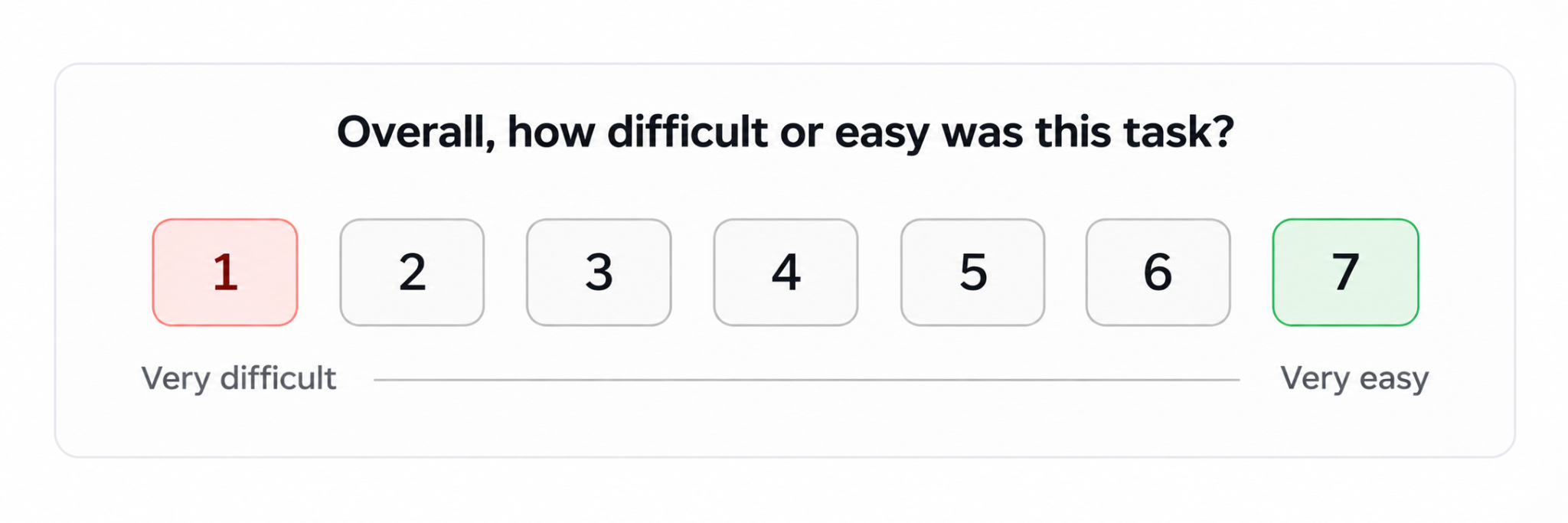
A score of 1 means the task felt very difficult. A score of 7 means it felt very easy. Higher scores indicate easier perceived task completion.
Why ask after every task? Asking immediately after each task gives you more specific feedback. Participants can rate the exact interaction they just completed instead of trying to remember several tasks at the end of the session.
For example, someone might find signing up easy but struggle to find a billing setting. If you collect one difficulty rating at the end, these different experiences can get mixed together. Task-level SEQ scores help you compare individual tasks and identify where participants experience the most friction.
Testing tip: Ask the same SEQ question after every task and keep the seven-point scale consistent. You can then compare scores across tasks and investigate low-scoring tasks through follow-up questions.
Measuring Overall Usability With the System Usability Scale (SUS)
The SEQ tells you how hard each task felt. The System Usability Scale (SUS) tells you how usable the whole product felt. Ask it once, at the end of the session, before you start the open debrief.
The SUS questionnaire has 10 statements. Participants rate each one from 1 (strongly disagree) to 5 (strongly agree):
- I think that I would like to use this system frequently.
- I found the system unnecessarily complex.
- I thought the system was easy to use.
- I think that I would need the support of a technical person to be able to use this system.
- I found the various functions in this system were well integrated.
- I thought there was too much inconsistency in this system.
- I would imagine that most people would learn to use this system very quickly.
- I found the system very cumbersome to use.
- I felt very confident using the system.
- I needed to learn a lot of things before I could get going with this system.
Notice that the statements switch between positive and negative. This stops people from ticking the same answer all the way down.
How to score it: For the positive statements (1st, 3rd, 5th, 7th and 9th), subtract 1 from the answer. For the negative statements (2nd, 4th, 6th, 8th and 10th), subtract the answer from 5. Add everything up and multiply by 2.5. You get a score from 0 to 100. The average score across many studies is about 68, so anything above that is better than most products.
Testing tip: SUS is one of the most common usability testing metrics because it's short and easy to compare over time. Run it after every round of testing to see whether your changes actually made the product easier to use.
5 Usability Testing Questions You Should Never Ask
Some questions can make usability testing feedback less reliable. Questions about future intentions may encourage participants to predict what they would do rather than describe their actual behavior. This is known as hypothetical bias.
Here are 5 common questions to avoid, why they can mislead you, and better ways to gather useful feedback.
Would You Use This Feature?
Asking participants whether they would use a feature often produces overly positive answers. They may find the idea interesting or say yes simply because it sounds useful. However, expressing interest doesn't mean they have a genuine need for it.
For example, someone might say they'd use an automatic expense categorization feature. But if they rarely struggle with categorizing expenses, the feature may not solve a meaningful problem in their workflow.
Instead of asking participants to predict future behavior, ask about their actual experiences: "When did you last encounter a situation where this feature would have helped?"
This question helps you understand whether participants have experienced the problem, how recently it happened, and how they currently handle it. You can then determine whether the proposed feature addresses a genuine user need.
Would You Pay for This Product?
Asking participants whether they would pay for a product doesn't reliably predict actual purchasing behavior. They may say yes because the product sounds useful or because they want to support your idea. But expressing willingness to pay doesn't mean they're ready to spend money.
For example, someone might say they'd pay for a budgeting app with automatic expense tracking. However, they may already manage their finances using a free spreadsheet or never have paid for a similar tool.
Instead of asking participants to predict a future purchase, explore their actual spending behavior: "Have you paid for a product to solve this problem before? What did you pay?"
This helps you understand whether they've previously spent money to address the problem, how much they paid, and what motivated the purchase. You can also ask whether they're still using that solution or have switched to something else.
Past purchases don't guarantee future buying decisions, but they provide stronger evidence of actual spending behavior than a hypothetical yes or no.
Don't You Think This Design Looks Better?
This question introduces the moderator's personal opinion into the testing session. Participants may assume you prefer a particular design and feel pressured to agree, even when they have a different opinion.
This can be especially misleading when comparing two design variations. A participant might prefer the previous layout but agree with the moderator to avoid sounding critical. You end up measuring their willingness to agree rather than their actual design preferences.
A more neutral way to explore their opinion is: "What is your impression of this design?"
This gives participants room to describe what they like, dislike, or find confusing without suggesting a preferred answer. You can follow up by asking what stands out, which elements work well, and what they would change.
Let participants form their own opinions before sharing yours. Their honest reactions are far more useful than agreement with the moderator.
Wasn't That Feature Easy to Find?
This question assumes participants found the feature without difficulty. But reaching the correct destination doesn't necessarily mean the navigation was clear. A participant might have clicked through several menus, explored unrelated options, or struggled before finally locating it.
For example, someone may find the account settings after checking three different menus. Asking whether the feature was easy to find could encourage them to overlook that struggle.
Instead, ask participants to describe their navigation process: "How did you go about finding that feature?"
Their answers help you understand where they looked first, which navigation labels they followed, and what made them choose a particular path. Compare their explanations with their actual clicks and navigation behavior to identify confusing menus, unclear labels, or misplaced features.
Do You Like Our New Interface?
Asking participants whether they like an interface measures their general opinion, not how well they can use it. Someone might love the visual design but struggle to complete basic tasks. Another participant might dislike the colors yet navigate the product without any difficulty.
This makes general approval a poor indicator of usability. Instead of focusing on whether participants like the interface, explore their actual experience: "What worked well, and what didn't work well while using this interface?"
This encourages participants to discuss specific interactions rather than give a simple positive or negative opinion. You can learn which parts felt intuitive, where they encountered difficulties, and what needs improvement.
Remember, good usability testing focuses on what participants actually do, not just what they say they might do. Usability testing is also just one of several UX research methods, so pair it with interviews or analytics when you need the bigger picture. Ask about real experiences, observe their behavior, and avoid questions that encourage predictions or agreement.
How to Adapt Questions for Moderated and Unmoderated Usability Testing
The way you ask usability testing questions depends on how the session is conducted. In moderated testing, a researcher can observe participants, ask follow-up questions, and investigate unexpected behavior in real time.
Unmoderated testing works differently. Participants complete tasks independently, so instructions and questions must be clear enough to guide them without a moderator.
This means you can't always use the same questions in both formats. Here's how to adapt your questions for each testing approach.
Questions for Moderated Usability Testing
In moderated usability testing, researchers can ask follow-up questions while participants interact with the product. This makes it easier to understand why someone hesitates, chooses a particular option, or takes an unexpected path.
Rather than asking every question from a fixed script, use prompts that respond to what you observe. If your team doesn't have a trained moderator, one of these usability testing agencies can run the sessions for you. Here are 4 types of questions you can use during a moderated session:
- Open-ended follow-up questions
Use these when you need more context about a participant's actions or decisions. Encourage them to explain their experience in their own words.
- "What were you expecting to happen?"
- "What were you trying to accomplish here?"
- Think-aloud prompts
Encourage participants to share their thoughts as they interact with the interface. These prompts help you understand their expectations and decisions without taking control of the task.
- "Can you talk me through what you're thinking?"
- "What are you looking for right now?"
- Neutral clarification questions
Use these when a participant gives a vague answer or makes a decision you don't fully understand. Ask for clarification without suggesting what they should say.
- "Can you explain why you chose that option?"
- "What made you decide to continue?"
- Contextual questions about unexpected behavior
When someone clicks an unexpected element, revisits a page, or takes an unusual navigation path, ask about that specific action. This helps uncover what led to their decision.
- "What information were you looking for when you opened this menu?"
- "What made you go back to the previous screen?"
Questions for Unmoderated Usability Testing
In unmoderated usability testing, nobody is there to explain a confusing task or ask "why?" at the right moment. So every question has to work on its own. Write each one so a participant can understand it the first time they read it.
Here are 5 types of unmoderated usability testing questions that work well:
- Clear task prompts
Give one goal per task and avoid hints. For example: "You want to add a $25 lunch expense from yesterday. Show how you would do that." - Task success checks
Ask participants to confirm the outcome. For example: "Were you able to add the expense? (Yes / No / Not sure)" - Written follow-up questions
Since you can't ask follow-up questions live, add one right after each task: "What, if anything, slowed you down during this task?" - Rating questions
Add the SEQ after each task and the SUS at the end. Scales give you numbers you can compare across many participants. - Open closing question
End with: "Is there anything else you'd like to tell us about this experience?" This catches problems your tasks didn't cover.
How Prototype Fidelity Changes Your Usability Testing Questions
In prototype usability testing, the type of prototype you're testing determines what you can reasonably evaluate. A basic wireframe can help you understand whether users recognize the structure and know where to find information.
A realistic prototype or live product allows you to test interactions, task completion, and interface feedback. As a result, your questions should match the prototype's capabilities.
Questions for Low-Fidelity Figma Wireframes
Low-fidelity wireframes usually contain basic layouts, placeholder text, and limited interactions. At this stage, focus on how participants understand the interface rather than how well its interactions work.
Ask questions about:
- Conceptual understanding: What do you think this screen is designed to help you do?
- Information hierarchy: Where would you expect to find this information?
- Navigation expectations: What would you expect to happen after selecting this option?
- Mental models: Does the structure match how you normally approach this task?
These questions help identify confusing layouts, unclear labels, and differences between user expectations and the proposed design.
Questions for High-Fidelity Prototypes and Live Products
High-fidelity prototypes and live products provide more realistic interactions. Participants can explore buttons, menus, forms, and navigation flows. Focus on whether these interactions behave as users expect and support successful task completion.
Useful questions include:
- Interaction clarity: What did you expect when you clicked this button?
- Task difficulty: Was there anything that slowed you down?
- Information clarity: What information helped you complete this task?
- Interface feedback: Did the system respond as you expected?
The key is to match your questions to what the prototype can demonstrate. Test structure and expectations with wireframes, interaction flows with high-fidelity prototypes, and real functionality with live products. When the findings point to deeper interface problems, a UI/UX design agency can turn them into a tested redesign.
Usability Testing Questions for Websites and Mobile Apps
The questions above work for most products. But websites and mobile apps each have their own common problems, so it helps to add a few questions that fit the platform.
Website Usability Testing Questions
Use these website usability testing questions for marketing sites, online stores, and web applications. They focus on navigation, search, and finding information.
- How would you find [specific information] on this website? Shows whether your menu labels and page structure match how people think.
- What would you search for to find this? Reveals the words people actually use, which helps you fix search and page labels.
- Where on this page would you click to [goal]? Checks whether your main buttons and links stand out enough.
- How do you know where you are on the site right now? Tests whether breadcrumbs, page titles, and menus help people stay oriented.
- What would you do if you couldn't find what you need here? Shows whether people know their next option, such as search, help, or contact.
Usability Testing Questions for Mobile Apps
Use these app usability testing questions when testing on a phone. Small screens, gestures, and interruptions create problems that rarely show up on desktop.
- How would you get back to the previous screen from here? Tests whether back navigation and gestures feel natural.
- What do you think this icon does? Icons without labels often confuse people on small screens.
- Was anything hard to tap or read? Uncovers buttons that are too small or text that's hard to read.
- If you had to stop halfway through, what would you expect when you came back? Checks whether the app saves progress after an interruption.
- How did you feel about the notifications or permission requests? Shows whether pop-ups feel helpful or annoying at that moment.
Frequently Asked Questions
How Many Questions Should You Ask in a 30-Minute Usability Test?
A 30-minute usability test typically accommodates 3–4 core tasks, a few warm-up questions, and a short debrief. The exact number depends on task complexity. Prioritize meaningful observation and participant feedback over fitting in as many questions as possible.
What Should You Do If a Participant Lies on the Screener?
If a participant provides inconsistent screening answers, verify the information before making a decision. Complete the session when practical, document the discrepancy, and flag their data for review. Exclude the session from target-user analysis if they clearly don't meet your recruitment criteria.
How Do You Know If a Usability Testing Question Is Leading?
A usability testing question is leading when it suggests an expected answer, introduces an assumption, or pressures participants to agree. Neutral questions avoid these cues and encourage participants to describe their experiences in their own words. To avoid leading questions, ask what happened ("How did you find the checkout?") instead of suggesting a result ("Was checkout easy?").
What Is the Difference Between SEQ and SUS?
SEQ measures how easy or difficult a participant finds an individual task, usually through a seven-point scale. SUS measures perceived overall system usability using a standardized 10-item questionnaire. Both provide useful insights but evaluate different aspects of the user experience.
How Many Questions Should You Ask in a 60-Minute Usability Test?
A 60-minute usability test can typically accommodate 5–7 core tasks, along with warm-up questions, follow-ups, and a final debrief. The number depends on task complexity. Allow enough time for participants to complete tasks and explain their experiences.
Should You Ask Open-Ended or Closed-Ended Questions During Usability Testing?
Open-ended questions are generally better for exploring user behavior, expectations, and frustrations. Closed-ended questions work well for screening, collecting structured responses, and measuring task difficulty or perceived usability through standardized scales such as SEQ and SUS.
What Is the 5-User Rule in Usability Testing?
The 5-user rule says that testing with about 5 participants finds most of the usability problems in a design. It applies to qualitative testing of one user group. Run small rounds of 5, fix what you find, and test again rather than running one large study.
Is Usability Testing Qualitative or Quantitative?
Usability testing can be both. Watching people and asking open-ended questions gives you qualitative insights about why problems happen. Measures like task success, time on task, SEQ, and SUS give you quantitative data you can compare over time.
Can AI Ask Usability Testing Questions Instead of a Human Moderator?
AI usability testing tools can follow a script, ask simple follow-up questions, and summarize answers, which helps with large unmoderated studies. A human moderator is still better at noticing hesitation, adjusting questions in the moment, and exploring unexpected behavior.
Final Thoughts
Effective usability testing isn't about asking more questions. It's about asking the right questions to understand user behavior, expectations, and frustrations. Use neutral wording and focus on real experiences rather than hypothetical answers.
Start with one important user journey. Give participants realistic tasks, observe where they struggle, and use follow-up questions to understand why. Turn those findings into practical improvements.