


.svg)

%201%201.svg)
Beginner's Guide to UX Laws: 15 Principles With Real Examples

- Start with the user problem, not the law. Identify where users struggle before choosing a principle to guide your design decisions.
- Use Hick's Law to simplify decisions and Fitts's Law to improve interactions. Too many choices can slow decision-making, while small or distant targets can make actions harder to complete.
- Use Gestalt principles to organize visual information. Proximity, similarity, common region, and Prägnanz help users recognize relationships and understand interface layouts.
- Familiarity and visual appeal influence usability. Jakob's Law helps you meet familiar user expectations, while the Aesthetic–Usability Effect explains why attractive interfaces can seem easier to use.
- Make progress, feedback, and important moments clear. The Doherty Threshold highlights responsiveness, the Goal-Gradient Effect relates to motivation near a goal, and the Peak-End Rule explains how memorable moments can shape overall impressions.
- Treat UX laws as starting points, not guaranteed solutions. Use them to form hypotheses, observe real users, test design changes, and refine your decisions based on evidence.
Have you ever used an app that felt easy to navigate, while another left you wondering what to do next? Both might offer similar features, yet one feels natural to use and the other feels frustrating.
The difference often comes down to how well the design accounts for human behavior. Good UX design isn't just about creating attractive interfaces. It also means understanding how people think, make decisions, process information, and interact with digital products.
That's where UX laws come in. These principles draw on psychology, human behavior, and visual perception to help designers understand why certain design decisions work and where an interface might create friction. They aren't rigid rules for every situation, but they offer a useful starting point for making informed design decisions.
In this guide, you'll learn 15 important UX laws and principles, see how they apply to real products, and discover how to use them in your own designs.
What Are UX Laws?
UX laws are principles based on psychology, human behavior, and visual perception that help designers understand how people interact with products. They explain patterns in how users notice information, make decisions, remember things, and respond to different interface elements. By understanding these patterns, designers can make products easier to learn, navigate, and use.
Many UX laws come from research in psychology, cognitive science, and human-computer interaction. For example, Hick's Law explains how the number of choices can affect decision-making time.
Fitts's Law describes how the size and distance of a target affect how quickly someone can reach it. Gestalt principles, such as the Law of Proximity, explain how people perceive relationships between visual elements. Designer Jon Yablonski collected many of these principles in his book Laws of UX, a handy companion as you learn them.
These principles matter because people don't interact with interfaces in isolation. They bring expectations, habits, limited attention, and different levels of experience to every interaction.
A designer who understands these factors can make better decisions about navigation, buttons, forms, layouts, and feedback. Instead of relying only on personal taste, they can use established principles to explain why a design choice might work and identify potential usability problems.
Why Do UX Laws Matter in UX Design?
Designers often face the same challenge: how can they make a product easier to understand and use? A dashboard might contain all the necessary features but still feel confusing.
A form might collect the right information but take too long to complete. These problems aren't always caused by missing features. Sometimes, the way information and interactions are designed creates unnecessary friction.
UX laws help designers understand why these problems occur and make more informed decisions about solving them. Here are 5 ways these principles can improve everyday design work.
- Reduce unnecessary decisions and mental effort: Users shouldn't have to think harder than necessary to complete a task. Hick's Law helps designers understand how too many choices can slow decision-making.
- Make interfaces easier to understand and navigate: Users need to recognize how different parts of an interface relate to one another. The Law of Proximity explains how placing related elements close together helps people perceive them as a group.
- Improve visual hierarchy and interaction: Not every element deserves the same level of attention. Fitts's Law helps designers understand how the size and placement of interactive targets affect how easily users can reach them.
- Make important actions easier to find: Users should be able to identify the next step without searching through an entire screen. Designers can use visual emphasis, clear labels, and meaningful placement to guide attention toward important actions.
- Create more predictable and consistent experiences: Users bring expectations from other products they have used. Jakob's Law explains why familiar interaction patterns can make a new product easier to learn.
15 UX Laws Every Designer Should Know
Each UX law helps explain a different aspect of how people interact with digital products. Understanding these principles helps designers identify usability problems, make informed design decisions, and create interfaces that are easier to use.
Let's explore 15 important UX laws and principles, with clear explanations and practical examples to help you understand how to apply them in your own design work.
1. Hick's Law
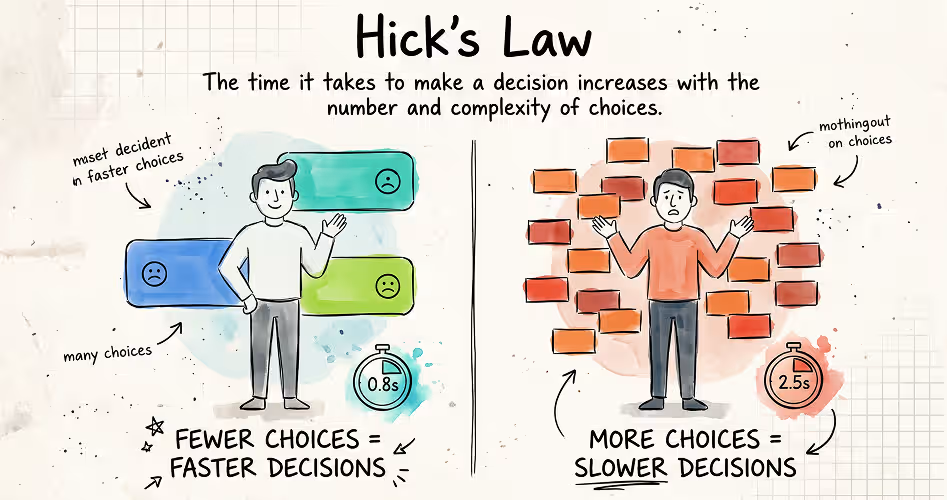
Hick's Law states that the time it takes a person to make a decision increases logarithmically with the number of choices available. Also known as the Hick–Hyman Law, it helps designers understand how the number of options can affect decision-making in digital interfaces.
The law comes from research conducted by psychologists William Edmund Hick in 1952 and Ray Hyman in 1953. Their experiments examined how the number of possible choices affected people's reaction times. In UX design, the principle helps explain why presenting too many options at once can make it harder for users to decide what to do next. You can explore its background in Hick's original research and the Laws of UX explanation.
For example, imagine a SaaS dashboard displaying 18 actions with equal visual prominence. A new user might struggle to identify where to begin. If the interface highlights common actions, such as Create a project and Invite a teammate, while organizing less frequently used actions into clear categories, users can find a starting point more easily.
Designers can apply Hick's Law by prioritizing relevant actions, grouping related options, and presenting advanced settings only when users need them, a pattern known as progressive disclosure. However, fewer choices don't always mean better UX.
Hiding useful features or adding unnecessary steps can make a product harder to use. The goal is to help users make decisions with less unnecessary effort, not simply to reduce the number of options.
2. Fitts's Law
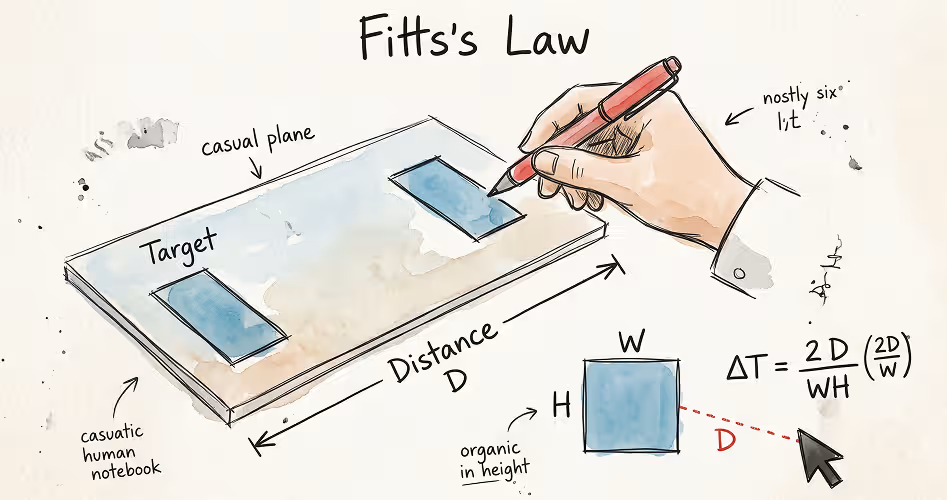
Fitts's Law states that the time required to reach and select a target depends on the target's size and its distance from the user. Larger targets that are closer are generally faster to select than smaller targets that are farther away.
In UX design, this principle helps designers decide where to place buttons, how large interactive elements should be, and how easily users can reach them.
Psychologist Paul Fitts introduced this law in 1954 through research on human movement and target selection. His findings later became important in human-computer interaction, particularly for designing interfaces operated with a mouse or touchscreen. You can read the original research or explore the Laws of UX explanation.
Imagine a mobile banking app with a tiny Transfer money icon positioned in the corner of the screen. Users may struggle to tap it accurately, especially when using one hand. That's a common situation: in Steven Hoober's study of how people hold their phones, 49% of people touching their screens were using one hand. A larger touch target placed within comfortable reach makes the action easier to perform.
Designers can apply Fitts's Law by making frequently used controls sufficiently large, positioning important actions where users can reach them comfortably, and leaving enough space between neighboring targets to prevent accidental selections. As a reference point, Apple's Human Interface Guidelines use 44 by 44 points as the default control size on iOS, and WCAG 2.2 sets a minimum target size of 24 by 24 CSS pixels.
However, bigger isn't always better. Oversized buttons can clutter an interface, and the best placement depends on the device, task, and user. The goal is to make important actions easy to reach and select without compromising the overall design.
3. Miller's Law
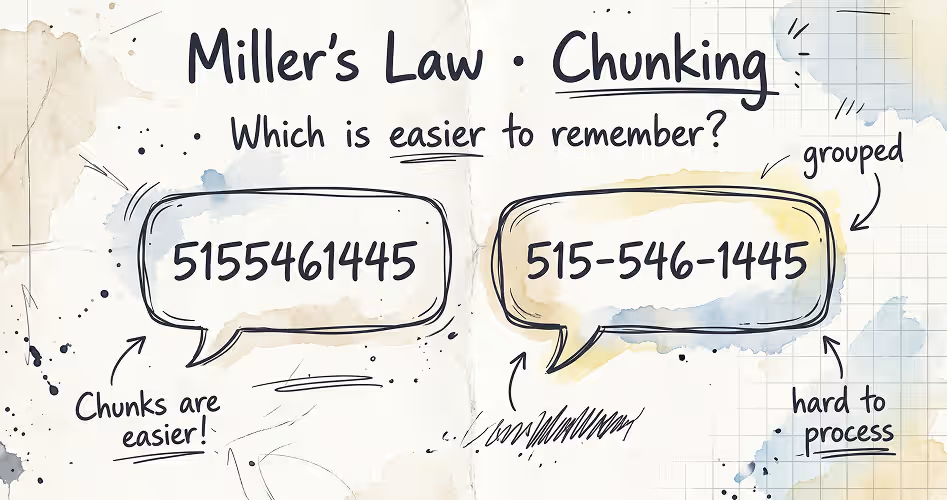
Miller's Law is commonly used in UX design to explain why grouping information into meaningful chunks makes it easier for people to process and remember. It is associated with psychologist George A. Miller's 1956 paper, The Magical Number Seven, Plus or Minus Two, which explored the limits of immediate memory and information processing. Later research by psychologist Nelson Cowan puts the limit closer to about four chunks, which is why the way you group information matters more than the exact number.
For example, imagine a SaaS dashboard with 15 account settings displayed in one long, unorganized list. Users may find it difficult to scan and remember where each setting belongs.
Grouping them into categories such as Profile, Security, Notifications, and Billing creates a clearer structure. Instead of processing every setting as an unrelated item, users can navigate through meaningful groups.
This technique is called chunking. Designers use it to organize related information into recognizable units, making complex interfaces easier to understand. It can be useful when designing navigation menus, forms, dashboards, and onboarding flows.
The practical lesson is to organize information in ways that make sense to users, rather than counting interface elements.
4. Tesler's Law

Tesler's Law, also known as the Law of Conservation of Complexity, states that every system has some complexity that cannot be eliminated entirely; it can only be shifted between the user and the system. The principle encourages designers to handle as much of that complexity as possible through thoughtful design and technology, rather than making users do unnecessary work.
Think of an online checkout form. Users may need to provide their delivery address, but they shouldn't have to enter information the system already knows. A checkout that automatically fills in saved address details reduces the user's effort.
The complexity hasn't disappeared: the product still needs to store, retrieve, and verify that information. The system simply handles more of the work on the user's behalf.
Larry Tesler, a computer scientist who worked at Xerox PARC and Apple, developed this principle during the 1980s while advocating for software that was easier to use. His central argument was that developers should sometimes take on additional technical complexity to save users from repeatedly dealing with it.
For UX designers, the lesson is to reduce unnecessary user effort by moving avoidable complexity into the product wherever practical. Smart defaults, autofill, automatic formatting, and helpful error handling are common ways to achieve this.
5. Law of Proximity
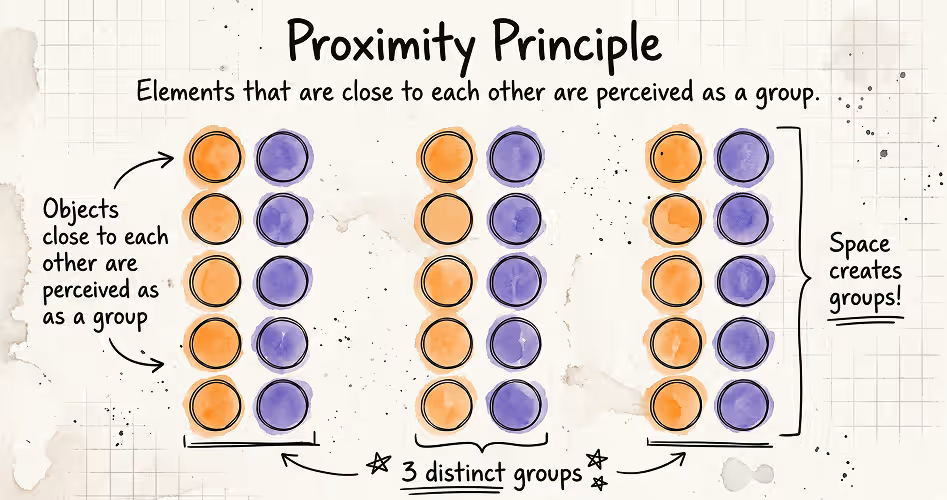
The Law of Proximity states that people tend to perceive visual elements placed close together as belonging to the same group, while elements placed farther apart appear less related.
This principle comes from Gestalt psychology, which explains how people organize visual information into meaningful patterns. Max Wertheimer, one of its founders, listed proximity as the first grouping factor in his 1923 paper on perceptual organization. In UX design, proximity helps users understand relationships between interface elements without needing extra labels or explanations.
Designers use this principle to organize forms, navigation menus, dashboard sections, and search results. For example, placing related metrics close together in a dashboard helps users recognize them as part of the same category. Using whitespace to separate unrelated sections makes the interface easier to scan without adding unnecessary borders or visual elements.
The key is to use spacing intentionally. Keep related elements close enough to form a clear visual group, and create greater separation between unrelated groups.
However, proximity alone doesn't always communicate meaning correctly. Designers should also consider labels, alignment, borders, and visual consistency to ensure users understand the intended relationships.
6. Law of Similarity

The Law of Similarity states that people tend to perceive visual elements that share similar characteristics as belonging to the same group. These characteristics can include color, shape, size, and orientation. It's a principle of Gestalt psychology that helps explain how people recognize patterns and relationships in visual information.
In UX design, similarity helps users understand an interface without having to examine every element individually. For example, imagine a SaaS dashboard displaying several project cards.
If each card uses the same layout, typography, and button style, users can recognize that the cards serve a similar purpose. Consistent styling, often managed through a design system, creates a visual pattern that makes the interface easier to understand.
Designers can use this principle to create consistent navigation links, distinguish interactive elements from static content, and communicate the meaning of status indicators.
The key is to make elements with similar functions look consistent and give meaningfully different elements clear visual distinctions. When combined with other principles, such as the Law of Proximity, similarity helps designers communicate relationships and organize information more effectively.
7. Law of Common Region

The Law of Common Region states that people tend to perceive elements inside the same enclosed area as belonging together. In UX design, that area might be a card, a bordered panel, or a section with a shared background. The boundary helps users recognize which information belongs together, even when the individual elements serve different purposes. Psychologist Stephen Palmer described this principle in a 1992 study on perceptual grouping, adding it to the older Gestalt principles.
Imagine a SaaS dashboard showing monthly revenue, customer growth, and conversion rates. If each metric sits inside its own card, users can distinguish the information at a glance.
Within each card, the metric, label, and supporting details appear as one group. Without these boundaries, users may find it harder to tell where one set of information ends and another begins.
This principle is especially useful when designing dashboards, settings pages, forms, and product cards. A shared container can establish relationships that might otherwise require additional labels or explanations. It can also help users scan complex interfaces by dividing information into recognizable sections.
8. Law of Prägnanz
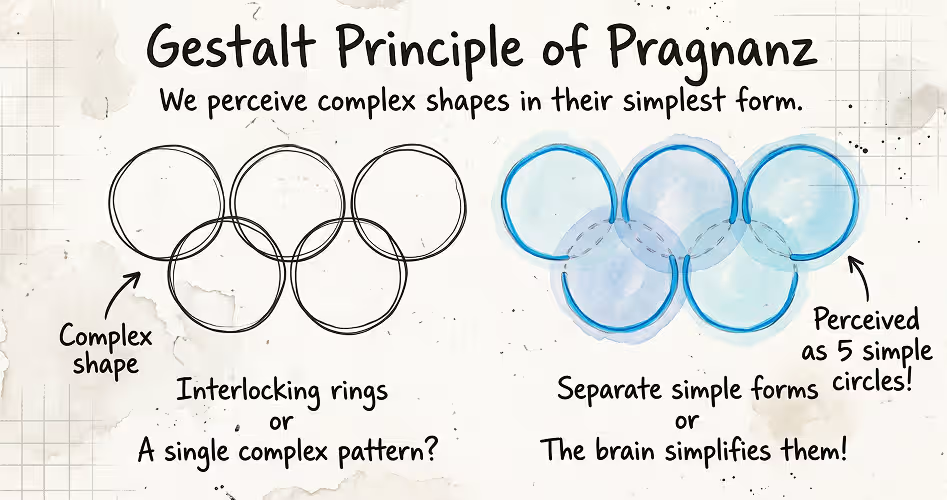
The Law of Prägnanz states that people tend to perceive and interpret visual information in the simplest, most organized form possible. Also known as the Law of Good Gestalt, this principle comes from Gestalt psychology, which studies how people organize visual elements into meaningful patterns rather than seeing them as unrelated parts.
Imagine two overlapping circles. Most people perceive them as two complete circles overlapping, rather than interpreting the shapes as several separate fragments. Our brains tend to favor a simpler, more organized interpretation of the visual information.
In UX design, this principle helps designers make interfaces easier to understand.
Consistent alignment, clear shapes, and a strong visual hierarchy help users recognize patterns. For example, a dashboard with clearly organized sections, like a bento grid layout, is easier to interpret than one with inconsistent layouts and competing visual elements.
However, the Law of Prägnanz doesn't mean every interface should be minimal or contain fewer elements. Removing necessary labels, hiding important controls, or replacing familiar text with ambiguous icons can make a product harder to use. The goal is to present information in a way that makes its structure and meaning easy to recognize.
9. Aesthetic–Usability Effect
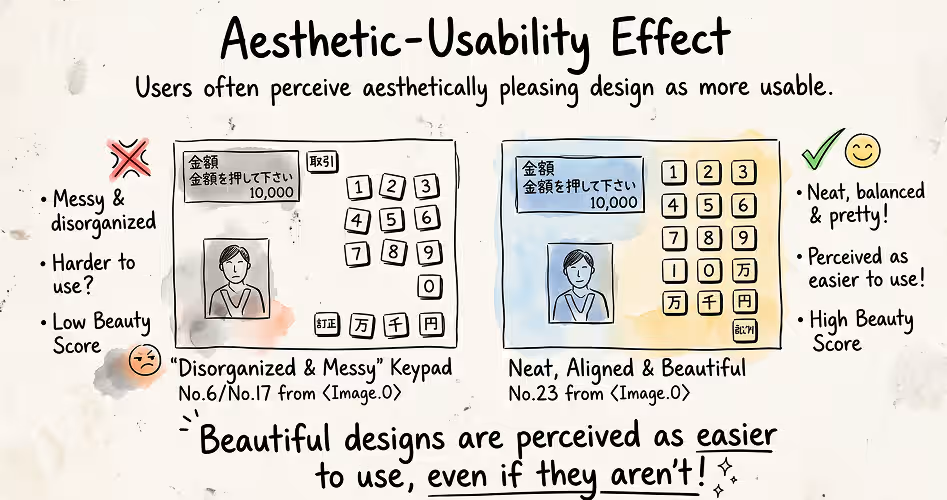
The Aesthetic–Usability Effect describes people's tendency to perceive visually attractive interfaces as easier to use, even when their actual usability hasn't improved. In other words, a product's appearance can influence how users judge its functionality before they have fully experienced it.
The effect was first studied in human–computer interaction by researchers Masaaki Kurosu and Kaori Kashimura in 1995. They tested 26 variations of an ATM interface with 252 participants, asking them to rate each design's visual appeal and perceived usability.
Their findings showed a stronger relationship between visual appeal and perceived usability than between visual appeal and inherent usability. You can read more in their original research paper. Five years later, Noam Tractinsky and his colleagues found a similar pattern in a study called What Is Beautiful Is Usable, where people still rated attractive designs as easier to use after actually using them.
Consider two SaaS dashboards with similar features. One has consistent typography, balanced spacing, and a clear visual hierarchy. The other looks cluttered and inconsistent. Users may perceive the polished dashboard as easier to use, even before trying both products.
For UX designers, this means visual design influences first impressions and how users evaluate an experience. However, looking usable and being usable are two different things. An attractive interface can make users more tolerant of minor problems, but it won't compensate for confusing navigation or a task they cannot complete.
10. Von Restorff Effect
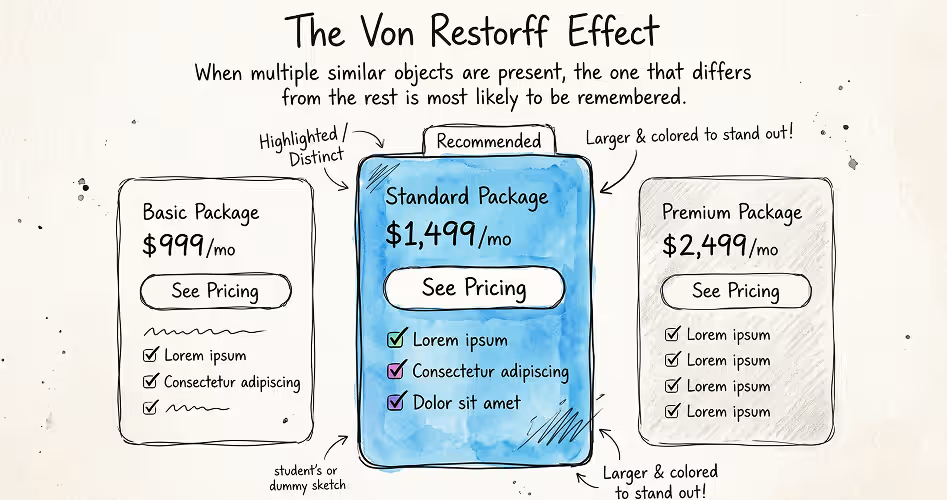
The Von Restorff Effect, also known as the Isolation Effect, describes the tendency for an item that stands out from similar items to be remembered more easily.
First documented by German psychiatrist Hedwig von Restorff in 1933, this effect demonstrates how distinctiveness can influence memory. When one item differs noticeably from the others, it may become more memorable because it attracts attention and is easier to distinguish from its surroundings.
In UX design, this principle helps designers decide which elements should stand out. Imagine a pricing page with three subscription plans. If all three plans look identical, users may find it harder to distinguish the option the business wants to highlight.
However, standing out does not automatically make an element more useful or guarantee that users will remember it. The effect depends on the surrounding elements, the type of difference, and the user's attention. Psychologist R. Reed Hunt made the same point in a 1995 review of von Restorff's work: an item is only distinctive in relation to what surrounds it.
If every button uses a bright color or every card has a prominent badge, the contrast disappears. Designers should reserve distinctive styling for information that genuinely deserves emphasis, such as a primary action, an important warning, or a relevant plan recommendation.
11. Serial Position Effect
The Serial Position Effect explains why people often remember the first and last items in a sequence better than the ones in between. This pattern has two parts: the primacy effect, which favors items at the beginning, and the recency effect, which favors items at the end.
Psychologist Bennet Murdock demonstrated this pattern in a 1962 experiment in which participants tried to recall lists of words. People generally recalled more words from the beginning and end of each list than from the middle. The finding became an important part of research into how people remember information.
Think about the last time you browsed a website's navigation menu. You might notice the first few links quickly, then scan down to the final option, while some links in the middle receive less attention. A similar pattern can matter when users move through onboarding screens, read a list of recommendations, or review steps in a setup process.
The effect also has limits. Remembering an item more easily doesn't mean users understand it, consider it important, or act on it. Familiarity, attention, task demands, and the length of a sequence can all influence recall.
Use the Serial Position Effect as a useful consideration when organizing information, then test whether the arrangement actually helps people complete their tasks.
12. Peak-End Rule
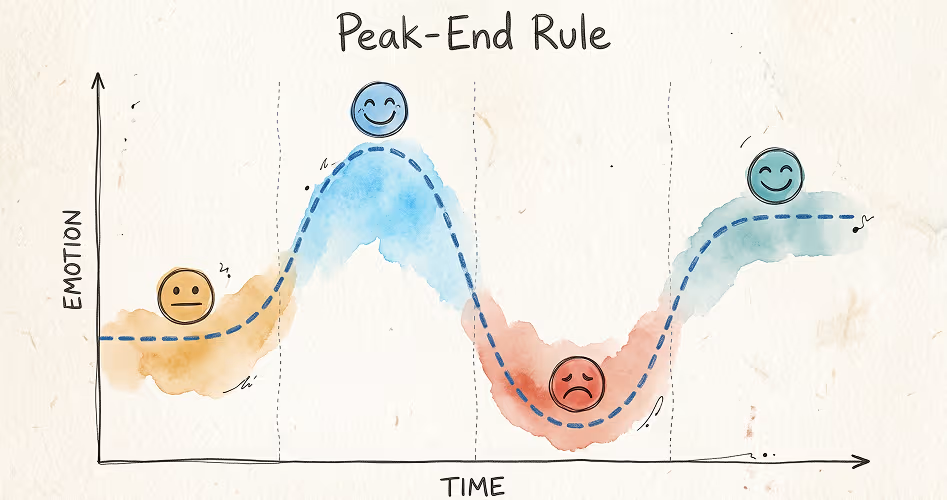
The Peak-End Rule suggests that people tend to remember an experience based largely on its most intense moment and how it ends. The most intense moment can be positive or negative, depending on what happens.
This effect was explored by psychologist Daniel Kahneman and his colleagues in a 1993 study involving cold-water experiences. Their findings suggested that people don't evaluate an experience simply by adding up every moment. Certain moments can have a greater influence on how they remember it.
Now, think about completing a task in a SaaS product. If the setup process ends with a confusing error, users may leave with a negative impression, even if the earlier steps went smoothly. A clear confirmation and a useful next step can create a more satisfying ending.
From the designer's side, this means paying attention to moments that matter most to users, especially frustrating obstacles, the aha moment when the product first proves its value, and task completion. It doesn't mean adding a flashy animation to every success screen. A simple confirmation that reassures users their work is saved can be more valuable.
13. Jakob's Law

Jakob's Law states that people spend much of their time using other websites and apps, so they expect a new product to work in familiar ways. Established patterns help users understand how to navigate and interact without learning every convention from scratch.
Imagine opening an online store for the first time. You probably look for the search function near the top, expect the shopping cart to be easy to find, and assume clicking the company logo will take you back to the homepage. These expectations come from using other websites, not from instructions provided by the store you're visiting.
Jakob Nielsen introduced this principle in his 2000 article End of Web Design, built around the idea that users' experience with other websites shapes their expectations. For designers, it offers a useful starting point: keep common interactions familiar, and use originality where it improves the experience. A product can have its own visual identity without inventing a new way to search, navigate, or complete a purchase.
But the familiar patterns aren't always the best solution. A new interaction can work better when it solves a problem that existing conventions handle poorly. The important thing is to have a clear reason for changing an established pattern and to test whether users can understand the new approach.
14. Doherty Threshold

The Doherty Threshold describes how fast system responses help people maintain their pace and stay engaged while working. The principle is commonly associated with a response time of around 400 milliseconds, where interactions can feel continuous rather than interrupted by waiting.
The idea comes from a 1982 IBM report by Walter J. Doherty and Ahrvind J. Thadhani. Their research showed that faster computer responses could significantly increase user productivity. The often-quoted 400-millisecond figure is a later shorthand for the principle, not a strict cutoff established by the report.
Think about using a search filter on an online store. When results update almost immediately, you can keep adjusting your search without losing momentum. If every change takes several seconds, you have to pause, wait, and repeatedly regain your focus. Jakob Nielsen's response time limits explain why: about 0.1 seconds feels instant, while around one second is the most a delay can last before it breaks a user's flow of thought.
That makes response time part of the interface design, not just a technical concern, which is why designers should be part of app performance optimization. When an action can't finish quickly, immediate feedback can still reassure users that the system has registered their input.
A loading indicator, visible progress, or a clear status message helps them understand what's happening instead of wondering whether the interface has frozen.
The goal isn't to treat 400 milliseconds as a deadline for every operation. Complex tasks may take longer. What matters is making interactions feel responsive and keeping users informed when waiting is unavoidable.
15. Goal-Gradient Effect
The Goal-Gradient Effect describes how people's effort toward a goal can increase as they get closer to achieving it. The closer the finish line feels, the more motivated people may become to reach it. The idea goes back to psychologist Clark Hull, who proposed a goal-gradient hypothesis in 1932 after noticing that rats in a maze ran faster as they got closer to the food.
A 2006 study by researchers Ran Kivetz, Oleg Urminsky, and Yuhuang Zheng found that customers purchased coffee more frequently as they approached earning a free coffee. The researchers also observed a similar pattern in an online task, where participants increased their effort as they neared their goal.
This idea can be useful when designing onboarding experiences. Imagine a new user setting up a project management tool. A checklist showing four completed steps out of five makes the remaining task clear. Instead of wondering how much work is left, the user can see that they're nearly finished.
Progress indicators, milestone trackers, and setup checklists can help users recognize their progress and understand what remains. However, these elements work best when they reflect genuine progress toward something users actually want to accomplish.
When Should You Use Each UX Law?
You don't need to memorize all 15 UX laws or force them into every design. Start by identifying what makes an interface difficult to use, the same first step a UX audit takes.
Are users struggling to choose an option, understand the layout, find a button, or finish a task? Once you understand the problem, the relevant UX laws can help you decide what to investigate and how to improve the design.
Use this table as a starting point when reviewing your own designs.
Remember: start with the user problem, not the law. The purpose of learning UX laws is to make better design decisions - not to apply every principle to every screen.
How to Apply UX Laws to Your Design Process
Knowing UX law is one thing. Recognizing when to use it in a real project takes practice. The easiest way to learn is to start with a usability problem and use the laws to explore possible solutions.
1. Identify the Usability Problem: Start by describing what's going wrong instead of immediately choosing a UX law. For example, new users take too long to find the Create Project button. That's a specific usability problem you can investigate. Saying the dashboard looks confusing is a useful observation, but it doesn't tell you exactly what needs to change.
2. Observe Users in Action: Watch how users navigate the dashboard, ideally in a moderated usability test. Ask them to complete a realistic task, such as creating their first project. Notice where they hesitate, which controls they overlook, and whether they click the wrong options. This helps you understand the problem rather than guessing what users find difficult.
3. Find a Relevant UX Law: Now consider which principle might explain what you've observed. If users struggle to choose between too many equally prominent actions, Hick's Law may be relevant. If they can't notice the main button, the Von Restorff Effect may offer another useful perspective. If the button is too small to click comfortably, consider Fitts's Law.
4. Propose a Design Change: Turn your understanding into a specific design decision. You might make Create Project the primary action, or organize secondary actions into clear groups, and reduce unnecessary visual competition. Each change should address an observed problem rather than simply make the interface look different.
5. Test the New Design: Give users the same task with the revised dashboard. Can they find the button and create a project more easily? Observe what happens instead of asking only whether they like the new design. You don't need a large study for this: Jakob Nielsen's research shows that testing with about five users uncovers most usability problems.
6. Evaluate and Refine: Compare the results with what happened before. If users complete the task more easily, your change may have helped. If they still struggle, investigate why and revise the design.
Common Mistakes to Avoid When Using UX Laws
UX laws are useful tools, but knowing a principle doesn't automatically mean you'll make the right design decision. Watch out for these common mistakes when applying them to real projects.
- Treating UX laws as absolute rules. Hick's Law doesn't mean every menu must have fewer options, and Fitts's Law doesn't mean every button should be oversized. The right decision depends on the task, the interface, and the people using it.
- Applying a principle without understanding the problem. Don't add a progress bar just because the Goal-Gradient Effect seems relevant. First, investigate why users abandon the process. The actual problem might be confusing instructions or unnecessary steps.
- Confusing different UX laws. Some principles address similar problems but explain different things. The Law of Proximity concerns how spacing communicates relationships, while the Law of Similarity concerns how shared visual characteristics create groups. Understand the distinction before choosing which principle to apply.
- Prioritizing visual simplicity over users' needs. Removing labels, hiding useful features, or replacing clear text with unfamiliar icons can make an interface harder to use. A cleaner-looking screen isn't necessarily a more usable one.
- Copying familiar patterns without considering the context. Jakob's Law explains why familiar interactions can help users, but copying another product's interface doesn't guarantee a good experience. Your design still needs to fit your users, their goals, and the tasks they need to complete.
- Assuming a design improvement works without testing it. A button that stands out more might attract attention, but users may still misunderstand its purpose. Test your changes with real users through usability testing and observe whether they complete their tasks more successfully.
Frequently Asked Questions
What are UX laws?
UX laws are principles based on psychology, human behavior, and visual perception that help explain how people interact with digital products. Designers use them to understand usability problems and make informed decisions about layouts, and other parts of the user experience.
What are the most important UX laws?
Some widely used UX laws include Hick's Law, Fitts's Law, Miller's Law, Jakob's Law, the Law of Proximity, and the Aesthetic–Usability Effect. Each addresses a different aspect of user behavior, from decision-making and target selection to visual organization and perceived usability.
How do you use UX laws in UI design?
To use UX laws in UI design, first identify a usability problem, then choose a relevant principle to help investigate it. For example, Hick's Law can help you evaluate whether too many choices make a screen difficult to navigate.
Are UX laws actual rules that designers must follow?
No. UX laws describe general patterns in human behavior, not rules that apply to every situation. Their relevance depends on factors such as the user's goals, the task, and the interface. Designers should use these principles to form hypotheses and validate their decisions through user research and usability testing.
What is the difference between UX laws and UX principles?
UX laws describe observed patterns in how people think, perceive, remember, or interact with things. UX principles are broader guidelines that help designers make decisions about usability and experience. The terms sometimes overlap in design practice, and not every commonly cited UX law is a universal scientific law.
How can beginners learn and practice UX laws?
Beginners can learn UX laws by studying one principle at a time and looking for examples in websites and apps they use daily. Identify a design decision, consider which law might explain it, and think about how the experience could improve.
Final Thoughts
UX laws help you understand why people interact with digital products in certain ways and how design decisions can make those experiences easier or more frustrating. They give you a starting point for recognizing usability problems and exploring possible solutions.
You don't need to memorize all 15 laws at once. Start with one, look for it in the apps and websites you use every day, and consider how it could improve an interface.







.svg)
.svg)


.svg)







.avif)



.svg)

